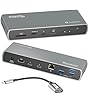





















| Brand | Plugable |
|---|---|
| Manufacturer | Plugable |
| Place of Business | Redmond, WA |
| Model | UD-7400PD |
| Part Number | UD-7400PD |
| Hardware interface | USB Type C |
| Compatible Devices | All kinds of computers that have a full-featured USB-C port (including Thunderbolt and USB4) that supports video and charging |
| Number of Items | 1 |
| Wattage | 140 |
| Batteries Required | No |
| Number of Ports | 11 |
| Total USB Ports | 7 |
| Manufacturer | Plugable |
| Item model number | UD-7400PD |
| Parcel Dimensions | 23.09 x 14.5 x 7.39 cm; 1.25 kg |
| ASIN | B0DPGM58S1 |
-
-
-
-
-
-
-
3 VIDEOS -
Image Unavailable
Colour:
-
-
-
- To view this video, download
Plugable USB C Docking Station 5 Monitors, 140W DisplayLink Dock Connects up to Five 4K Displays for MacBook Windows Thunderbolt 4 Laptops, 2x HDMI, 3x USBC 2.5Gbps Ethernet, Driver Required UD-7400PD
Purchase options and add-ons
| Brand | Plugable |
| Colour | Space Grey |
| Hardware interface | USB Type C |
| Compatible devices | All kinds of computers that have a full-featured USB-C port (including Thunderbolt and USB4) that supports video and charging See more |
| Total USB ports | 7 |
| Number of ports | 11 |
| Item weight | 1.25 kg |
| Total HDMI ports | 2 |
| Wattage | 140 |
| Global Trade Identification Number | 00819927013488 |
About this item
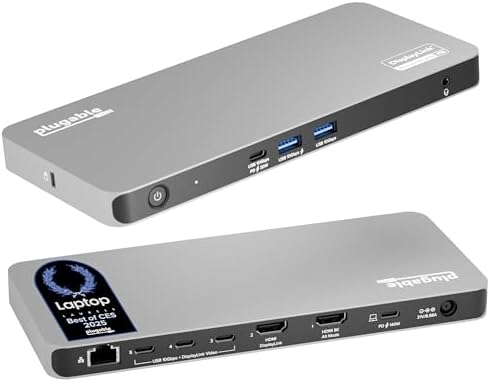
- The 5 Display Dock at a Glance: The UD-7400PD Plugable docking station drives up to 5 high-res displays (3x 8K, or 1x 8K + 4x 4K), with up to 140W laptop charging + 30W device charging, 2.5Gbps Ethernet, USB and USB-C ports. It’s what multitasking would look like if multitasking multitasked
- Extend to 5x 4K Displays: The USB-C docking station offers 1x HDMI 2.1 (up to 8K 30Hz), 1x HDMI 2.0 (4K 60Hz), and 3x USB-C DisplayLink (4K 60Hz each) so you can extend to up to 5x 4K 60Hz screens or 3x at 8K 30Hz. Note: The DisplayLink software application must be installed on a Windows or Mac computer for the dock’s HDMI video outputs to function. This process is typically automatic on Windows, manual install required on macOS.
- Made for the IT Pro: The UD-7400PD comes equipped with DockTag On Screen Display (OSD) to quickly display the dock’s status, asset details, and a QR code for fast access to set up instructions and support resources
- Incredibly Compatible: DisplayLink (driver required) universal docking station features HDMI & USB-C video ports. Works with video-enabled USB-C or Thunderbolt Windows 10+ or macOS 11+ hosts; even base M1/M2/M3/M4 Macs can connect 5 4K displays. Note: HDCP video (Netflix, Hulu, etc.) not supported
- Lifetime Support: This USB-C and DisplayLink Docking Station has been designed with reliability at its core and was built to meet the deployment demands of IT departments and the ease of use necessary for home offices. Includes lifetime support from our North American team of connectivity experts
Frequently bought together

Product information
Technical Details
Additional Information
| Date First Available | Dec 2 2024 |
|---|---|
| Customer Reviews |
4.2 out of 5 stars |
| 鶹 Rank |
Feedback
Videos for similar products
From the brand

-
-
-
Find Your Docking Station
-
Shop for Mac
-
Shop for Windows
-
Shop Universal Compatability
-
Product Description
| Quintuple (5) Display Support | Connect up to five 4K@60Hz displays via a combination of HDMI and USB-C connections |
| Powerful host charging | Provides up to 140W of power to charge the host computer |
| Port flexibility | Three USB-C ports can support both USB 10Gbps data and video output via DisplayLink |
| Broad compatibility | Hybrid docking station combining the power of USB-C Alt Mode Video and the DisplayLink DL-7400 chipset |
| DockTag Enabled | DockTag OSD displays the dock’s status, asset details, and a scannable code linking to setup instructions and support resources |
-
Will this docking station work with my computer?
A computer with a full-featured USB-C port (including Thunderbolt / USB4) that supports video and charging is compatible. Monitors with HDMI and/or USB-C are compatible. Use of a USB-C video adapter or cable may be required (sold separately).
-
Do I need to install software or drivers in order to use the UD-7400PD docking station?
DisplayLink software is required for Windows and macOS to enable display functionality. On macOS, 'Screen Recording' allows the driver to send display data via USB, enabling external displays; no data is stored.
-
Is this docking station compatible with M1 / M2 / M3 / M4 Mac laptops?
Yes. Apple Mac laptops with M1/M2/M3/M4 processors that are running macOS 11 or later are compatible. DisplayLink software installation required. Screen Recording' allows display data to be sent via USB enabling external displays; no data is stored.
-
How do the DockTag on-screen informational displays work?
DockTag shows a 60-minute on-screen informational display with model, serial, and additional resources when no laptop is attached to the dock. The power button can be pressed to dismiss the info screen, or power cycle the dock to restart the screen.
-
At what rate will the UD-7400PD charge my computer?
The UD-7400PD can provide up to 140W of power to a computer that supports 140W (28V 5A) charging via standard USB-C Power Delivery. Computers not supporting 140W PD, or requiring proprietary signaling (e.g., Lenovo), will charge at up to 100W.
Plugable Docking Stations
UD-7400PD
Add to Cart
| TBT-6950PD
Add to Cart
| UD-ULTC4K
Add to Cart
| TBT4-UDZ | |
|---|---|---|---|---|
|
Customer Reviews
|
4.2 out of 5 stars 91
|
4.1 out of 5 stars 127
|
4.3 out of 5 stars 1,666
|
4.1 out of 5 stars 425
|
|
Laptop Compatibility
| USB4, Thunderbolt, USB-C | USB4, Thunderbolt, USB-C | USB4, Thunderbolt, USB-C | USB4, Thunderbolt, USB-C |
|
Laptop Charging
| 140W | 100W (96W Certified) | 100W | 100W (98W Certified) |
|
Max # of Displays
| 5 | 4 | 3 | 2 (Mac), 4 (Windows) |
|
DockTag OSD & Asset Management
| Yes | - | - | - |
|
Video Output Types
| 2x HDMI, 3x USB-C | 2x HDMI, 2x Thunderbolt/USB-C | 3x HDMI, 3x DisplayPort | 2x DisplayPort and 2x HDMI |
|
# of Ports
| 11 | 11 | 13 | 16 |
|
Ethernet
| 2.5 Gigabit | Gigabit | Gigabit | 2.5 Gigabit |