| Brand | Plugable |
|---|---|
| Manufacturer | Plugable |
| Model | UD-3900C4 |
| Model Name | UD-3900C4 |
| Part Number | UD-3900C4 |
| Hardware interface | USB Type C |
| Compatible Devices | MacBook Pro |
| Number of Items | 1 |
| Wattage | 100 watts |
| Batteries included | No |
| Batteries Required | No |
| Number of Ports | 14 |
| Total USB Ports | 5 |
| Does it contain liquid? | No |
| Includes rechargable battery | No |
| Manufacturer | Plugable |
| Item model number | UD-3900C4 |
| Product Dimensions | 25.4 x 15.24 x 10.16 cm; 486 g |
| ASIN | B09TSQYGKS |
-
-
-
-
-
-
-
VIDEO -
Image Unavailable
Colour:
-
-
-
- To view this video, download
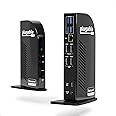
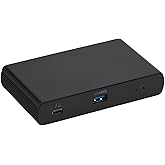
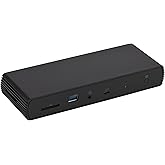
Plugable 14-in-1 USB C Docking Station | 4X HDMI Quad Dock with 100W Charging, HDMI Displays | Compatible with Windows, Thunderbolt (4X USB, 1x USB-C, Ethernet, SD Card, Audio) UD-3900C4
Purchase options and add-ons
| Brand | Plugable |
| Colour | Black |
| Hardware interface | USB Type C |
| Compatible devices | MacBook Pro |
| Total USB ports | 5 |
| Number of ports | 14 |
| Item weight | 486 Grams |
| Total HDMI ports | 4 |
| Wattage | 100 watts |
| Global Trade Identification Number | 00819927012627 |
About this item
- More Ports, More Power: Expand your connectivity with a TAA-compliant 4 monitor docking station built for performance. This 14-in-1 USB-C docking station features 4x HDMI ports supporting 1080p @ 60Hz, 96W laptop charging, 4x USB 3.0, and 1x USB-C (20W) port. The perfect quad monitor docking station for professionals needing display flexibility and power on their desk.
- Optimize Workstations: Drive productivity in Financial Services, Engineering or Media Teams with 4x 1080p monitors, 5Gbps USB data, and 96W laptop charging. This docking station transforms any hot desk or fixed workstation into a powerful hub; perfect for analysts or content creators who depend on multiple displays and constant peripheral connectivity.
- Hybrid Display Technology: This 4 HDMI docking station uniquely combines DisplayLink and DisplayPort Alt Mode MST to enable four extended displays, HDMI 1-2 use DisplayLink, while HDMI 3-4 rely on Alt Mode. A compatible USB-C port with DisplayPort Alt Mode is required for HDMI 3 and 4 to function. Also includes 1x USB-C (5Gbps + 20W charging), 4x USB 3.0 (5Gbps), Ethernet, SD Card Reader, and audio in/out.
- Compatibility: Works with USB4, Thunderbolt 3/4, and USB-C systems that support DisplayPort Alt Mode MST. Supports up to four monitors on Windows 10+ and ChromeOS 100+. On macOS, it supports three extended displays; the fourth will mirror due to a lack of MST support. Requires DisplayLink drivers,automatically installed via Windows Update for most users. In corporate environments, manual installation may be needed.
- 2-Year Coverage, Lifetime Support: Every Plugable product, including this 14-in-1 USB C docking station, is covered against defects for 2 years and comes with lifetime support. If you ever have questions, contact our North American-based team - even before purchase
Frequently bought together

Product information
Technical Details
Additional Information
| Date First Available | March 8 2022 |
|---|---|
| Customer Reviews |
4.0 out of 5 stars |
| 鶹 Rank |
Feedback
Featured items you may like
鶹 Basics Thunderbolt4/USB4 Pro Docking Station,2xTBT4,1xHDMI2.1,3xUSB A 3.1,RJ45,Dual DisplayFREE Shipping by 鶹Get it by Monday, Jan 5
鶹 Basics Thunderbolt4/USB4 Docking Station, 3X Downstream TBT4 (Dual Display), 1xUSB A 3.1FREE Shipping by 鶹Get it by Tuesday, Jan 6
鶹 Basics Aluminum Type-C Docking with DisplayPort, HDMI, VGA, 3 USB-A, Ethernet, SD/TF Card Reader, Audio, and Type-C Charging Port (PD 100W) - Pedestal, BlackFREE Shipping by 鶹Get it by Sunday, Jan 4Only 4 left in stock.
From the brand

-
-
-
Find Your Docking Station
-
Shop for Mac
-
Shop for Windows
-
Shop Universal Compatability
-
Product Description
How to Install Driver on macOS
Note - macOS requires ‘Screen Recording’ permission for the DisplayLink software to work. Granting this permission enables sending data from your computer over USB to the HDMI outputs. No data, images, or pixels are being stored or recorded.
| Quad 1080p Displays | Extend your desktop across four external displays, each at up to 1080p @ 60Hz. This dock uses a unique combination of DisplayLink (HDMI 1 & 2) and Alt Mode (HDMI 3 & 4) to achieve multi-monitor setups. Note for macOS: Due to OS limitations (no MST support), only three unique extended displays are supported; the fourth will be mirrored. Not recommended for 4-monitor macOS setups. |
| 100W Power Delivery | Charge your laptop directly through the dock with up to 96W of certified USB-C Power Delivery. Power most 13-inch to 16-inch laptops, including many MacBook Pro and Windows Ultrabooks, via a single USB-C cable. Reduce clutter with efficient charging. |
| All-in-One 14-Port Hub | The UD-3900C4 offers comprehensive connectivity: four HDMI outputs (2x HDMI 1.3 DisplayLink, 2x HDMI 2.0 Alt Mode) for displays. It connects to your computer via a single USB-C host port (USB 3.2 Gen 2 (10Gbps), Power Delivery). For peripherals, find one USB-C downstream port (5Gbps, 20W charging) and four USB 3.0 Type-A data ports (5Gbps). It also features a Gigabit Ethernet (RJ45) port, 3.5mm headphone and microphone jacks, and an SD 4.0 (UHS-II) card reader. |
| Broad OS Compatibility | It works with Windows 10+ (DisplayLink drivers auto-install, or manual install for restricted environments). For macOS 10+, it requires the DisplayLink Manager App and supports a maximum of three unique extended displays. ChromeOS 100+ offers native DisplayLink support, needing no driver installation. Alt-Mode MST support via USB-C host port is required. |
-
I have a MacBook. Will this dock support four external monitors?
No, due to macOS limitations (no MST support), this dock is not recommended for 4-monitor macOS setups. MacBooks are limited to three unique extended displays when using this docking station.
-
Windows drivers are "automatic." What if my corporate environment restricts updates?
While DisplayLink drivers are usually automatically installed, for corporate or restricted environments, manual installation may be required.
-
How can I check if my laptop's USB-C port supports DisplayPort Alt Mode for optimal displays?
For optimal Alt Mode display performance, your USB-C port must support DisplayPort Alt Mode (e.g., DP 1.2 or 1.4). Please consult your laptop's specifications or reach out to us directly to confirm if your system supports this technology.
-
Is additional software always required to use this dock?
For Windows, DisplayLink drivers for HDMI 1 and 2 usually install automatically. macOS requires manual installation of the DisplayLink Manager App. ChromeOS typically needs no additional software.
-
What is the difference between DisplayLink and Alt Mode ports on this dock?
DisplayLink ports (HDMI 1 & 2) use a chip and require drivers; they work on most systems. Alt Mode ports (HDMI 3 & 4) use your computer’s GPU via USB-C and need your system to support DisplayPort Alt Mode.
Plugable Docking Stations
UD-3900C4
Add to Cart
| UD-ULTC4K
Add to Cart
| UD-ULTCDL
Add to Cart
| UD-3900PDZ
Add to Cart
| UD-7400PD
Add to Cart
| |
|---|---|---|---|---|---|
|
Customer Reviews
|
4.0 out of 5 stars 220
|
4.3 out of 5 stars 1,667
|
4.3 out of 5 stars 1,447
|
4.2 out of 5 stars 965
|
4.2 out of 5 stars 91
|
|
Max # of Displays
| 4 | 3 | 3 | 3 | 5 |
|
Video Ports
| 4x HDMI | 3x HDMI 2.0 or DisplayPort 1.2 | 3x HDMI | 1x HDMI 1.4, 2x HDMI 1.3 | HDMI 2.1, HDMI 2.0, 3x USB-C |
|
Max Resolution Supported
| 4x 1080p@60Hz | 3x 4K 60Hz | 1x 4K 30Hz, 2x 1920x1200 60Hz | 1x 4K 30Hz, 2x 1920x1200 60Hz | 5x 4K 60Hz |
|
# of Ports
| 14 | 13 | 13 | 12 | 11 |
|
Laptop Charging
| 100W (96W Certified) | 100W (96W Certified) | 100W (96W Certified) | 100W | 140W |
|
Laptop Connection
| USB4, Thunderbolt 4 / 3, USB-C | USB4, Thunderbolt 4 / 3, USB-C | USB4, Thunderbolt 4 / 3, USB-C | USB4, Thunderbolt 4 / 3, USB-C | USB4, Thunderbolt 4 / 3, USB-C |