Beast Games. Strong. Smart. Coming soon. Prime.
No featured offers available
Learn more

No featured offers available

We feature offers with an Add to Cart button when an offer meets our high standards for:

  • Quality Price,
  • Reliable delivery option, and
  • Seller who offers good customer service
“No featured offers available” means no offers currently meet all of these expectations. Select See All Buying Options to shop available offers.

Added to

Sorry, there was a problem.

There was an error retrieving your wish lists. Please try again.

Sorry, there was a problem.

List unavailable.
  • 2 VIDEOS
Displays Not Working? Install the DisplayLink Manager AppPlugable Technologies
  • Plugable Dual DisplayPort & HDMI Docking Station - USB 3.0 & USB-C Laptop Dock for Dual Monitors, DisplayLink, Mac (Driver Required), ChromeOS & Windows, Gigabit Ethernet and Audio (UD-6950Z)
  • To view this video, download

Plugable Dual DisplayPort & HDMI Docking Station - USB 3.0 & USB-C Laptop Dock for Dual Monitors, DisplayLink, Mac (Driver Required), ChromeOS & Windows, Gigabit Ethernet and Audio (UD-6950Z)

4.0 out of 5 stars (1,580)

To see product details, add this item to your cart. You can always remove it later.

About this item

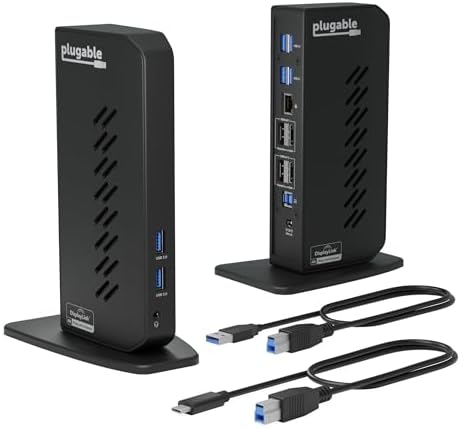
  • Flexible Expandability: This versatile laptop docking station dual monitor setup includes dual HDMI and DisplayPort outputs, Gigabit Ethernet, audio jack, and six USB 3.0 ports. It supports both USB-C and USB 3.0 host connections - making it the perfect USB docking station for expanded connectivity.
  • Dual 4K Monitors with HDMI and DisplayPort: Enjoy ultra-clear visuals with support for two 4K monitors via DisplayLink docking station technology - outputting 3840x2160 @ 60Hz using DisplayPort or HDMI. Ideal for multitasking and boosting productivity.
  • Optimized for Work, Not Gaming: Best suited for web browsing, productivity, and office applications. This laptop dock does not support gaming or protected content (HDCP) playback, such as Netflix, Hulu, etc.
  • Compatibility: Compatible with Windows 11/10/8.x/7, macOS 10.14+ (driver required) and ChromeOS 100+. This laptop docking station offers plug-and-play functionality for Windows and ChromeOS. Not compatible with Linux; manual driver installation required on Mac. Please note, this docking station does NOT charge the host computer
  • Transform Your Workspace with Dual Monitors: Enhance your setup with a sleek vertical USB dock that supports dual monitor displays. Ideal for professionals using Windows, macOS, or seeking a reliable ChromeOS docking station experience with 4K productivity and clean cable management.

Product information

Technical Details

Brand ‎Plugable
Manufacturer ‎Plugable
Place of Business ‎Redmond, WA
Model ‎UD-6950Z
Part Number ‎UD-6950Z
Hardware interface ‎USB Docking Station
Compatible Devices ‎Apple M1/M2 and Intel Macs (with macOS 10.15 or later), ChromeOS 100 or later, Microsoft Surface line, HP Spectre x360 series, Dell XPS 13 & XPS 15 / Latitude, Lenovo ThinkPad T series
Number of Items ‎1
Batteries included ‎No
Batteries Required ‎No
Number of Ports ‎13
Total USB Ports ‎6
Does it contain liquid? ‎No
Includes rechargable battery ‎No
Manufacturer ‎Plugable
Item model number ‎UD-6950Z
Product Dimensions ‎5 x 7 x 5 cm; 350 g
ASIN ‎B08B6CZ29Q

Additional Information

Date First Available June 22 2020
Customer Reviews
4.0 out of 5 stars (1,580)

4.0 out of 5 stars
鶹 Rank
Is discontinued by manufacturer No

Feedback

Plugable Dual DisplayPort & HDMI Docking Station - USB 3.0 & USB-C Laptop Dock for Dual Monitors, DisplayLink, Mac (Driver Required), ChromeOS & Windows, Gigabit Ethernet and Audio (UD-6950Z)


Found a lower price? Let us know. Although we can't match every price reported, we'll use your feedback to ensure that our prices remain competitive.

Where did you see a lower price?

Price Availability
/
/
/
/
Please sign in to provide feedback.
Brief content visible, double tap to read full content.
Full content visible, double tap to read brief content.

Videos for similar products


From the brand


Product Description

How to Install DisplayLink Driver for macOS

The video showcases the product in use.The video guides you through product setup.The video compares multiple products.The video shows the product being unpacked.

video thumbnail driver

Merchant video

The UD-6950Z makes it easy to set up dual external displays on macOS using DisplayLink, supporting resolutions up to 4K @ 60Hz. This is a game changer for Mac chipsets that limit external displays.

The required installation is simple - just download and install the DisplayLink Manager application.

Dual 4K displays Up to two 4K@60Hz displays via either HDMI or DisplayPort
6x USB 5Gbps Standard USB-A 5Gbps ports
Host Connection USB 3.0 or USB-C connection to host, two different USB cables provided
1x 3.5mm Audio Jack TRRS Headset port, supports stereo stereo speakers/headphones or combination headsets
  • Most modern computers running Windows, macOS and ChromeOS that have an available USB-A or USB-C port are compatible with the UD-6950Z

  • Windows 10 or later, macOS 11 or later (driver installation required), and ChromeOS version 100 or later

  • Yes, DisplayLink software must be installed on a Windows or Mac computer. This process is typically automatic on Windows, but must be manually installed on macOS. No installation required on ChromeOS.

  • The UD-6950Z supports up to two 3840x2160 resolution 60Hz refresh rate monitors. The UD-6950Z provides two video output groups, each with a choice of a DisplayPort or HDMI video output port.

  • No, the UD-6950Z does NOT charge the host computer. An alternative that will charge the host computer is the the Plugable UD-6950PDH docking station

Plugable Docking Stations

UD-6950Z

UD-3900H

UD-3900Z

UD-6950PDH

Customer Reviews
4.0 out of 5 stars 1,580
4.5 out of 5 stars 1,806
4.6 out of 5 stars 1,827
4.3 out of 5 stars 262
# of Displays
2 2 2 2
Video Ports
2x HDMI 2.0,2x DisplayPort 1.2 1x HDMI 1.4, 1x DVI 2x HDMI 1.4 2x DisplayPort or HDMI
Max Resolutions Supported
2x 4K 60Hz 2x 1920x1200 @ 60Hz 2x 1920x1200 @ 60Hz 2x 4K 60Hz
# of USB Ports
6 6 6 5
USB Port Specifications
All USB 3.0 2x USB 3.0, 4x USB 2.0 2x USB 3.0 front, 4x USB 2.0 4x USB 3.0, 1x USB-C
Laptop Charging
No No No Yes
Laptop Connection
USB 3.0 and USB-C USB 3.0 and USB-C USB 3.0 and USB-C USB4, Thunderbolt 4 / 3, USB-C