| Brand | Plugable |
|---|---|
| Manufacturer | Plugable |
| Model | TBT4-UDX1 |
| Model Name | TBT4-UDX1 |
| Part Number | TBT4-UDX1 |
| Hardware interface | Thunderbolt |
| Compatible Devices | PC with Windows 10 or later, Mac with macOS 11.2 or later, Surface Pro 8, Surface Pro 9, M1/M2/M3 MacBook |
| Number of Items | 1 |
| Wattage | 1E+2 |
| Batteries included | No |
| Batteries Required | No |
| Number of Ports | 11 |
| Total USB Ports | 7 |
| Does it contain liquid? | No |
| Includes rechargable battery | No |
| Manufacturer | Plugable |
| Item model number | TBT4-UDX1 |
| Product Dimensions | 24.99 x 13 x 8.99 cm; 1.24 kg |
| ASIN | B0CFC9CR5W |
-
-
-
-
-
-
-
2 VIDEOS -
Image Unavailable
Colour:
-
-
-
- To view this video, download
Plugable Thunderbolt 4 Docking Station | TAA-Compliant Dual Monitor Laptop Dock for Mac & Windows | 3X Thunderbolt Ports, USB-C to HDMI Adapter, 100W PD, 2.5Gb Ethernet, 4X USB-A 10Gbps (TBT4-UDX1)
Purchase options and add-ons
| Brand | Plugable |
| Colour | Space Gray |
| Hardware interface | Thunderbolt |
| Compatible devices | PC with Windows 10 or later, Mac with macOS 11.2 or later, Surface Pro 8, Surface Pro 9, M1/M2/M3 MacBook See more |
| Total USB ports | 7 |
| Product Dimensions | 25L x 13W x 9H Centimetres |
| Number of ports | 11 |
| Item weight | 1.24 Kilograms |
| Total HDMI ports | 1 |
| Wattage | 1E+2 |
About this item
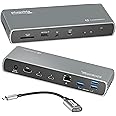
- Thunderbolt Certified Performance: Power meets performance in this TAA-compliant Thunderbolt 4 dock. The Thunderbolt 4 host port delivers up to 100W charging (96W certified) and 40Gbps bandwidth to your laptop, while two downstream Thunderbolt ports provide up to 15W power and 40Gbps to your most demanding peripherals. The Plugable TBT4-UDX1 is ready to work
- Dual Displays Options, Simplified: Connect up to two 4K 60Hz monitors—one via HDMI, and one via the included USB-C to HDMI adapter. For maximum resolution, connect a single 8K 30Hz display through Thunderbolt 4. Note for MacBook systems: Fully compatible with all M4 MacBooks and M1/M2/M3 MacBooks with Pro or Max CPU. Base M1 and M2 MacBooks support only a single external display; base M3 Macs support dual displays in clamshell mode only.
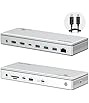
- Expand your Connectivity: With 11 essential ports, this dock keeps your setup streamlined: 3x Thunderbolt 4 ports (40Gbps)—1 for the host, 2 for devices like your SSD or phone—plus HDMI, 4x 10Gbps USB-A ports, 2.5Gbps Ethernet, SD card reader, combo audio jack, 96W laptop charging (fast-charge a 14” MacBook Pro from 0-50% in 30 just minutes).
- Built for Modern Laptops: Compatible with Windows 10 and newer, and macOS 11.2+. As a MacBook Thunderbolt dock, dual external displays are supported on Pro/Max versions of M1/M2/M3 MacBooks, and all M4 systems. For best performance, pair with a Thunderbolt 4 or USB4 host using the included 3’ (1m) certified cable.
- Lifetime Support: Backed by Plugable’s U.S.-based support team and a reputation for clear, accurate product information. Designed with reliability at its core and built to meet the demands of IT departments and the ease of use of home offices.
Frequently bought together

Product information
Technical Details
Additional Information
| Date First Available | Sept. 7 2023 |
|---|---|
| Customer Reviews |
4.2 out of 5 stars |
| 鶹 Rank |
Feedback
Videos for similar products
From the brand

-
-
-
Find Your Docking Station
-
Shop for Mac
-
Shop for Windows
-
Shop Universal Compatability
-
Product Description
Connect with a Plugable docking station designed for modern laptops. The Plugable Thunderbolt 4 and USB4 Docking Station (TBT4-UDX1) with 100W charging offers something a lot of Thunderbolt docking stations lack, Thunderbolt ports (which are fully USB4 compatible, by the way). In addition to the 40Gbps Thunderbolt connection to the host, get 2x downstream ports (40Gbps) for your most powerful peripherals.
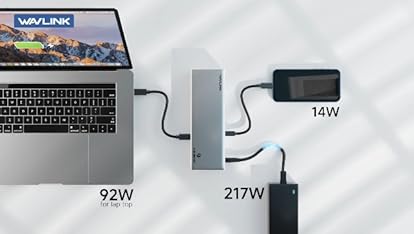
Get powered up. With 100W charging (96W certified), charge a MacBook Pro 14” from 0%-50% in about 30 minutes*. Charge a Dell XPS 15 9520 from 0%-50% in about 60 minutes**. Extra Thunderbolt ports offer more than data. Each one borrows 15W from the host power supply to provide power to connected devices. When one Thunderbolt device is connected, the host receives 81W, and if two Thunderbolt devices are connected, the host receives 66W.
Laptop docking stations like the Plugable TBT4-UDX1 let you spread out on two screens at up to 4K 60Hz. If you’re presenting to clients or streaming some shows, the 4K HDMI port connects an extra display at up to 60Hz. An included USB-C to HDMI adapter lets you connect a second 4K 60Hz monitor. But if you really want to pack in the pixels, go straight to the Thunderbolt port to connect an 8K monitor up to 30Hz.
Diving deeper into its features, the 11-port expansion on this USB C hub is perfect for ultra-thin devices like the Surface Pro 8. Get instant access to 1x HDMI port, 4x USB 3.0 ports, a 2.5 Gigabit Ethernet port, an SD Card reader, and even a combination audio jack. And the convenience continues with an included 3’ (1m) Thunderbolt cable. Just a heads up, on Mac, dual display is only available on M1 / M2 / M3 systems with a Pro or Max chip, like the Macbook Pro M1 Pro/Max, M2 Pro/Max, M3 Pro/Max. Base M4 and M4 Pro/Max systems can also support dual displays.
*Internal testing based on solo charging a MacBook Pro 14" M1 Pro starting from 0% battery
**Internal testing based on solo charging a Dell XPS 15 9520 with a 12th generation Intel CPU running Windows 11
-
Thunderbolt 4 Certified
Get three Powerful Thunderbolt 4 ports (USB 4 compatible). 1x to the host, 2x downstream
-
Single 8K 30Hz
Dual 4K 60Hz
Connect 2x displays up to 4K 60Hz (USB-C to HDMI adapter included), or 1x 8K 30Hz via Thunderbolt
-
(96W certified)
Up to 100W Charging
Provides up to 100W (96W certified) to laptop, and up to 15W charging to the Thunderbolt ports
-
Compatibility
| System Requirements | Host computer with a built-in Thunderbolt 4 or USB4 port running Windows 10 and later or macOS 11 and later |
| Drivers | Typically no driver installation is necessary on the host computer in order to use the TBT4-UDX1. On Windows, it may be necessary to manually install an Ethernet adapter driver to ensure the best performance. |
| Mac Configuration | Apple Mac systems with an Apple processor must have an M1 Pro/Max, M2 Pro/Max, M3 Pro/Max, Base M4, M4 Pro/Max processor in order to use dual displays |
| Display Capabilities | The TBT4-UDX1 has one built-in HDMI video output port supporting a display up to 4K resolution at a 60Hz refresh rate. A USB Type-C to HDMI adapter is included which can allow for a second display up to 4K resolution at a 60Hz refresh rate. Dual display capability is dependent on the host system’s external display capability |
| Not Compatible with | Host computers that do not have a Thunderbolt 4 or USB4 port |
-
Will this dock work with any laptop? What kind of cable should I use to connect the dock to my laptop?
A computer that has a Thunderbolt 4 port or USB4 port that is running Windows 10 or later or macOS 11 or later should be compatible with the Plugable TBT4-UDX1 docking station. Computers that do not meet these requirements are not supported.
-
Why should I choose a dock with extra downstream Thunderbolt ports?
Downstream Thunderbolt ports provide flexibility in terms of the devices that can be used. If the host has a Thunderbolt 4 port, the downstream ports will work as Thunderbolt 4 ports which allow Thunderbolt 4, 3 and USB-C devices to be connected.
-
Is my computer compatible with the Plugable TBT4-UDX1 docking station?
Most computers with a built-in Thunderbolt 4 or USB4 port running Windows 10 and later or macOS 11 and later are compatible with the TBT4-UDX1.
-
Do I need to install software or drivers in order to use the TBT4-UDX1?
In most circumstances, no software or driver installation is necessary in order to use the TBT4-UDX1.
-
Are my monitors compatible with the TBT4-UDX1 docking station?
The TBT4-UDX1 has one built-in HDMI video output supporting up to 4K resolution at up to a 60Hz refresh rate. We also include in the box one USB Type-C to HDMI adapter to add a second display (second display dependent on host capability).
Compare Plugable Products
TBT4-UDX1
Add to Cart
| TBT4-UDZ
Add to Cart
| TBT3-UDZ | TBT4-HUB3C
Add to Cart
| UD-6950Z | |
|---|---|---|---|---|---|
|
Customer Reviews
|
4.2 out of 5 stars 138
|
4.1 out of 5 stars 427
|
4.0 out of 5 stars 869
|
4.4 out of 5 stars 284
|
4.0 out of 5 stars 1,580
|
|
Laptop compatibility
| USB4, Thunderbolt 4 / 3, USB-C | USB4, Thunderbolt 4 / 3, USB-C | USB4, Thunderbolt 4 / 3, USB-C | USB4, Thunderbolt 4 / 3, USB-C | USB USB4 Thunderbolt 4/3 USB-C |
|
Thunderbolt Downstream Ports
| 2x Thunderbolt | - | - | 3x Thunderbolt | - |
|
Laptop Charging
| 100W (96W Certified) | 100W (98W Certified) | 100W (96W Certified) | 60W | - |
|
Max # of Displays
| Up to 2x | 4x *Thunderbolt 4 Windows | Up to 2x | Up to 2x | Up to 2x |
|
Video Output Types
| 1x HDMI, 1x incl. HDMI adapter | 2x DisplayPort & 2x HDMI | 2x DisplayPort or HDMI | 3x Thunderbolt, adapter incl. | 2x HDMI or 2X DisplayPort |
|
# of Ports
| 11 | 16 | 14 | 4 | 11 |
|
Ethernet
| 2.5 Gigabit | 2.5 Gigabit | Gigabit | - | Gigabit |
|
SD
| ✔ | ✔ | ✔ | ✘ | ✘ |
|
Orientation
| Horizontal | Vertical or Horizontal | Vertical or Horizontal | Horizontal | Vertical |
![[2 Pack 4Ft] Thunderbolt 4 Cable, 40Gbps Thunderbolt Cable with 100W Charging and 8K Compatible with Thunderbolt 4/3 Monitor,](https://images-na.ssl-images-amazon.com/images/I/61bBzYNF-VL._AC_UL116_SR116,116_.jpg)