| Brand | Plugable |
|---|---|
| Manufacturer | Plugable |
| Place of Business | Redmond, WA |
| Model | UD-6950Z |
| Part Number | UD-6950Z |
| Hardware interface | USB Docking Station |
| Compatible Devices | Apple M1/M2 and Intel Macs (with macOS 10.15 or later), ChromeOS 100 or later, Microsoft Surface line, HP Spectre x360 series, Dell XPS 13 & XPS 15 / Latitude, Lenovo ThinkPad T series |
| Number of Items | 1 |
| Batteries included | No |
| Batteries Required | No |
| Number of Ports | 13 |
| Total USB Ports | 6 |
| Does it contain liquid? | No |
| Includes rechargable battery | No |
| Manufacturer | Plugable |
| Item model number | UD-6950Z |
| Product Dimensions | 5 x 7 x 5 cm; 350 g |
| ASIN | B08B6CZ29Q |
Consider these alternative items
Learn more
No featured offers available
We feature offers with an Add to Cart button when an offer meets our high standards for:
- Quality Price,
- Reliable delivery option, and
- Seller who offers good customer service
-
-
-
-
-
-
-
2 VIDEOS -
Image Unavailable
Colour:
-
-
-
- To view this video, download
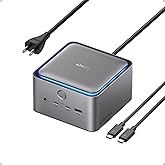
Plugable Dual DisplayPort & HDMI Docking Station - USB 3.0 & USB-C Laptop Dock for Dual Monitors, DisplayLink, Mac (Driver Required), ChromeOS & Windows, Gigabit Ethernet and Audio (UD-6950Z)
| Brand | Plugable |
| Colour | Black |
| Hardware interface | USB Docking Station |
| Compatible devices | Apple M1/M2 and Intel Macs (with macOS 10.15 or later), ChromeOS 100 or later, Microsoft Surface line, HP Spectre x360 series, Dell XPS 13 & XPS 15 / Latitude, Lenovo ThinkPad T series See more |
| Total USB ports | 6 |
| Product Dimensions | 13.5L x 7W x 19H Centimetres |
| Number of ports | 13 |
| Item weight | 350 Grams |
| Total HDMI ports | 2 |
| Input voltage | 20 Volts (DC) |
About this item
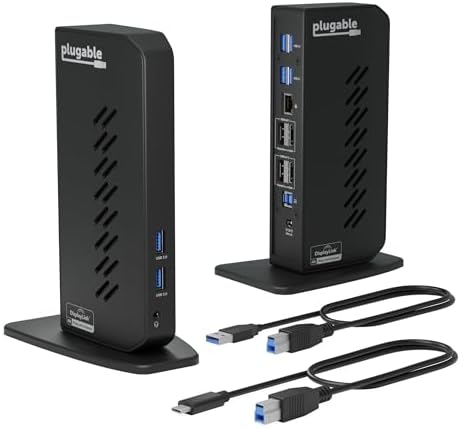
- Flexible Expandability: This versatile laptop docking station dual monitor setup includes dual HDMI and DisplayPort outputs, Gigabit Ethernet, audio jack, and six USB 3.0 ports. It supports both USB-C and USB 3.0 host connections - making it the perfect USB docking station for expanded connectivity.
- Dual 4K Monitors with HDMI and DisplayPort: Enjoy ultra-clear visuals with support for two 4K monitors via DisplayLink docking station technology - outputting 3840x2160 @ 60Hz using DisplayPort or HDMI. Ideal for multitasking and boosting productivity.
- Optimized for Work, Not Gaming: Best suited for web browsing, productivity, and office applications. This laptop dock does not support gaming or protected content (HDCP) playback, such as Netflix, Hulu, etc.
- Compatibility: Compatible with Windows 11/10/8.x/7, macOS 10.14+ (driver required) and ChromeOS 100+. This laptop docking station offers plug-and-play functionality for Windows and ChromeOS. Not compatible with Linux; manual driver installation required on Mac. Please note, this docking station does NOT charge the host computer
- Transform Your Workspace with Dual Monitors: Enhance your setup with a sleek vertical USB dock that supports dual monitor displays. Ideal for professionals using Windows, macOS, or seeking a reliable ChromeOS docking station experience with 4K productivity and clean cable management.
Product information
Technical Details
Additional Information
| Date First Available | June 22 2020 |
|---|---|
| Customer Reviews |
4.0 out of 5 stars |
| 鶹 Rank | |
| Is discontinued by manufacturer | No |
Feedback
Videos for similar products
From the brand
-
-
-
Find Your Docking Station
-
Shop for Mac
-
Shop for Windows
-
Shop Universal Compatability
-
Product Description
How to Install DisplayLink Driver for macOS
The UD-6950Z makes it easy to set up dual external displays on macOS using DisplayLink, supporting resolutions up to 4K @ 60Hz. This is a game changer for Mac chipsets that limit external displays.
The required installation is simple - just download and install the DisplayLink Manager application.
-
Dive into 2x extended displays at 4K 60Hz. Dock doesn’t support HDCP. Not recommend for gaming.
-
Built on DisplayLink for better compatibility. Even extends screens on M1, M2, M3, M4 MacBooks.
-
2x HDMI 2x DisplayPort 6x USB 3.0 1x Combination Audio Jack 1x Gigabit Ethernet
-
| Dual 4K displays | Up to two 4K@60Hz displays via either HDMI or DisplayPort |
| 6x USB 5Gbps | Standard USB-A 5Gbps ports |
| Host Connection | USB 3.0 or USB-C connection to host, two different USB cables provided |
| 1x 3.5mm Audio Jack | TRRS Headset port, supports stereo stereo speakers/headphones or combination headsets |
-
How can I tell if the UD-6950Z docking station is compatible with my computer?
Most modern computers running Windows, macOS and ChromeOS that have an available USB-A or USB-C port are compatible with the UD-6950Z
-
What operating systems are the UD-6950Z docking station compatible with?
Windows 10 or later, macOS 11 or later (driver installation required), and ChromeOS version 100 or later
-
Does the UD-6950Z docking station require software or a driver download?
Yes, DisplayLink software must be installed on a Windows or Mac computer. This process is typically automatic on Windows, but must be manually installed on macOS. No installation required on ChromeOS.
-
How can I tell if my monitors are compatible with the UD-6950Z docking station?
The UD-6950Z supports up to two 3840x2160 resolution 60Hz refresh rate monitors. The UD-6950Z provides two video output groups, each with a choice of a DisplayPort or HDMI video output port.
-
Does the UD-6950Z charge the host computer?
No, the UD-6950Z does NOT charge the host computer. An alternative that will charge the host computer is the the Plugable UD-6950PDH docking station
Plugable Docking Stations
UD-6950Z | UD-3900H
Add to Cart
| UD-3900Z
Add to Cart
| UD-6950PDH
Add to Cart
| |
|---|---|---|---|---|
|
Customer Reviews
|
4.0 out of 5 stars 1,580
|
4.5 out of 5 stars 1,806
|
4.6 out of 5 stars 1,827
|
4.3 out of 5 stars 262
|
|
# of Displays
| 2 | 2 | 2 | 2 |
|
Video Ports
| 2x HDMI 2.0,2x DisplayPort 1.2 | 1x HDMI 1.4, 1x DVI | 2x HDMI 1.4 | 2x DisplayPort or HDMI |
|
Max Resolutions Supported
| 2x 4K 60Hz | 2x 1920x1200 @ 60Hz | 2x 1920x1200 @ 60Hz | 2x 4K 60Hz |
|
# of USB Ports
| 6 | 6 | 6 | 5 |
|
USB Port Specifications
| All USB 3.0 | 2x USB 3.0, 4x USB 2.0 | 2x USB 3.0 front, 4x USB 2.0 | 4x USB 3.0, 1x USB-C |
|
Laptop Charging
| No | No | No | Yes |
|
Laptop Connection
| USB 3.0 and USB-C | USB 3.0 and USB-C | USB 3.0 and USB-C | USB4, Thunderbolt 4 / 3, USB-C |