| Brand | Plugable |
|---|---|
| Manufacturer | Plugable |
| Place of Business | Redmond, WA |
| Model | UD-MSTH2 |
| Part Number | UD-MSTH2 |
| Hardware interface | USB 3.0 Type C, USB Docking Station |
| Compatible Devices | Windows Laptops |
| Number of Items | 1 |
| Wattage | 65 |
| Batteries included | No |
| Batteries Required | No |
| Number of Ports | 10 |
| Total USB Ports | 3 |
| Does it contain liquid? | No |
| Manufacturer | Plugable |
| Item model number | UD-MSTH2 |
| Product Dimensions | 23.5 x 14.5 x 7.62 cm; 229.63 g |
| ASIN | B0CKJNZRW3 |

-
-
-
-
-
-
-
VIDEO -
Image Unavailable
Colour:
-
-
-
- To view this video, download
Plugable USB-C Docking Station Dual 4K 60Hz HDMI, 65W Charging, Gigabit Ethernet, 1x USB-C 5Gbps, 3X USB-A, Audio, Windows/ChromeOS, USB-C/USB4/Thunderbolt, Driverless (UD-MSTH2)
Purchase options and add-ons
| Brand | Plugable |
| Colour | Black |
| Hardware interface | USB 3.0 Type C, USB Docking Station |
| Compatible devices | Windows Laptops |
| Total USB ports | 3 |
| Product Dimensions | 23.5L x 14.5W x 7.6H Centimetres |
| Number of ports | 10 |
| Item weight | 8.1 Ounces |
| Total HDMI ports | 2 |
| Wattage | 65 |
About this item
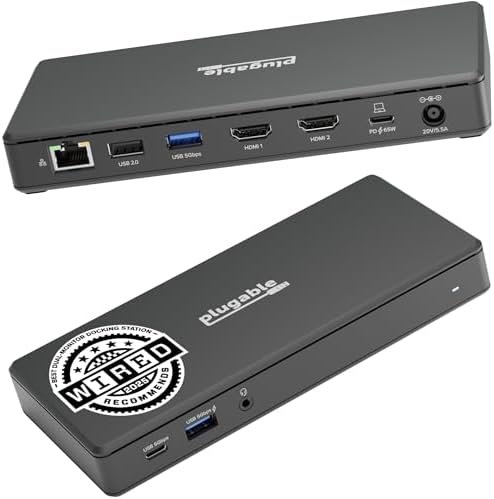
- 4K Driverless Dock: Power and Connectivity in One Dock: With 65W charging, 1x USB-C (5Gbps), 2x USB-A 3.0 (5Gbps), 1x USB 2.0 (480Mbps), Gigabit Ethernet, and audio in/out, this USB-C docking station connects everything you need efficiently and reliably.
- Dual 4K Display USB-C Dock: Expand your workspace with 2x HDMI ports supporting up to 4K 60Hz each with this USB-C docking station - no driver installation required. Perfect for multitasking across emails, spreadsheets, and video calls. (Note: Display output requires USB-C with DP Alt Mode support. DP 1.4 with DSC required for dual 4K 60Hz)
- Plug-and-Play: No drivers, no setup stress. This USB-C dock works out of the box with supported systems, providing seamless connectivity for professionals, creators, and remote workers. Host device must support USB-C DisplayPort Alternate Mode (DP Alt Mode) for video output. Not all USB-C ports support video.
- Compatibility: This dock is built for USB-C Windows 10+, USB4, and Chromebook systems. Not recommended for macOS due to lack of MST support and display limitations. Always verify host compatibility before purchase.
- Lifetime Support: This device has been designed with reliability at its core and was built to meet the deployment demands of IT departments and the ease of use necessary for home offices. Includes lifetime support from our North American team of connectivity experts
Frequently bought together

Product information
Technical Details
Additional Information
| Date First Available | Oct. 20 2023 |
|---|---|
| Customer Reviews |
4.2 out of 5 stars |
| 鶹 Rank |
Feedback
Videos for similar products
From the brand

-
-
-
Find Your Docking Station
-
Shop for Mac
-
Shop for Windows
-
Shop Universal Compatability
-
Product Description
Walk up to this hub, plug in, and get to work. The Plugable USB-C laptop docking station dual monitor with 65W Power Delivery (UD-MSTH2) was built around an MST (Multi-Stream Transport) chipset to ensure peak performance under any workload. Starting with 2x HDMI ports, each ready for a 4K 60Hz monitor, so you can give a screen to your email and still dedicate a screen to your spreadsheets (or scrolling).
To unlock full dual 4K 60Hz display functionality, your laptop must support USB-C DisplayPort Alternate Mode (DP Alt Mode) with MST, and DP 1.4 with DSC. Not all USB-C ports support video, and macOS systems only support one external display.
You can even connect your iPhone 16, of course, it’ll only extend to one display.
Screens aren’t the only thing you’ll be connecting to this Plugable docking station. A USB-C port (5 Gbps) for your modern devices, 2x USB (5 Gbps), and a USB 2.0 (480Mbps) for your legacy devices. And of course, Gigabit ethernet and an audio jack – between flaky Wi-Fi and wireless headphones that never seem to be charged, sometimes it’s best to have a backup.
Need help getting started? Make sure to use certified HDMI 2.0 (18Gbps) cables and HDMI 2.0 capable monitors, confirm your laptop’s USB-C port supports DP 1.2 Alt Mode + MST, and update your graphics drivers. Dual 4K 60Hz video is dependant on host system capabilities. If issues persist, power cycle the dock by unplugging all connections and reconnecting after 60 seconds.
-
Up to 4K 60Hz
2x Extended Display
A screen for this, a screen for that. Extend your display across two 4K monitors
-
Power Delivery
65W
Keep your laptop charged while you work with up to 65W Power Delivery
-
| System Requirements | Supports full-featured USB-C, USB4, and Thunderbolt 4 / Thunderbolt 3 systems running Windows 10 / 11, ChromeOS 100+ |
| Drivers | No driver installation required; up-to-date system graphics drivers recommended |
| Display Capabilities | Dual 4K@60Hz supported with laptops supporting DP 1.4 with DSC over a USB-C connection that supports Alternate Mode. Dual 1920x1080@60Hz supported with laptops supporting DP 1.2 |
| Not Recommended For | Apple MacBook Pro / Air due to no MST support in macOS. Only one external display is supported when using this dock with a Mac. |
-
Will this dock work with any laptop?
A computer that has a full featured USB-C / USB4 / Thunderbolt 4 or 3 port that is running Windows 10 or 11, ChromeOS version 100+ should be compatible with the Plugable UD-MSTH2. Computers that do not meet these requirements are not supported
-
Is my Apple Mac computer compatible with the Plugable UD-MSTH2 docking station?
macOS does not support MST. UD-MSTH2 will power/charge a Mac and drive one external HDMI display; a second external display will not extend. For dual displays on Mac, choose one of our DisplayLink-based docks instead
-
Do I need to install software or drivers in order to use the UD-MSTH2?
No. UD-MSTH2 is driverless. For best results, keep your laptop’s graphics and USB-C firmware up to date.
-
Are my monitors compatible with the UD-MSTH2 docking station?
Any monitor with HDMI input works. For 4K 60Hz, use HDMI 2.0 capable screens and certified HDMI 2.0 cables. Dual 4K 60Hz is dependent on system's graphics capabilities.
-
What type of work or applications is the UD-MSTH2 suitable for?
The UD-MSTH2 provides a direct connection to your system’s GPU, so it can use the native performance without being slowed by software. Including HDCP support so steaming from your favorite service like Netflix/Hulu/鶹 Prime is no problem
Compare Plugable Products
UD-MSTH2
Add to Cart
| UD-MSTHDC
Add to Cart
| UD-3900Z
Add to Cart
| UD-4VPD
Add to Cart
| TBT4-UDZ | |
|---|---|---|---|---|---|
|
Customer Reviews
|
4.2 out of 5 stars 185
|
3.8 out of 5 stars 80
|
4.6 out of 5 stars 1,824
|
3.9 out of 5 stars 142
|
4.1 out of 5 stars 420
|
|
Video Output Types
| 2x HDMI 2.0 | 2x HDMI 2.0, 2x DisplayPort | 2x HDMI | 2x HDMI | 2x DisplayPort and 2x HDMI |
|
Max Resolution Supported
| 4K | 4K 60Hz | 2x 1920x1200 @ 60Hz | 2x 4K 120Hz | 4K 60Hz |
|
Total Port Count
| 9 | 12 | 10 | 11 | 16 |
|
Laptop Charging
| 65W | 60W | Does Not Charge | 100W | 100W (96W Certified) |
|
Laptop Connection
| USB-C, USB4, Thunderbolt 4/3 | USB-C, USB4, Thunderbolt 4/3 | USB 3.0/USB-C, Thunderbolt 4/3 | USB-C, USB4, Thunderbolt 4/3 | USB-C, USB4, Thunderbolt 4/3 |