| Brand | Plugable |
|---|---|
| Manufacturer | Plugable |
| Model | UD-6950PDH |
| Model Name | UD-6950PDH |
| Part Number | UD-6950PDH |
| Hardware interface | USB Type C |
| Compatible Devices | Windows 10 / 11 & macOS 10.15.x and later, ChromeOS 100.x and later, Supports full-featured USB-C, USB4, and Thunderbolt 3 / Thunderbolt 4 systems, including: M1/M2-based MacBooks (Original M1/M2, M1 Pro, M1 Max); Intel-based Thunderbolt 3 MacBooks (late 2016+) Dell XPS, Latitude, Inspiron series with full-featured USB-C, USB4, or Thunderbolt 3 / 4 Microsoft Surface Pro / Go / Book / Laptop models with USB-C, USB4, or Thunderbolt 4 HP ProBook, EliteBook, Spectre x360 series with full-featured USB-C, USB4, or Thunderbolt 3 / 4 Lenovo ThinkPad, IdeaPad, and Yoga with full-featured USB-C, USB4, or Thunderbolt 3 / 4 LG Gram with full-featured USB-C, USB4, or Thunderbolt 3 / 4 & thousands of other laptops which are compliant with full-featured, standards-compliant USB-C ports |
| Number of Items | 1 |
| Wattage | 100 watts |
| Batteries included | No |
| Batteries Required | No |
| Number of Ports | 15 |
| Total USB Ports | 5 |
| Does it contain liquid? | No |
| Includes rechargable battery | No |
| Manufacturer | Plugable |
| Item model number | UD-6950PDH |
| Product Dimensions | 23.88 x 7.87 x 3.05 cm; 331.69 g |
| ASIN | B09TQY97MJ |
-
-
-
-
-
-
-
3 VIDEOS -
Image Unavailable
Colour:
-
-
-
- To view this video, download
Plugable USB C Laptop Docking Station, Dual Monitor 4K 60Hz for Apple Mac M1/M2/M3/M4/M5, 2X HDMI or DisplayPort for MacBook, 100W Charging DisplayLink Dock, Driver Install Required (UD-6950PDH)
Purchase options and add-ons
| Brand | Plugable |
| Colour | Silver |
| Hardware interface | USB Type C |
| Compatible devices | Windows 10 / 11 & macOS 10.15.x and later, ChromeOS 100.x and later, Supports full-featured USB-C, USB4, and Thunderbolt 3 / Thunderbolt 4 systems, including: M1/M2-based MacBooks (Original M1/M2, M1 Pro, M1 Max); Intel-based Thunderbolt 3 MacBooks (late 2016+) Dell XPS, Latitude, Inspiron series with full-featured USB-C, USB4, or Thunderbolt 3 / 4 Microsoft Surface Pro / Go / Book / Laptop models with USB-C, USB4, or Thunderbolt 4 HP ProBook, EliteBook, Spectre x360 series with full-featured USB-C, USB4, or Thunderbolt 3 / 4 Lenovo ThinkPad, IdeaPad, and Yoga with full-featured USB-C, USB4, or Thunderbolt 3 / 4 LG Gram with full-featured USB-C, USB4, or Thunderbolt 3 / 4 & thousands of other laptops which are compliant with full-featured, standards-compliant USB-C ports See more |
| Total USB ports | 5 |
| Product Dimensions | 23.9L x 7.9W x 3H Centimetres |
| Number of ports | 15 |
| Item weight | 11.7 Ounces |
| Total HDMI ports | 2 |
| Wattage | 100 watts |
About this item
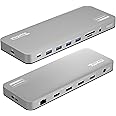
- 14-in-1 Dock for Mac - 14-port USB-C docking station with a premium aluminum housing and space gray finish for Mac hosts 2x 4K monitors in HDMI, DisplayPort or both, a front-facing USB-C and and USB port for charging, plus 3 additional USB 3.0 ports, SD and microSD card readers, 3.5mm headset jack, Ethernet, and 100W charging
- Dual 4K Display: 2x HDMI ports and 2x DisplayPort ports for connecting two screens up to 4K 60Hz without adapters, even on Macs that typically support only one. Requires installation of DisplayLink to enable extended desktop on M1/M2/M3/M4/M5 MacBooks.
- How it Works - Some Macs only support a single extended monitor. This USB C dock uses DisplayLink technology to circumvent display limitations. It’s an ideal solution for multitaskers and M1/M2/M3/M4 MacBook, MacBook Air, and MacBook Pro users
- Works With - Ideal for traditional and hybrid office setups, this MacBook dock for multiple monitors is compatible with macOS 11+, Windows 10 and newer, and ChromeOS 100+ systems with Thunderbolt, USB4, or USB-C. Driver installation required. HDCP not supported
- 2-Year Coverage, Lifetime Support - Every Plugable product, including this docking station, is covered against defects for 2 years and comes with lifetime support. If you ever have questions, contact our North American-based team - even before purchase2-Year Coverage, Lifetime Support - Every Plugable product, including this laptop docking station, is covered against defects for 2 years and comes with lifetime support. If you ever have questions, contact our North American-based team - even before purchase
Frequently bought together

Product information
Technical Details
Additional Information
| Date First Available | Aug. 26 2022 |
|---|---|
| Customer Reviews |
4.3 out of 5 stars |
| 鶹 Rank |
Feedback
Videos for similar products
From the brand

-
Universally Compatible Docks
-
-
Find Your Docking Station
-
Windows Compatible Docks
-
Mac Compatible Docks
-
-
Product Description
-
Mix and Match
2x HDMI, 2x DisplayPort
Connect up to two HDMI or DisplayPort monitors, or a mix of both at up to 4K 60Hz.
-
Powerful
Laptop Charging
With 100W charging, you have enough power to charge just about any laptop.
-
Get connected with 3x USB-A (5Gbps) + 1x USB-A (5Gbps 5V/1.5A) + 1x USB-C (5Gbps 5V/1.5A)
-
Q: Does the UD-6950PDH support dual 4K@60Hz monitors in addition to any laptop displays?
A: Yes, this dock allows for two additional 4K@60Hz displays to be connected via HDMI, DisplayPort, or a combination of both.
-
Do I need to install software in order to use the device and connect my external monitors
Yes, DisplayLink software is required for the UD-6950PDH to display an image. Manual installation is required for macOS, Windows installation is typically automatic. We recommend installing the latest DisplayLink software for the best performance.
-
Q: Is the Playback of Copy-Protected or Encrypted Video Content Supported on macOS while using the UD-6950PDH?
A: No, HDCP (High-bandwidth Digital Content Protection) is not supported on macOS when this docking station is connected. HDCP content will not play on any displays, including the built-in display or those connected directly to the computer.
-
I plugged into the front USB-C and nothing happened why?
The front USB-C port is for accessories and peripheral charging only (wireless earbuds, keyboards, phones). The USB-C port on the side of the dock is the host connection.
-
Q: When installing DisplayLink software on my Mac, why is it necessary to grant ‘Screen Recording’ permission?
macOS requires "Screen Recording" for the DisplayLink driver to work properly. Approving it enables the driver to send data over USB from your computer to the DisplayLink-powered display. No data, images, or pixels are being stored or recorded.
Plugable Docking Stations
UD-6950PDH
Add to Cart
| UD-ULTC4K
Add to Cart
| TBT3-UDZ
Add to Cart
| USBC-6950PDZ
Add to Cart
| |
|---|---|---|---|---|
|
Customer Reviews
|
4.3 out of 5 stars 261
|
4.3 out of 5 stars 1,666
|
4.0 out of 5 stars 868
|
4.2 out of 5 stars 298
|
|
# of Displays
| 2 | 3 | 2 | 2 |
|
Video Ports
| 2x DisplayPort or HDMI | 3x HDMI 2.0 or DisplayPort | 2x DisplayPort or HDMI | 2x HDMI |
|
Max Resolution Supported
| 2x 4K 60Hz | 3x 4K 60Hz | 2x 4096x2160 @ 60Hz | 2x 4K 60Hz |
|
# of USB Ports
| 5 | 5 | 3 | 2 |
|
Laptop Charging
| 100W (96W Certified) | 100W (96W Certified) | 100W (96W Certified) | Pass-Through 82W |
|
Laptop Connection
| USB4, Thunderbolt 4 / 3, USB-C | USB4, Thunderbolt 4 / 3, USB-C | USB4, Thunderbolt 4 / 3, USB-C | USB4, Thunderbolt 4 / 3, USB-C |