| Brand | Plugable |
|---|---|
| Item model number | UD-ULTCDL |
| Operating System | Chrome,Mac,Windows |
| Product Dimensions | 11.94 x 6.6 x 17.53 cm; 400 g |
| Item dimensions L x W x H | 11.9 x 6.6 x 17.5 Centimetres |
| Colour | Black |

-
-
-
-
-
-
-
2 VIDEOS -
Image Unavailable
Colour:
-
-
-
- To view this video, download
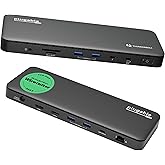
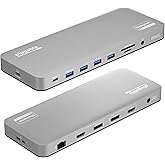
Plugable USB-C Triple Monitor Docking Station: 13-in-1 Laptop Dock with 100W Charging for Mac (DisplayLink Driver Required), Windows, Chrome, 3 HDMI, Gigabit Ethernet, SD, USB-C 20W, 4 USB - UD-ULTCDL
Purchase options and add-ons
| Brand | Plugable |
| Colour | Black |
| Hardware interface | USB 3.0 Type C |
| Compatible devices | Windows 10 / 11 & macOS 10.15.x and later, ChromeOS 100.x and later Supports full-featured USB-C, USB4, and Thunderbolt 3 / Thunderbolt 4 systems, including: M1/M2-based MacBooks (Original M1/M2, M1 Pro, M1 Max); Intel-based Thunderbolt 3 MacBooks (late 2016+) Dell XPS, Latitude, Inspiron series with full-featured USB-C, USB4, or Thunderbolt 3 / 4 Microsoft Surface Pro / Go / Book / Laptop models with USB-C, USB4, or Thunderbolt 4 HP ProBook, EliteBook, Spectre x360 series with full-featured USB-C, USB4, or Thunderbolt 3 / 4 Lenovo ThinkPad, IdeaPad, and Yoga with full-featured USB-C, USB4, or Thunderbolt 3 / 4 LG Gram with full-featured USB-C, USB4, or Thunderbolt 3 / 4 & thousands of other laptops which are compliant with full-featured, standards-compliant USB-C ports See more |
| Total USB ports | 5 |
| Product Dimensions | 11.9L x 6.6W x 17.5H Centimetres |
| Number of ports | 13 |
| Item weight | 400 Grams |
| Total HDMI ports | 3 |
| Wattage | 100 |
About this item
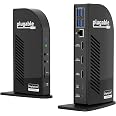
- Powerful Expansion - This TAA-compliant USB C docking station with 13 ports for the professional who needs to spread out across three monitors, even on laptops that only support one extra screen, and offers 100W charging to power through your day
- Triple Monitor Support: Achieve a pristine picture on your main display with up to 4K 30Hz, and up to 1920x1200 @ 60Hz on displays two and three resolutions; DisplayLink technology enables adding three extended screens to M1 / M2 / M3 / M4 Macs, making it the ideal universal docking station.
- Fast 100W Power Delivery: Connect and charge your laptop with up to 100W (96W certified) directly through the USB-C port on the rear of the DisplayLink docking station. The front USB-C port also provides 20W charging to connected devices like phones, adding versatility to this DisplayLink dock.
- Enhanced Compatibility: USB-C dock is compatible with Windows 10 or later, and macOS 11+ systems with USB4, Thunderbolt, and video-capable USB-C; macOS requires installation of DisplayLink drivers, see gallery video for installation walkthrough. Note: HDCP not supported.
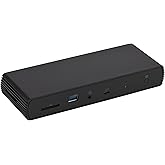
- Connection Options: This USB 3.0 docking station features 4x USB 3.0 ports for high-speed data transfers up to 5 Gbps, along with an SD card reader supporting SD, SDHC, SDXC, and MMC formats. It also includes a Gigabit Ethernet port and separate audio in/out ports for comprehensive connectivity.
- 2-Year Coverage, Lifetime Support - Every Plugable product, including this docking station, is covered against defects for 2 years and comes with lifetime support. If you ever have questions, contact our North American-based team - even before purchase
Frequently bought together

Product information
Technical Details
Summary
Additional Information
| ASIN | B01FKTZLBS |
|---|---|
| Customer Reviews |
4.3 out of 5 stars |
| 鶹 Rank | |
| Date First Available | June 1 2016 |
| Manufacturer | Plugable |
| Place of Business | Redmond, WA |
Warranty & Support
Feedback
Featured items you may like
鶹 Basics Thunderbolt4/USB4 Pro Docking Station,2xTBT4,1xHDMI2.1,3xUSB A 3.1,RJ45,Dual DisplayFREE Shipping by 鶹Get it by Tuesday, Dec 30Only 7 left in stock (more on the way).
鶹 Basics Thunderbolt4/USB4 Docking Station, 3X Downstream TBT4 (Dual Display), 1xUSB A 3.1FREE Shipping by 鶹Get it by Tuesday, Dec 30Only 3 left in stock (more on the way).
From the brand
-
-
-
Find Your Docking Station
-
Shop for Mac
-
Shop for Windows
-
Shop Universal Compatability
-
Product Description
The Plugable UD-ULTCDL Triple Monitor Docking Station features three HDMI ports for USB-C, USB4, or Thunderbolt laptops, including M1-M4 Macs. It offers 100W Power Delivery and 20W fast charging. Note: Corporate laptops may restrict driver installation.
How to install driver on MacOS
Note - macOS requires ‘Screen Recording’ permission for the DisplayLink software to work. Granting this permission enables sending data from your computer over USB to the HDMI outputs. No data, images, or pixels are being stored or recorded.
-
Do I need to install software in order to use the device?
Yes, DisplayLink software is required for the UD-ULTCDL for full functionality. Manual installation is required for macOS. Installation is typically automatic on Windows. No driver installation required for ChromeOS.
-
When installing DisplayLink software on my Mac, why is it necessary to grant ‘Screen Recording’ permission?
macOS requires "Screen Recording" for the DisplayLink driver to work properly. Approving it enables the driver to send data over USB from your computer to the DisplayLink-powered display. No data, images, or pixels are being stored or recorded.
-
Does this dock allow for three displays even on base M1, M2, or M3 Macs?
Yes. Enabled by DisplayLink technology, UD-ULTCDL can connect three displays (1x 4K 30Hz, 2x 1080p 60Hz) even if the computer supports only one display output on its own. DisplayLink Manager installation required on Mac.
-
Which USB-C port on the dock can be used to connect my computer?
The USB-C port on the rear of the dock is dedicated for connecting your laptop. The front port is a hub port only, so it doesn’t work to connect a computer to the dock.
-
Why aren’t all three displays connecting to my dock?
Please confirm your laptop’s USB-C port supports video output (Alt mode), and that you have the DisplayLink driver/software installed.
Plugable Docking Stations
UD-ULTCDL
Add to Cart
| UD-ULTC4K
Add to Cart
| UD-6950Z | UD-3900C4
Add to Cart
| TBT4-UDZ | |
|---|---|---|---|---|---|
|
Customer Reviews
|
4.3 out of 5 stars 1,438
|
4.3 out of 5 stars 1,664
|
4.0 out of 5 stars 1,579
|
4.1 out of 5 stars 217
|
4.1 out of 5 stars 419
|
|
Max Displays per Dock
| 3 | 3 | 2 | 4 | 4 Windows,2 Mac M1-M4 Pro/Max |
|
Video Ports
| 3x HDMI | 3x HDMI 2.0 or DisplayPort 1.2 | 2x HDMI 2.0 or DisplayPort 1.2 | 4x HDMI | 2x HDMI 2.0 or DisplayPort 1.2 |
|
Max Resolutions Supported
| 1x 4K 30Hz, 2x 1920x1200 60Hz | 3x 4K 60Hz | 2x 4K 60Hz | 4x 1080p 60Hz | 4x 4K 60Hz |
|
# of USB 3.0 Ports
| 4 | 4 | 6 | 4 | 6 |
|
# of USB-C Ports
| 1 | 1 | - | 1 | 1 |
|
Laptop Charging
| 100W (96W Certified) | 100W (96W Certified) | - | 100W (96W Certified) | 100W (96W Certified) |
|
Laptop Connection
| USB-C, Thunderbolt, USB4 | USB-C, Thunderbolt, USB4 | USB 3.0, USBC Thunderbolt,USB4 | USB-C, Thunderbolt, USB4 | USB-C, Thunderbolt, USB4 |