Beast Games. Strong. Smart. Coming soon. Prime.
To see product details, add this item to your cart. You can always remove it later.
Ships from
Ships from
Returns
Returnable until 31 Jan 2026
For the 2025 holiday season, eligible items purchased between 1 November and 31 December 2025 can be returned until 31 January 2026.
Payment
Secure transaction
Your transaction is secure
We work hard to protect your security and privacy. Our payment security system encrypts your information during transmission. We don’t share your credit card details with third-party sellers, and we don’t sell your information to others. Learn more
Packaging
Ships in product packaging
black leaf Ships in product packaging
Shows what's inside. Item often ships in manufacturer container to reduce packaging. To hide what's inside, choose Ship in 鶹 packaging at checkout. Learn more
Added to

Sorry, there was a problem.

There was an error retrieving your wish lists. Please try again.

Sorry, there was a problem.

List unavailable.
  • 4 VIDEOS
GLOTRENDS M.2 SSD Adapter SeriesGLOTRENDS CA Official Store
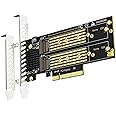
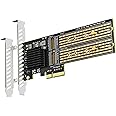
  • GLOTRENDS PA21 Dual M.2 NVMe to PCIe 4.0 X8 Adapter Without Bifurcation Function, Support 22110/2280/2260/2242/2230 Size (PCIe Bifurcation Motherboard is Required)
  • To view this video, download

GLOTRENDS PA21 Dual M.2 NVMe to PCIe 4.0 X8 Adapter Without Bifurcation Function, Support 22110/2280/2260/2242/2230 Size (PCIe Bifurcation Motherboard is Required)

4.3 out of 5 stars (257)
鶹's Choice highlights highly rated, well-priced products available to ship immediately.
鶹's Choice

To see product details, add this item to your cart. You can always remove it later.

Purchase options and add-ons

About this item

  • Dual M.2 NVMe to PCIe 4.0 X8 Adapter: By installing 2 M.2 NVMe SSDs (Support 22110/2280/2260/2242/2230 M.2 NVMe SSD) on this PCIe 4.0 X8 adapter, your computer will be able to access 2 M.2 NVMe SSDs at the same time
  • Hardware Platform: Support Soft RAID in Intel/AMD platform, not support Mac Pro 5.1 (Note: To set up Intel's RAID-on-CPU (VROC), you need to purchase your license)
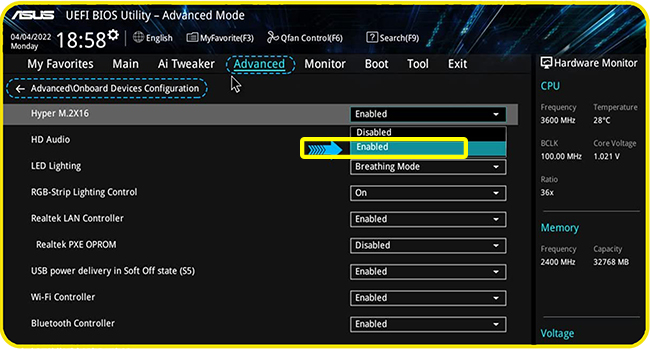
  • Set the PCIe Bifurcation mode of the corresponding PCIe slot in the BIOS, support X4X4X4X4 or X4X4X8 or Hyper M.2 X16 mode (Note: Can not support X8X4X4 mode)
  • Important: Because this adapter does not support PCIe Bifurcation, it requires a motherboard that supports PCIe Bifurcation. Otherwise, only the NVMe-1 port can recognize the NVMe SSD. Before purchasing, please check the PCIe expansion slot part of the motherboard manual on the motherboard manufacturer's website, or consult us directly
  • To reach PCIe 4.0 X4 (64Gbps) full speed, the CPU and motherboard PCIe slot and PCIe M.2 SSD should all be PCIe 4.0 features (Note: PCIe 4.0 is not supported on Intel CPUs below 11th generation)
  • Support OS Booting: Reinstall the OS, and set up BIOS/UEFI boot from this M.2 NVMe SSD (Note: Some motherboards are too old to support OS booting. In this case, M.2 NVMe SSDs can be used as storage disks)
  • OS compatibility: Plug-and-play in Windows 11/10/8/Linux/Mac OS (Note: Not support Windows 7). The new M.2 NVMe SSD needs to be initialized and formatted before it can be recognized by the computer host.

Frequently bought together

This item: GLOTRENDS PA21 Dual M.2 NVMe to PCIe 4.0 X8 Adapter Without Bifurcation Function, Support 22110/2280/2260/2242/2230 Size (PCIe Bifurcation Motherboard is Required)
$39.00
Get it by Saturday, Jan 3
In Stock
Sold by GLOTRENDS CA Official Store and ships from 鶹 Fulfillment.
+
$8.99
Get it by Saturday, Jan 3
In Stock
Sold by GLOTRENDS CA Official Store and ships from 鶹 Fulfillment.
+
$108.00
Get it by Saturday, Jan 3
In Stock
Sold by GLOTRENDS CA Official Store and ships from 鶹 Fulfillment.
Total price:$00
To see our price, add these items to your cart.
Details
Added to Cart
Choose items to buy together.

Product information

Technical Details

Brand ‎GLOTRENDS
Manufacturer ‎glotrends
Model ‎PA21
Part Number ‎PA21
OS ‎Linux, Windows, Mac OS (Not support Windows 7/Mac Pro 5.1)
Hardware interface ‎PCIE x 8
Graphics Card Interface ‎PCI Express
Compatible Devices ‎Personal Computer
Number of Items ‎1
Batteries included ‎No
Batteries Required ‎No
Does it contain liquid? ‎No
Manufacturer ‎glotrends
Item model number ‎PA21
Product Dimensions ‎15 x 5.4 x 0.3 cm; 130 g
ASIN ‎B09PGDMWKH

Additional Information

Date First Available Dec 30 2021
Customer Reviews
4.3 out of 5 stars (257)

4.3 out of 5 stars
鶹 Rank

Feedback

GLOTRENDS PA21 Dual M.2 NVMe to PCIe 4.0 X8 Adapter Without Bifurcation Function, Support 22110/2280/2260/2242/2230 Size (PCIe Bifurcation Motherboard is Required)


Found a lower price? Let us know. Although we can't match every price reported, we'll use your feedback to ensure that our prices remain competitive.

Where did you see a lower price?

Price Availability
/
/
/
/
Please sign in to provide feedback.
Brief content visible, double tap to read full content.
Full content visible, double tap to read brief content.

Videos for similar products


From the brand


Product Description

Model: PA21

Interface to PC PCI-Express 4.0 X8 (128GBbps at max)
Interface to SSD 2 x Key M ( Support 2230/2242/2260/2280/22110 form factor)
OS Compatibility Windows and Linux (Note: not support windows 7)
PCIe Bifurcation Not support, so it requires a motherboard that supports PCIe Bifurcation
Hardware Platform Intel and AMD motherboard with PCIe Bifurcation (Note: not support Mac Pro)
CPU Requirements Intel 11th Gen or Ryzen 5000 Series and above
RAID Setup Software RAID setup via Windows Disk Management or Linux mdadm Utility
Installation Low-profile and Regular-profile bracket
Dual M.2 NVMe to PCIe 4.0 X8

PCIe Bifurcation in ASUS BIOS

Enable Hyper M.2 <---> Advanced\Onboard Devices Configuration

Dual M.2 NVMe to PCIe 4.0 X8

PCIe Bifurcation in MSI or others BIOS

Configure PCIe x4+x4 or x4+x4x4+x4

Dual M.2 NVMe to PCIe 4.0 X8
Software RAID for M.2 NVMe SSD

RAID Setup in Window 10/11

  1. When you locate 2 separate M.2 NVMe SSDs in Windows 10/11 Disk Management
  2. Right-click the disk volume you want to set up as a soft RAID
  3. A pop-up window will appear; click the desired option (Spanned/Striped/Mirrored