| Brand | BroadLink |
|---|---|
| Manufacturer | Hangzhou BroadLink Technology Co.,Ltd. |
| Place of Business | Lorena, SP 12603000,BR |
| Model | RM4 mini S |
| Model Name | RM4 mini S |
| Part Number | RM4mini S |
| Compatible Devices | Many devices (such as TVs, Air Conditioners, Fans, Amplifiers, Sound Bars, STBs, etc.), but specific models or brands not mentioned |
| Special features | Universal |
| Voltage | 5 Volts |
| Battery Description | No Battery Required |
| Batteries included | No |
| Batteries Required | No |
| Connector Type | USB, Wi-Fi |
| Does it contain liquid? | No |
| Manufacturer | Hangzhou BroadLink Technology Co.,Ltd. |
| Item model number | RM4 mini S |
| Parcel Dimensions | 8.6 x 6.9 x 5.2 cm; 100 g |
| ASIN | B08JPBH1PB |

BroadLink RM4 mini S Smart Remote and Sensor Cable Set, Universal IR Remote Control Hub with Temperature Humidity Monitor USB Cable, Compatible with Alexa, Google Home, IFTTT
Purchase options and add-ons
| Brand | BroadLink |
| Special feature | Universal |
| Max number of supported devices | 9 |
| Compatible devices | Many devices (such as TVs, Air Conditioners, Fans, Amplifiers, Sound Bars, STBs, etc.), but specific models or brands not mentioned See more |
| Connectivity technology | USB, Wi-Fi |
About this item
- RM4 mini and Sensor Cable Set - This set comes with RM4 mini and HTS2 Sensor Accessory that integrates the functions of temperature and humidity sensor and power cable. Connect the sensor cable between the RM4 mini and USB adapter just like an ordinary USB cable, at the control panel of RM4 mini in BroadLink app, it will display temperature and humidity of the room where the sensor located. Set the triggers, such as turn on your air conditioner automatically when the temperature rises.
- High Compatibility Universal Remote - RM4 mini remote supports 50,000+ IR controlled devices, such as TV, Air Conditioner, IR Fan, Amplifier, Sound Bar, STB, etc. Supported IR database is constantly updated by cloud server to ensure newer devices are always compatible. Option to create an user-defined control panel of your IR controlled device and learn buttons if no available cloud data is matching with.
- Voice Control and IFTTT - Works with Alexa, Google Assistant and IFTTT (“BroadLink” skill/service). Simply setup with 鶹 Echo or Google Nest to voice control your IR devices, turn on/off the devices, change channel for the TV and adjust the temperature for the AC. More home automation settings can be added by IFTTT. Siri voice control is also available on iPhone.
- Multifunction - Create multiple timers, scenes and routines as you need to control your home IR controlled appliances, such as schedule a time to turn on your TV to a specific channel to watch your favorite game or TV show. Families can share the remote with each other via invite and join function in the app.
- Tech Support - One-Year Warranty, 24/7 Technical Support. Video Guide is available on our 鶹 Brand Store page and YouTube. Broadlink APP has launched a new "Help centre" section, where you can get more help on APP configuration and device usage. Please click "Me"-"Help centre" to find it!
- Please Note - RM4 mini only supports 2.4 GHz (NOT 5 GHz) Wi-Fi to configure in the App. Since IR signals can only be received in the absence of obstacles, please make sure there are no obstacles between the RM4 mini and your device.
Frequently bought together

Explore more items
ZOOZ 700 Series Z-Wave Plus Double Relay ZEN52 | Control 2 Lights Individually, Signal Repeater | Works with SmartThings, Hubitat, and Home Assistant (JS) | Z-Wave Hub Required (Sold Separately)FREE Shipping by 鶹Get it by Tuesday, Mar 10Only 1 left in stock.
Product information
Technical Details
Additional Information
| Date First Available | Sept. 22 2020 |
|---|---|
| Customer Reviews |
4.2 out of 5 stars |
| 鶹 Rank |
|
| Is discontinued by manufacturer | No |
Feedback
Product details
- Is discontinued by manufacturer : No
- Parcel Dimensions : 8.6 x 6.9 x 5.2 cm; 100 g
- Manufacturer : Hangzhou BroadLink Technology Co.,Ltd.
- ASIN : B08JPBH1PB
- Item model number : RM4 mini S
- Customer Reviews:
From the brand
-
About Us
Launched in 2013, BroadLink focuses on smart home control, bringing a convenient and smart lifestyle to over 2 million customers.
Users can control their appliances, lights through smart phones from anywhere, anytime.
We have been working in the field of smart universal remotes, smart bulbs and sensors for more than 10 years, bringing the smart home into a new era with real zero-setup, auto-networking and considerable affordable cost.
-
Broadlink RM4 pro
Mini Size, Maximum Control.
Empower Your IR & RF devices with Smart Control.
Product Description
Wi-Fi IR Universal Remote, control all your IR 38KHz devices.
Say goodbye to multiple remotes and hello to an organized smart home.
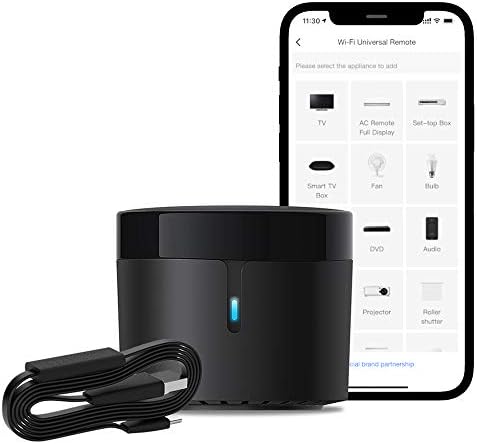
RM4 mini turns your smartphone into a universal remote and integrates control of home automation devices in one easy-to-use app BroadLink.
-
Remote Control via Broadlink APP
Control your home's IR devices from anywhere, anytime with the Broadlink APP.
-
Make Your Life More Convenient
When paired with Alexa/Google Assistant, you can control your device with hands-free voice control.
-
-
Control Multiple Appliances With One Button
Customize different scenes with one-click option for sleep scene, morning scene, away scene and more
-
Phone as Remote: All Functions, One Tap Away
Just select built-in channels to watch your favorite program.
BroadLink APP
All Remotes in BroadLink APP, including AC, TV, Fan, Lamp and etc.
BroadLink app has better user experiences in configuration and creating scenes. If you have an Android phone integrates IR emitter itself, you can use it to control your IR devices from BroadLink App as a test before you decide to buy our product. (Note: it only supports 2.4 GHz (NOT 5 GHz) Wi-Fi to configure in the app.)
HOW TO USE?
Download BroadLink APP
Search for "BroadLink" on Google Play or scan the QR code on the user manual.
Register an account and log in to the Broadlink APP.
Connect device to your Wi-Fi
Tap "Add device" on APP and follow the instructions.
Choose your Wi-Fi (2.4Ghz only), the Wi-Fi password should contain no more than 32 characters.
Add Remote Panels
Tap “add appliances” to choose a category and a brand. Find the best solution from our library or define customized remote panel from leaning mode.
Link with Alexa / Google home
In BroadLink APP, tap "Add Voice Assistant".
In Google/Alexa/IFTTT App, enable the skill/service named "Broadlink", link account and discover devices.
Choose BroadLink Products, Create Smart Home
RM4 mini Sensor Cable Set
Add to Cart
| RM4 pro Sensor Cable Set | RM4 pro IR and RF Remote
Add to Cart
| RM4 mini IR Remote
Add to Cart
| RM mini3 IR Remote
Add to Cart
| |
|---|---|---|---|---|---|
|
Customer Reviews
|
4.2 out of 5 stars 592
|
4.0 out of 5 stars 405
|
3.9 out of 5 stars 4,981
|
3.9 out of 5 stars 4,981
|
4.0 out of 5 stars 4,003
|
|
Model
| RM4 mini S | RM4 pro S | RM4 pro | RM4 mini | RM mini3 |
|
Function
| Control IR appliances | Control IR, RF appliances | Control IR, RF appliances | Control IR appliances | Control IR appliances |
|
App Control
| ✔ | ✔ | ✔ | ✔ | ✔ |
|
Voice Control
| ✔ | ✔ | ✔ | ✔ | ✔ |
|
Support Sensor Cable
| ✔ | ✔ | ✔ | ✔ | ✘ |
|
USB Cable Type
| Temperature Humidity Sensor | Temperature Humidity Sensor | Regular Power Cable | Regular Power Cable | Regular Power Cable |
-
Why can't it connect to the APP / Wi-Fi ?
It only support 2.4 GHz Wi-Fi for configuration, does not support 5 GHz or mesh router.
Please check whether the frequency in the router setting is 2.4 GHz, and make sure the length of Wi-Fi password does not exceed 32 characters.
-
Broadlink database list doesn't have my AC model, what should I do?
Sorry there is no option available for your appliance.
Please choose “Learn remote" to create a remote, tap the buttons on the original remote to let the RM4 mini learn the commands. Then you will be able to control the appliance after learning.
-
Is my appliance compatible with the RM4mini?
RM4mini supports IR 38KHz control devices, does not support Bluetooth or RF. Please check the manual of your appliance or consult the manufacturer to confirm.
-
How to tell if my remote is infrared or Bluetooth?
1) Infrared remote has an infrared emitter (crystal head) on the top of itself, you need to point the emitter at the device when use it;
2) Bluetooth remote does not have an infrared emitter, and it usually needs to be matched before first use.
-
It can't control my IR device stably, what should I do?
The IR signal can't go through the wall, please check and make sure the device is close to your appliance and there is no obstacle in between.