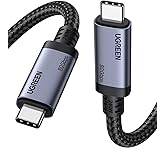
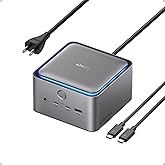
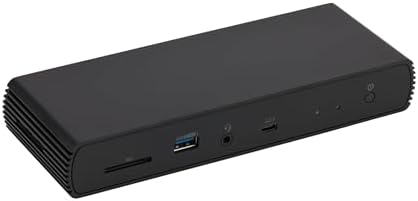
Pro docking station for additional device connectivity and charging needs. Note: Please use the provided black Thunderbolt 4 cable to connect between the Thunderbolt 4 port on the front of docking station and your laptop.
Supports Thunderbolt and USB4 function. Supports dual 4K@60Hz displays via two Thunderbolt 4 USB-C ports. Note: Verify your laptop's Thunderbolt ports support dual 4K@60Hz output. Ensure your graphics card installed the latest drivers. Confirm your monitors support 4K@60Hz display. Use high-quality Thunderbolt 4 or USB4 cables for connection (not included). Avoid connect HDMI port firstly to prevent resolution downgrade due to bandwidth limitations.
Supports dynamic PD profile up to 96W to charge devices . Note: Check the laptop manufacturer's power supply specifications before use. Ports may not function properly if laptop power requirements exceed 96W, as the docking station will activate overload protection feature and cause disconnection.
HDMI 2.1 output supports up to 8K30Hz; Ethernet RJ45 port supports up to 2.5Gbps (approximately 300 Megabytes per sec). Note: Thunderbolt bandwidth is shared across devices, so display resolution and LAN speed may decrease with multiple high-bandwidth connections. When fully loaded, the docking station may reach 122°F/50°C, which is normal for such products.
Travel-friendly design slips easily into a laptop bag or carry-on.
Compatible with Laptops running Windows 10 OS or later which have a Thunderbolt 4 port, and non-M1/M2 chip MacBooks running macOS 11 (Big Sur) or later. Backwards compatible for Thunderbolt 3 laptops work with limited functionality (e.g. not support dual display). Not compatible with Linux or Chrome OS laptops, and M1/M2 chip MacBooks running maxOS 10.16 or earlier.
What's Included: Thunderbolt 4 dock, Thunderbolt 4 cable, power adapter, and Quick Setup Guide
The ClimatePartner certified product label confirms that a product meets the requirements for the five steps in climate action including calculating carbon footprints, setting reduction targets, implementing reductions, financing climate projects and communicating transparently to continuously reducing emissions.
Why isn’t my laptop charging or charging slowly through the dock?
Ensure your laptop supports USB-C/Thunderbolt PD. This dock delivers up to 96W. Some gaming or creator laptops need higher power. Use the front Thunderbolt 4 PD port for charging.
Why won’t my displays extend or mirror?
Configure display settings in Windows/macOS. Note: M1/M2 MacBook (base models) only support one external monitor due to chipset limits. Pro/Max models support multiple displays.
Why is video quality poor or flickering on dual monitors?
Use certified HDMI 2.1/Thunderbolt cables. Connect Thunderbolt first if mixing HDMI + Thunderbolt. Play high-resolution content on the primary display for the best performance.
Why doesn’t the Ethernet port reach 2.5GbE speed?
Check if your laptop, router, and cable support 2.5GbE. Some Intel laptops have USB controller limits. Update drivers if speed is lower than expected.
Why does my dock disconnect every 10–15 minutes?
Update GPU/Thunderbolt drivers and OS firmware. Use original power adapter and quality cables. On Windows, try disabling USB selective suspend for stable performance.
Â鶹Çø.ca Returns Policies: Electronics purchased from Â鶹Çø.ca, or a seller but fulfilled by Â鶹Çø, can be returned to Â鶹Çø.ca within 30 days of delivery of shipment via our online Returns Centre. These items must be in new condition with original packaging and accessories. New, used and refurbished products purchased from Marketplace vendors are subject to the returns policy of the individual vendor.






![BENFEI USB C to HDMI Adapter 4K@60Hz, USB Type-C to HDMI Adapter [Thunderbolt 3/4/5 Compatible] with iPhone 15 Pro/Max, MacBo](https://images-na.ssl-images-amazon.com/images/I/61Pxn1-kWTL._AC_UL116_SR116,116_.jpg)
![BENFEI USB-C to DisplayPort 6 Feet Cable(8K@60Hz 4K@144Hz), USB Type-C to DisplayPort Cable [Thunderbolt 3/4 Compatible] with](https://images-na.ssl-images-amazon.com/images/I/61oOtJXfyrL._AC_UL116_SR116,116_.jpg)



![Cable Matters [Intel Certified] 40Gbps Thunderbolt 4 Cable 3.3ft with 8K Video and 240W Charging - 1m, Compatible with USB4,](https://images-na.ssl-images-amazon.com/images/I/719imuYep9L._AC_UL165_SR165,165_.jpg)