To see product details, add this item to your cart. You can always remove it later.
Shipper / Seller
Returns
Eligible for Return or Refund within 30 days of receipt
This item can be returned in its original condition for a full refund within 30 days of receipt. You may receive a partial or no refund on used, damaged or materially different returns.
Payment
Secure transaction
Your transaction is secure
We work hard to protect your security and privacy. Our payment security system encrypts your information during transmission. We don’t share your credit card details with third-party sellers, and we don’t sell your information to others. Learn more
Added to

Sorry, there was a problem.

There was an error retrieving your wish lists. Please try again.

Sorry, there was a problem.

List unavailable.
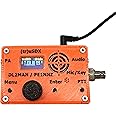
  • Malahit tr usdx transceiver 5-Band usdx Multimode QRP Assembled with case by PE1NNZ and DL2MAN

Malahit tr usdx transceiver 5-Band usdx Multimode QRP Assembled with case by PE1NNZ and DL2MAN

4.4 out of 5 stars (180)
鶹's Choice highlights highly rated, well-priced products available to ship immediately.
鶹's Choice

To see product details, add this item to your cart. You can always remove it later.
Save 5% at checkout qualifying items | Terms
when you buy $1000 of select items qualifying items | Terms

Purchase options and add-ons

About this item

  • LO Bands:80/60/40/30/20m,Mainboard:1.2 version,RF Board:1.0 version
  • Assembled With Case:Out of box,Assembled with 3D printed case (orange),raised lettering.
  • Already Bootloader:Mainboard have been finished the Bootloader and programed the firmware.The serial number has been attached to the bag inside the box.
  • Call Sign:If you want to program your call sign, you need to read and fully understand the instructions which is in the package.
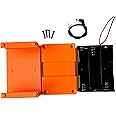
  • Excluding Battery Case:If you want, you can see the Battery Case on another page.
  • Power Jack:3.5mm x 1.35mm.
  • Firmware Version:1.Official version:programming: No spectrum display.2.Beta version programming: Spectrum display, but the main menu will have slightly fewer other functions than the official version.

Frequently bought together

This item: Malahit tr usdx transceiver 5-Band usdx Multimode QRP Assembled with case by PE1NNZ and DL2MAN
$259.68
Get it Mar 10 - 12
Only 10 left in stock.
Ships from and sold by ShoppingCentre*.
+
$47.51
Get it by Sunday, Mar 8
In Stock
Sold by Malahit Tech and ships from 鶹 Fulfillment.
+
$41.87
Get it by Tuesday, Mar 10
In Stock
Sold by Softcomplex and ships from 鶹 Fulfillment.
Total price:$00
To see our price, add these items to your cart.
Details
Added to Cart
Some of these items ship sooner than the others.
Choose items to buy together.

Product description

Overview:

The mainboard is version 1.2 and the RF board is version 1.0.

In this version change, only the mainboard has been changed to 1.2, while the others remain unchanged.

1.(tr)uSDX is the successor of the uSDX Project. It´s the Result of the Collaboration between PE1NNZ and DL2MAN. The design was intended as an easy to build (pre-assembled) Kit.

2.The (tr)uSDX is a 5-Band / Mulitmode QRP Transceiver in Pocket Format (90x60x30mm – 140g). It features a highly efficient Class E PA and Supports CW/LSB/USB and AM/FM. Right now it covers 80 /60/40/30/20m and in Future there will be support for 17/15/12/10m as well.

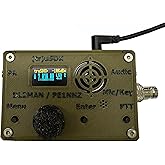
3.It is supplied with an OLED Display, onboard Mic, (tiny) onboard speaker and for improvised QSO onboard PTT Key can be used as emergency CW Key.

4.Further on, the (tr)uSDX has a (Micro)USB CAT and Programming Interface, and while it produces typically 5W @ 13,8V Power Supply, it can create 0,5W Output from 5V USB Supply alone.

5.It is supplied with OnBoard SWR Bridge and Voltage/Current measurement Hardware, to help in tuning and operation.

Thanks to DL2MAN and PE2NNZ Contribution. We are approved by original designer.

Features:

1.Lo Bands:20m/30m/40m/60m/80m,Out of box,Assembled with 3D printed case (orange),raised lettering.

2.Aboat Bootloader:Mainboard have been finished the Bootloader and programed the firmware,If you want your call sign to appear on your OLED, then you need to program the call sign by yourself.

3.How to program the call sign? Required equipment:

1)tr usdx(serial number is on the bag)

2)computer (download AVR-Dudess software on computer)

3)usb cable.(Please refer to the instructions in the package for details)

Note:

If you want to reprogram/upgrade the firmware (or program your call sign to the firmware), you need to follow these steps :

①Download the firmware(DL2MAN's page)

②Enter the serial number (the serial number is in the package) and download the firmware.

③ Install the USB Driver for the CH340 driver and AVR-Dudess software (if the computer prompts that the AVR-Dudess cannot be installed), please use another computer to install it.

④Restart the computer and use USB cable to connect the mainboard (the computer will make a ding-dong sound at this time, indicating that the CH340 driver software has been installed successfully. If not, it may be that the USB cable has no data transmission function, try to use another USB data cable).

⑤ Open the AVR-Dudess software, and then program the firmware. Please follow the position circled in the picture below, set up the software, and then program.Opening Device Manager under Windows will show the assigned COM-Port(first image below)

How to use the RESET function?

Step 1: Hold down the encoder (do not release your hand), then turn on the power.

Step 2: After displaying the "restart" message on the OLED, release your hand.

The above steps will complete the reset.

Product details

  • Product Dimensions ‏ : ‎ 10.16 x 5.08 x 5.08 cm; 230 g
  • Manufacturer ‏ : ‎ Malahit Tech
  • ASIN ‏ : ‎ B0BJ247SNL
  • Manufacturer reference ‏ : ‎ UK-RDMJH7102510BDAAEC
  • Customer Reviews:
    4.4 out of 5 stars (180)

Product information

Technical Details

Brand ‎Malahit
Manufacturer ‎Malahit Tech
Part Number ‎UK-RDMJH7102510BDAAEC
Number of Items ‎5
Voltage ‎12 Volts
Wattage ‎5 watts
Power source type ‎Solar
Batteries included ‎No
Batteries Required ‎No
Includes Remote ‎No
Manufacturer ‎Malahit Tech
Manufacturer reference ‎UK-RDMJH7102510BDAAEC
Product Dimensions ‎10.16 x 5.08 x 5.08 cm; 230 g
ASIN ‎B0BJ247SNL

Additional Information

Date First Available Oct. 20 2022
Customer Reviews
4.4 out of 5 stars (180)

4.4 out of 5 stars
鶹 Rank

Feedback

Malahit tr usdx transceiver 5-Band usdx Multimode QRP Assembled with case by PE1NNZ and DL2MAN


Found a lower price? Let us know. Although we can't match every price reported, we'll use your feedback to ensure that our prices remain competitive.

Where did you see a lower price?

Price Availability
/
/
/
/
Please sign in to provide feedback.
|
$25.99
Delivery Sun, Mar 8
Delivery Sun, Mar 8
Delivery Sun, Mar 8

Product Summary: Malahit tr usdx transceiver 5-Band usdx Multimode QRP Assembled with case by PE1NNZ and DL2MAN

From Malahit

4.4 out of 5 stars, 180 ratings

Customer reviews

Price

No featured offers available

Other sellers

Other sellers

About this Item

  • LO Bands:80/60/40/30/20m,Mainboard:1.2 version,RF Board:1.0 version
  • Assembled With Case:Out of box,Assembled with 3D printed case (orange),raised lettering.
  • Already Bootloader:Mainboard have been finished the Bootloader and programed the firmware.The serial number has been attached to the bag inside the box.
  • Call Sign:If you want to program your call sign, you need to read and fully understand the instructions which is in the package.
  • Excluding Battery Case:If you want, you can see the Battery Case on another page.
  • Power Jack:3.5mm x 1.35mm.
  • Firmware Version:1.Official version:programming: No spectrum display.2.Beta version programming: Spectrum display, but the main menu will have slightly fewer other functions than the official version.
  • No serial Number on the OLED:We have finished the Bootloader, so the serial number will not be displayed on the OLED.
  • How to find the serial number: The plastic bag in the package has a serial number label.If lose the serial number sticker, you can enter the 18 digit "0" during programming to find the original serial number. (000000000000000000 if unknown)

Product description

Overview:

The mainboard is version 1.2 and the RF board is version 1.0.

In this version change, only the mainboard has been changed to 1.2, while the others remain unchanged.

1.(tr)uSDX is the successor of the uSDX Project. It´s the Result of the Collaboration between PE1NNZ and DL2MAN. The design was intended as an easy to build (pre-assembled) Kit.

2.The (tr)uSDX is a 5-Band / Mulitmode QRP Transceiver in Pocket Format (90x60x30mm – 140g). It features a highly efficient Class E PA and Supports CW/LSB/USB and AM/FM. Right now it covers 80 /60/40/30/20m and in Future there will be support for 17/15/12/10m as well.

3.It is supplied with an OLED Display, onboard Mic, (tiny) onboard speaker and for improvised QSO onboard PTT Key can be used as emergency CW Key.

4.Further on, the (tr)uSDX has a (Micro)USB CAT and Programming Interface, and while it produces typically 5W @ 13,8V Power Supply, it can create 0,5W Output from 5V USB Supply alone.

5.It is supplied with OnBoard SWR Bridge and Voltage/Current measurement Hardware, to help in tuning and operation.

Thanks to DL2MAN and PE2NNZ Contribution. We are approved by original designer.

Features:

1.Lo Bands:20m/30m/40m/60m/80m,Out of box,Assembled with 3D printed case (orange),raised lettering.

2.Aboat Bootloader:Mainboard have been finished the Bootloader and programed the firmware,If you want your call sign to appear on your OLED, then you need to program the call sign by yourself.

3.How to program the call sign? Required equipment:

1)tr usdx(serial number is on the bag)

2)computer (download AVR-Dudess software on computer)

3)usb cable.(Please refer to the instructions in the package for details)

Note:

If you want to reprogram/upgrade the firmware (or program your call sign to the firmware), you need to follow these steps :

①Download the firmware(DL2MAN's page)

②Enter the serial number (the serial number is in the package) and download the firmware.

③ Install the USB Driver for the CH340 driver and AVR-Dudess software (if the computer prompts that the AVR-Dudess cannot be installed), please use another computer to install it.

④Restart the computer and use USB cable to connect the mainboard (the computer will make a ding-dong sound at this time, indicating that the CH340 driver software has been installed successfully. If not, it may be that the USB cable has no data transmission function, try to use another USB data cable).

⑤ Open the AVR-Dudess software, and then program the firmware. Please follow the position circled in the picture below, set up the software, and then program.Opening Device Manager under Windows will show the assigned COM-Port(first image below)

How to use the RESET function?

Step 1: Hold down the encoder (do not release your hand), then turn on the power.

Step 2: After displaying the "restart" message on the OLED, release your hand.

The above steps will complete the reset.

Feedback

Did you find this product summary feature useful?

Thank you for your feedback
Thank you for your feedback. You selected “Yes, it is useful”
Thank you for your feedback. You selected “No, it is not useful”
Product summary presents key information. Close to see all product details.