| Brand | WAVLINK |
|---|---|
| Manufacturer | Winstars Technology Limited |
| Place of Business | contact@wavlink.com |
| Model | WL-UG69PD13 PROM |
| Part Number | WL-UG69PD13 PROM |
| Hardware interface | 3.5mm Audio, DisplayPort, Ethernet, HDMI, USB Type C |
| Compatible Devices | MacBook M1/M2/M3/M4, Windows |
| Number of Items | 1 |
| Wattage | 130 |
| Batteries included | No |
| Batteries Required | No |
| Number of Ports | 15 |
| Total USB Ports | 5 |
| Manufacturer | Winstars Technology Limited |
| Item model number | WL-UG69PD13 PROM |
| Product Dimensions | 13.46 x 9.91 x 26.42 cm; 1.52 kg |
| ASIN | B0FCXMC3QZ |

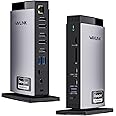
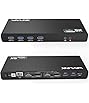
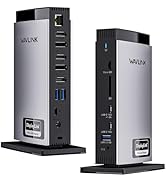
WAVLINK Docking Station 3 Monitors, Triple 4K@60Hz for MacBook M1/M2/M3/M4/Windows, Displaylink Dock with 3X HDMI or 2X DisplayPort, 130WPD,5 USB Ports, Ethernet, Audio, SD/TF
Purchase options and add-ons
| Brand | WAVLINK |
| Colour | Black |
| Hardware interface | 3.5mm Audio, DisplayPort, Ethernet, HDMI, USB Type C |
| Compatible devices | MacBook M1/M2/M3/M4, Windows |
| Total USB ports | 5 |
| Product Dimensions | 13.5L x 9.9W x 26.4H Centimetres |
| Number of ports | 15 |
| Item weight | 1.52 Kilograms |
| Total HDMI ports | 3 |
| Wattage | 130 |
About this item
- 15-in-1 USB-C Docking Station for MacBook: This docking station has 3 HDMI ports, 2 DisplayPort, 2 USB-C ports(10Gbps), 3 USB-A ports(5Gbps), RJ45 gigabit ethernet, SD/TF card slots, and a Audio/Mic ports, a host USB-C port. Connect to a compact laptop docking station via a USB C-C connection to provide convenience for your office or home work. 🌟Attention: HDMI (Alt. Mode) requires your laptop's type-C port to support video output.
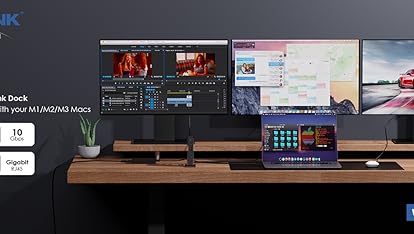
- Triple Monitor Docking Station: You can easily connect triple 4K60@Hz displays whether you are Mac or Windows! Experience the special 4K@60Hz high-definition output on the HDMI (Alt.Mode) port for tasks such as video editing and office work. The DisplayLink-6950 chipset supports dual 4K@60Hz DISPLAY on the Display 1/2 (HDMI/DP) port, which is ideal for expanding display options on M1/M2/M3/M4 mac or Windows. ★ Note: Only one of the HDMI and DP ports can be selected.
- Wide compatibility: The Wavlink docking station allows your MacBook to connect to three different displays via the DisplayLink driver, regardless of whether it is an M1/M2/M3/M4 model. Supports Windows 11/10/8.1/8/7/XP/Vista, Mac OS 10.14-14. x and later versions, Chrome OS, Ubuntu, Android, and Harmony OS. *Not compatible with Unix systems, Linux, iOS, and iPad operating systems. Note: The DisplayLink driver must be installed on your device to ensure proper media display functionality.
- Adequate 100W Power Supply: Equipped with a powerful 130W power adapter, the host's USB-C port can provide up to 100W charging power for laptops. Additionally, the USB-C port can also supply power to charge your phone or other devices, ensuring they operate continuously throughout the day while also powering connected peripherals for data transfer or display. *Please ensure that the host's Type-C port supports power delivery functionality.
- Super-Speed Transfer & Stable Network: Enjoy quick file transfers with 3 USB-A 5Gbps and 2 USB-C 10Gbps ports, perfect for connecting external hard drives and USB devices. The SD/TF card slots offer fast transfer speeds of up to 104MB/s, ideal for photographers, designers, and filmmakers to store their work effortlessly. Stay securely connected with the gigabit RJ45 ethernet port, providing stable wired network performance.
Check Compatibility
Frequently bought together

Videos for similar products
From the brand
-
-
Dual Monitors Dock Station
-
-
UMD05Pro
USB-C Dock Triple Display(2HDMI+DP+130W Charge)
Product Description
-
How to download and install the latest DisplayLink driver?
1. Access the URL: displaylink.com;
2. Find the corresponding driver of your system;
3. Download and install the driver;
4. Start use after easy setting.
-
Why can't I display multiple screens after installing the driver on my MacBook pro m1/m2/m3?
For macOS, please follow these steps: Please follow these steps: Privacy & Security > Screen Recording > Allow "DisplayLink manager" to join in. If not solved, Please look for Wavlink official.
-
Can this dock Station charge a laptop?
Yes. Please ensure that your laptop is compatible with USB C power supply or claims Thunderbolt 3/4 charging function. If not supported, the battery must be charged using the built-in device of the system.
Wavlink Displaylink Docking Station For Windows or Mac
Docking Station 3 Monitor
Add to Cart
| Docking Station 3 Monitor
Add to Cart
| Dual 5K DisplayLink Dock
Add to Cart
| Docking Station 3 Monitor
Add to Cart
| Dual 5K DisplayLink Dock
Add to Cart
| Dual 4K DisplayLink Dock
Add to Cart
| |
|---|---|---|---|---|---|---|
|
Customer Reviews
|
4.4 out of 5 stars 241
|
4.4 out of 5 stars 239
|
4.6 out of 5 stars 68
|
4.4 out of 5 stars 72
|
4.0 out of 5 stars 81
|
3.5 out of 5 stars 74
|
|
Video Resolution
| Dual 2K+Single4K@60Hz | Triple 4K@60Hz | Dual 5K/4K@60Hz | Dual 2K+Single4K@60Hz | Dual 5K/4K@60Hz | Dual 4K/Single 5K@60Hz |
|
Charging for Laptop
| 100W | 100W | 100W | 100W | 100W | 100W |
|
SD / TF Slots
| ✔ | ✔ | NO | ✔ | ✔ | NO |
|
USB Port
| 3*USB-A+2*USB-C | 3*USB-A+2*USB-C | 3*USB-A+2*USB-C | 5*USB-A | 5*USB-A | 3*USB-A+2*USB-C |
|
Gigabit Ethernet
| ✔ | ✔ | ✔ | ✔ | ✔ | ✔ |
Product details
- Product Dimensions : 13.46 x 9.91 x 26.42 cm; 1.52 kg
- Manufacturer : Winstars Technology Limited
- ASIN : B0FCXMC3QZ
- Item model number : WL-UG69PD13 PROM
- Customer Reviews:
Product information
Technical Details
Additional Information
| Date First Available | June 12 2025 |
|---|---|
| Customer Reviews |
4.4 out of 5 stars |
| 鶹 Rank |

![VESA Certified DisplayPort Cable, iVANKY DP Cable 6.6ft/2M, [2K@165Hz, 2K@144Hz, 4K@60Hz] High Speed Braided DisplayPort to D](https://images-na.ssl-images-amazon.com/images/I/71w-nKtHOcL._AC_UL116_SR116,116_.jpg)