| Manufacturer | Hiipoo |
|---|---|
| Place of Business | NO |
| Brand | Hiipoo |
| Model number | HIP0SUBINK |
| Colour | 522 5p |
| Number of Items | 1 |
| Size | 5 |
| Ink Color | Black, Cyan, Magenta, Yellow |
| Manufacturer Part Number | HIP00SUBINK |
One-time purchase
To see product details, add this item to your cart.
Ships from: 鶹 Sold by: H SG#
Sorry, there was a problem.
There was an error retrieving your wish lists. Please try again.Sorry, there was a problem.
List unavailable.Image Unavailable
Colour:
-
-
-
- To view this video, download
Hiipoo 580ML Sublimation Ink for EcoTank Supertank Inkjet Printer ET-2400 ET-2720 ET-2760 ET-2800 ET-2803 ET-2850 ET-3760 ET-4800 ET-15000 Heat Press Transfer on T-Shirt (Autofill/ICC-Free/Anti-UV)
Purchase options and add-ons
| Model name | Sublimation Ink |
| Brand | Hiipoo |
| Ink colour | Black, Cyan, Magenta, Yellow |
| Page yield | 300 |
| Compatible devices | Printer |
| Special feature | Refillable |
| Compatibility options | Compatible with EcoTank |
| Colour | 522 5p |
| Ink Base | Water |
| Manufacturer | Hiipoo |
About this item
- Wide Compatibility: Hiipoo Sublimation Ink Autofill Bottles for EcoTank ET-2720 ET-2710, ET-2760, ET-3710, ET-3760, ET-4760, ET-2800, ET-2803, ET-2850, ET-4800, ET-3830, ET-15000, ET-16600, ET-16650, ET-3750, ET-4700, ET-4750, ST-2000, ST-3000, ST-4000, ET-2700, ET-2750, ET-3700, ET-7750 ET-7700 printes. 【NOTE】 We have upgraded the packaging for Hiipoo products. During this time, you might receive any version of the package and they're still our authentic products.
- Great For DIY And On Demand Printing: The sublimation ink is ideal for mugs, T-shirts, cloth, pillowcases, shoes, caps, ceramics, boxes, bags, quilts, cross-stitched items, decorative clothes, flags, banners, etc. Bring your creations to life printing for every occasion, especially great as gifts for friends family, and more. (Note: Sublimation ink can only be used in fabrics containing less than 30% cotton.)
- Colorfully Vibrant: Hiippo sublimation ink offers the most vibrant Intense colors that stand out and are sure to get noticed in any situation, the colors do not fade are long lasting and are wonderfully resilient. The water-based dye sublimation ink is of the finest texture and gradient for a smooth even coat of printer inks every time that will last as well as be wonderfully vivid. This ensures no print-head clogs with a stronger color reduction to offer intense and vibrant color images.
- Professionally Certified Offering The Highest Quality Standard: This product holds the following certifications ISO-9001 and MSDS.The product has undergone rigorous scrutiny and quality checks to ensure the highest quality standards are met before delivery, in order to deliver the most potent, high-quality, stable, durable, and vibrant colors on the market today.
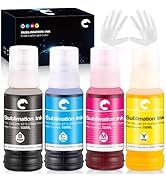
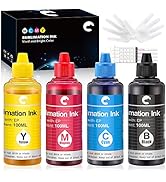
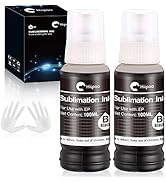
- Included Items: 2x140ml black sublimation ink; 1x100ml cyan sublimation ink; 1x100ml magenta sublimation ink; 1x100ml yellow sublimation ink; 2 x gloves. This package makes it simple and easy to refill, making it wonderfully user & eco-friendly. This is a product that you will come to love as soon as you receive it.
Frequently bought together

Product information
Technical Details
Additional Information
| ASIN | B09J4V5DY1 |
|---|---|
| Customer Reviews |
4.8 out of 5 stars |
| 鶹 Rank |
|
| Date First Available | Nov. 20 2021 |
Feedback
Videos for similar products
From the brand
-
A BETTER WAY TO CREATE!
Find your next favorite DIY products here, from sublimation supplies, printable iron-on, waterslide, and more. Explore how to take your crafting skill to the next level with Hiipoo and get inspired.
-
Shop More
Product Description
How to Convert an Epson Printer into a Sublimation Printer ?
For regular Epson printers with ink cartridges:
1. Purchase a set of empty cartridges compatible with your printer model
2. Fill them up with Hiipoo sublimation ink
3. Snap the ink cartridges into place
For Epson printers:
1. Use syringes to fill the tanks up with sublimation ink
2. Empty out the original bottles and leave them to dry after washing them out. After that, pour sublimation ink into the bottles to fill up the tanks
Sublimation Tips & Tricks
1. Sublimation prints come out dull and muted and will brighten up after being pressed.
2. Best print settings:
Use the following printer settings to make your colors pop. To change settings on Windows, open Start > Settings > Devices > Printers & scanners, click your sublimation printer, and then head to Manage > Printing preferences. Under the Main tab, change Paper Type to Premium Presentation Paper Matte and choose Quality as High. Under the More Options tab, Check off High Speed and check on Mirror Image.
3. Factors affecting transfer results:
>Paper transfer rate
>Print mode
>Transfer pressure
>Transfer temperature
>Transfer time
If the result of the transfer is not good enough, please check one by one. We recommend matching with Hiipoo Sublimation Paper, related transfer pressure、temperature and time have been attached to the package of Hiipoo Sublimation Paper.