| Brand | ZAMPAM |
|---|---|
| Manufacturer | ZAMPAM |
| Place of Business | ZAMPAM |
| Model | IC-DSN9-ETYL |
| Model Name | IC-DSN9-ETYL |
| OS | Android,Ios,Windows |
| Hardware Platform | MINI NES, MINI SNES, Nintendo Switch, PC/Mac/Linux/Unix, Raspberry PI |
| Compatible Devices | Android, Nintendo Switch, Windows |
| Special features | Wireless |
| Number of Items | 2 |
| Power source type | Battery Powered |
| Batteries included | Yes |
| Batteries Required | Yes |
| Battery Cell Composition | Lithium Ion |
| Keyboard Description | Gaming |
| Connector Type | 2.4GHz Wireless, USB |
| Does it contain liquid? | No |
| Manufacturer | ZAMPAM |
| Item model number | IC-DSN9-ETYL |
| Parcel Dimensions | 14.91 x 8.41 x 8 cm; 558 g |
| ASIN | B0BWY5CJFR |
-
-
-
-
-
VIDEO -
Image Unavailable
Colour:
-
-
-
- To view this video, download
Wireless Controller for Mini SNES (Classic Edition/Mini NES, Not Worked with Copied Console Gamepad with USB Wireless Receiver Compatible with Switch, Windows,iOS,Liunx,Android Device (2 Packs)
Purchase options and add-ons
| Brand | ZAMPAM |
| Model name | IC-DSN9-ETYL |
| Compatible devices | Android, Nintendo Switch, Windows |
| Controller type | Gamepad |
| Connectivity technology | 2.4GHz Wireless, USB |
About this item
- 2.4GHz Wireless technology.Wireless range reach 24 feets
- rechargeable Lithium Ion battery, One charge last around 100 hours
- Press the key "Select" + "Start" , can help you get back main menu. No need reset on console for SNES,NES Console.
- USB Adapter Compatible with Switch, PC, Window Games or Android Devices with Game Emulator, Turbo function, you can set (A/B/X/Y) as Turbo key in the USB mode by press and hold "select"+(A/B/X/Y) to turn on/off, Please check with the video regarding how to set controller with PC, Switch.
- Declaration from ipremium: Our controller only works with original Mini SNES and Mini NES , the controller wont' pair with Clone Console. Also please notice the controller does not compatible with the SNES/NES Classic consoles from the 80s and 90s, Even it can pair, X,Y Button will not work, or some case only One controller work. So we do not recomend customer with Copied console place order with our wireless controller
Frequently bought together

Product information
Technical Details
Additional Information
| Batteries | 1 Lithium Ion batteries required. (included) |
|---|---|
| Date First Available | April 1 2023 |
| Customer Reviews |
4.2 out of 5 stars |
| 鶹 Rank |
|
Feedback
Videos for similar products
Product Description
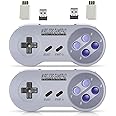
wireless controller has two wireless receivers:
1. USB Wireless Receiver for Game Emulator on PC , Android Devices, Raspberry Pi, also compatible for Nintendo switch
2. Wireless Receiver for Mini SNES/NES wireless controller has smart battery solution. One charge last long play time. Let you enjoy your game without worry battery .
We design press "Select"+"Start" button to help you get back main menu on Mini Snes/Mini NES game and Raspberry game. Save time and trouble when you need to switch games.
Since the Gaming company has ceased production in 2020, There many copied console in the Market.
Common issues you might encounter when you have a copied console in your hand:
- Blinking controller light and failure to connect to the adapter when it's inserted into the console.
- A black screen on your TV when the adapter is connected to the console.
- Non-functional X and Y buttons in some SNES games.
- Lag and a less-than-smooth gaming experience during play.
To verify the functionality of our controller, you can easily pair it with a PC using a USB dongle to test .
If you encounter any of the issues mentioned above after your purchase, we encourage you to utilize hassle-free return option. There's no need for an exchange
USB wireless adapter
USB wireless adapter allow you to play many games on multiple platforms, Such as Raspberry Pi, PC, MACBOOK, Android TV BOX.
For using the USB wireless adapter, Please download software like" joystick mapper" configure keys with the software. then you can play on your Macs, Window Gadget
For the USB mode. the controller support X input and D input. The default setting of the controller for USB mode is Xinput. This mode compatible with Windows (pc),Linux (Raspberry Pi) ,Android (Cell phone & PAD). But for MAC, You need to Switch to Dinput. By press key: “Select” + “L” + “Y” synchronously.
Please take reference from our Manual.
The controller has turbo function : you can set (A/B/X/Y) as Turbo key in the USB mode by press and hold "select"+(A/B/X/Y) to turn on/off
Wireless adapter for Mini SNES/NES , Also called SNES/NES Classic edition
The wireless adapter come with the controller compatible with SNES Classic Edition(Mini SNES) and NES Classic Edition( Mini NES), Let you enjoy these Classic Retro games.
Please notice the wireless adapter does not compatible with the SNES Console from 1970,1980 . the old version has different port. Not able to use it.
Also there are lots of copied mini snes in the market. so please make sure you have original one. or it might not work , or some copied model, only work with one controller.
UP to 24 feets remote distance
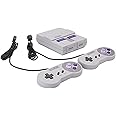
You can Play two wireless controllers at the same time on the SNES Classic Edition and NES Classic Edition. The wireless range reach Up to 24 feets, no more cords, Allow you sit on the cozy sofa to enjoy your retro games.
Brands in this category on 鶹
Product summary presents key product information
Keyboard shortcut
Shift
+
Alt
+
opt
+
D
Product Summary: Wireless Controller for Mini SNES (Classic Edition/Mini NES, Not Worked with Copied Console Gamepad with USB Wireless Receiver Compatible with Switch, Windows,iOS,Liunx,Android Device (2 Packs)
From ZAMPAM
About this Item
- 2.4GHz Wireless technology.Wireless range reach 24 feets
- rechargeable Lithium Ion battery, One charge last around 100 hours
- Press the key "Select" + "Start" , can help you get back main menu. No need reset on console for SNES,NES Console.
- USB Adapter Compatible with Switch, PC, Window Games or Android Devices with Game Emulator, Turbo function, you can set (A/B/X/Y) as Turbo key in the USB mode by press and hold "select"+(A/B/X/Y) to turn on/off, Please check with the video regarding how to set controller with PC, Switch.
- Declaration from ipremium: Our controller only works with original Mini SNES and Mini NES , the controller wont' pair with Clone Console. Also please notice the controller does not compatible with the SNES/NES Classic consoles from the 80s and 90s, Even it can pair, X,Y Button will not work, or some case only One controller work. So we do not recomend customer with Copied console place order with our wireless controller
Product description
Feedback
Did you find this product summary feature useful?