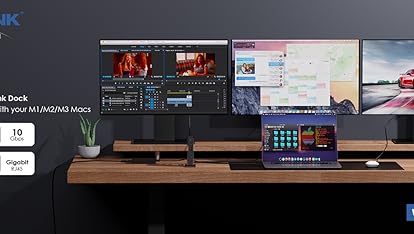
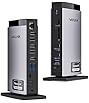
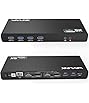
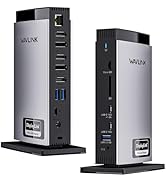
WAVLINK Universal Dual 5K DisplayLink Docking Station
Empower Your Workspace with Seamless Connectivity and Rapid PD 100W Upstream Charging!
Compatible Systems: Windows 10/11, Mac OS 11.x-15.x and latest, Chrome OS, Ubuntu, Android, HarmonyOS.
How to download and install the latest DisplayLink driver?
1. Visit “displaylink.com” and click on ‘Downloads’;
2. Find the corresponding driver for your system;
3. Download and install the driver;
4. Start to use it after simple configuration.
Multiple Display Resolution (Max. Resolution)
Notice: Only one video port can be used in the same Display, either a "DP++" or a "HDMI".
1)Single Display:
Display 1/2 (DP++): 5K (5120×1440)@60Hz or 4K (4096×2160)@60Hz
Display 1/2 (HDMI): 4K (4096×2160)@60Hz
2)Dual Display:
①Display 1 (HDMI) + Display 2 (HDMI): 4K (4096×2160)@60Hz*2
②Display 1 (DP++) + Display 2 (DP++): 5K (5120×1440)@60Hz*2 or 4K (4096×2160)@60Hz*2
③Display 1 (HDMI) + Display 2 (DP++): 4K (4096×2160)@60Hz + 5K (5120×1440)@60Hz or 4K (4096×2160)@60Hz
④Display 1 (DP++) + Display 2 (HDMI): 5K (5120×1440)@60Hz or 4K (4096×2160)@60Hz + 4K (4096×2160)@60Hz
Specification
1.Model: WL-UG69PD11
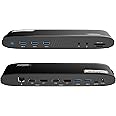
2.Ports: Side 1: Power LED; 3x USB-A 5Gbps; 1x 3.5mm Earphone; 1x 3.5mm Mic; SD/TF Card Reader(312MB/s)
Side 2: 1x RJ45(10/100/1000Mbps); Display 1 (HDMI/DP++); Display 2 (HDMI/DP++); 2x USB-A 5Gbps; 1x USB-C Upstream (Host, PD100W); 1x DC IN(20V)
3.Unit Size: 24.0x8.3x3.0cm/9.4x3.3x1.2in (L x W x H )
4.USB-C to C Cable Length: 100cm/39.4in
Power Adapter Cable Length(plug end): 150cm/59in
Power Adapter Cable Length (round port end): 110cm/43in
5.Unit Weight: 363g/12.8oz
6.Housing Material: ABS Plastic
7.Power LED: Blue
Features
- 2×Video Display Streams (2×HDMI + 2×DisplayPort) support a maximum of dual 5K@60Hz video output.
- The USB-C host is compatible with full-functional USB 3.1 Gen 1 Type-C hosts, and provides up to 100W upstream power delivery for the USB-C hosts.
- The 5 USB-A ports have a transfer speed of up to 5Gbps, and are backward compatible with USB 2.0.
- The RJ45 Ethernet port provides a 1000Mbps secure and fast wired network and is backward compatible with 10/100Mbps.
- The SD/Micro SD v4.0 supports SDXC UHS-II transfer speed up to 312MB/s.
- The 3-pole TRRS phone jack works for stereo audio input or output.
Warm Tips:
1.The dock is self-powered and needs to be connected to the power adapter to work normally.
2.Make sure your host's Type-C port supports power delivery to enjoy the extended charging function.
3.Does not support plug and play; driver installation is required. Please visit the website 'displaylink.com' to download the latest driver.
4.Not for Linux, Unix, iOS or iPadOS systems. Does not support Steam Deck.
5.Windows/Mac OS(12.x or above)-based devices support rotation and clamshell modes.
6.The DP and HDMI in the same video stream (Display 1/2) CANNOT be used simultaneously.
7.Not recommended to use video ports for gaming or video editing.
8.Does not support HDCP, will not playback encrypted or copy-protected content from Netflix, Hulu, iTunes, 麻豆区 Prime, etc.
9.For Mac users, it is necessary to grant permission to the DisplayLink Manager to record your screen.
In the Box
1x USB-C Dual 5K Display Docking Station
1x USB-C to USB-C Cable
1x 130W Power Adapter
1x Quick Start Guide
--------
Host Devices Compatibility List(Partial):
*Note: Supports almost all common computers, most notably M1/M2/M3/M4-based MacBook. If your device is not on the list, please let us know and we will be glad to help you check with it.
Compatible with Apple: macbook air, macbook pro, imac,mac mini
Compatible with Dell: XPS series, Latitude series, Inspiron series, Vostro series, Alienware series, G series, Precision series, Latitude Rugged series, Dell chromebook series
Compatible with ASUS: ProArt Studiobook series, Zenbook series, Vivobook series, Chromebook series, ExpertBook series, ROG Zephyrus series, ASUS Laptop series, BR Series, TUF Gaming series, ROG Flow Gaming series, ROG Strix Gaming series
Compatible with Msi: Titan GT Series, Stealth Series, Raider GE Series, Vector GP Series, Crosshair/ Pulse Series, Sword/ Katana Series,Cyborg/ Thin GF Series, Delta Series, Alpha Series, Bravo Series
Compatible with Acer: Swift series, Aspire series, Spin series, Nitro series, Enduro Urban series, TravelMate series
Compatible with HP: HP Chromebook series, HP Laptops series, HP Pavilion series, HP Envy series, HP Dragonfly Pro series, HP Spectre series, OMEN series, Victus series
Compatible with Lenovo: ThinkPad series, ThinkBook series, Yoga series, Legion series, Loq series, Ideapad series, Slim series, Chromebook series
Compatible with Huawei: MateBook x, MateBook, MateBook E, MateBook D
Compatible with Samsung: Galaxy Book series, Galaxy Chromebook series
Compatible with Razer: razer blade series
Compatible with Microsoft: surface book series, surface laptop series, surface pro series, Surface Studio 2+ series, Surface Go series(And more...)
--------