Shop gift cards for every stocking
To see product details, add this item to your cart. You can always remove it later.
Ships from
Ships from
Sold by
Returns
Returnable until 31 Jan 2026
For the 2025 holiday season, eligible items purchased between 1 November and 31 December 2025 can be returned until 31 January 2026.
Payment
Secure transaction
Your transaction is secure
We work hard to protect your security and privacy. Our payment security system encrypts your information during transmission. We don’t share your credit card details with third-party sellers, and we don’t sell your information to others. Learn more
Added to

Sorry, there was a problem.

There was an error retrieving your wish lists. Please try again.

Sorry, there was a problem.

List unavailable.
  • Universal Replacement Voice Remote Control – Compatible with All Major Streaming Devices (2nd, 3rd, 4K, Max) & Media Players (e.g., Lite Series, Streamer, HD, Stick, Box, Cube Series), with Hot Keys
  • To view this video, download

Universal Replacement Voice Remote Control – Compatible with All Major Streaming Devices (2nd, 3rd, 4K, Max) & Media Players (e.g., Lite Series, Streamer, HD, Stick, Box, Cube Series), with Hot Keys


To see product details, add this item to your cart. You can always remove it later.

Purchase options and add-ons

About this item

  • Universal Compatibility: This Replacement Voice Remote Works with a Wide Range of Streaming Devices and Media Players. It Is Compatible with 鶹 Fire TV Stick (2nd Gen, 3rd Gen, 4K, 4K Max) and Works with Various Media Players (Such as the Lite Series, Streamer, HD Series, Box, and Cube Series Models).
  • Incompatible Devices: Due to Differences in Communication Technology, This Universal Remote Is NOT Compatible with: (1) Early-Generation Streaming Devices; (2) First or Second-Generation Media Boxes (Typically Released Before 2018); or (3) Any Smart TVs (It Cannot Control TV Functions). Please Verify Your Device Is an External Streaming Device, Not a Television, Before Purchase.
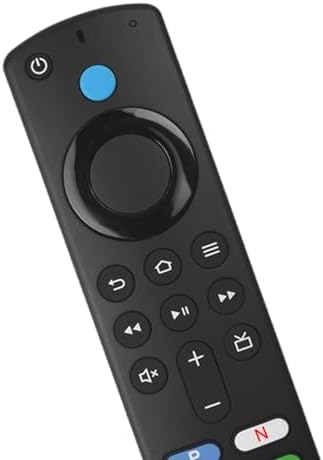
  • Voice Control and Hotkeys: Apexnark Universal Streaming Media Remote Control has Added Voice Function, Search or Jump to Your Favorite Content. Preset 4 Shortcut Button for Quick Access to Your Favorite Applications.
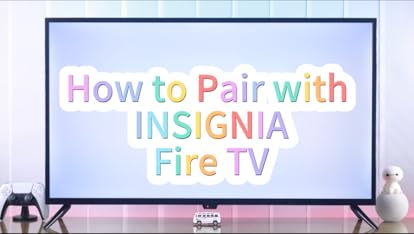
  • Easy to Match: Press and Hold the HOME Button for 10 to 15 Seconds. Release When the LED Starts Flashing Rapidly. Wait Patiently for 30 to 60 Seconds, and the Remote Control Will Automatically Pair.
  • Attention: 1. Please Prepare 2 AAA Batteries Beforehand. 2. Please Confirm Compatibility of Your Device with Our Remote Control Replacement. 3. Please Ensure Removal of Old Remote Control Battery Before Pairing.

Product information

Technical Details

Brand ‎Apexnark
Manufacturer ‎Apexnark
Place of Business ‎Apexnark
Model ‎001
Model Name ‎001
Hardware Platform ‎Universal Television Streaming Device/Media Players
Compatible Devices ‎Set Top Box, Streaming Device
Special features ‎Universal, Voice Search
Number of Items ‎1
Battery Description ‎AAA
Batteries included ‎No
Batteries Required ‎Yes
Connector Type ‎Infrared
Manufacturer ‎Apexnark
Item model number ‎001
Product Dimensions ‎14.4 x 3.8 x 1.8 cm; 47.5 g
ASIN ‎B0FVFB6ZWD

Additional Information

Date First Available Oct. 9 2025
鶹 Rank

Feedback

Universal Replacement Voice Remote Control – Compatible with All Major Streaming Devices (2nd, 3rd, 4K, Max) & Media Players (e.g., Lite Series, Streamer, HD, Stick, Box, Cube Series), with Hot Keys


Found a lower price? Let us know. Although we can't match every price reported, we'll use your feedback to ensure that our prices remain competitive.

Where did you see a lower price?

Price Availability
/
/
/
/
Please sign in to provide feedback.
Brief content visible, double tap to read full content.
Full content visible, double tap to read brief content.

Videos for similar products


Product Description

Universal Streaming Media Remote Control
This compatible Smart TV remote control replacement is stable to use within a range of 10 meters
Universal Streaming Media Remote Control
Preset multifunctional buttons simplify your streaming playback through convenient TV control
Universal Streaming Media Remote Control
This universal remote control is a fun gift for your home TV

Brands in this category on 鶹

Brand in this category on 鶹

Product Summary: Universal Replacement Voice Remote Control – Compatible with All Major Streaming Devices (2nd, 3rd, 4K, Max) & Media Players (e.g., Lite Series, Streamer, HD, Stick, Box, Cube Series), with Hot Keys

From Apexnark

Price

No featured offers available

Other sellers

Other sellers

About this Item

  • Universal Compatibility: This Replacement Voice Remote Works with a Wide Range of Streaming Devices and Media Players. It Is Compatible with 鶹 Fire TV Stick (2nd Gen, 3rd Gen, 4K, 4K Max) and Works with Various Media Players (Such as the Lite Series, Streamer, HD Series, Box, and Cube Series Models).
  • Incompatible Devices: Due to Differences in Communication Technology, This Universal Remote Is NOT Compatible with: (1) Early-Generation Streaming Devices; (2) First or Second-Generation Media Boxes (Typically Released Before 2018); or (3) Any Smart TVs (It Cannot Control TV Functions). Please Verify Your Device Is an External Streaming Device, Not a Television, Before Purchase.
  • Voice Control and Hotkeys: Apexnark Universal Streaming Media Remote Control has Added Voice Function, Search or Jump to Your Favorite Content. Preset 4 Shortcut Button for Quick Access to Your Favorite Applications.
  • Easy to Match: Press and Hold the HOME Button for 10 to 15 Seconds. Release When the LED Starts Flashing Rapidly. Wait Patiently for 30 to 60 Seconds, and the Remote Control Will Automatically Pair.
  • Attention: 1. Please Prepare 2 AAA Batteries Beforehand. 2. Please Confirm Compatibility of Your Device with Our Remote Control Replacement. 3. Please Ensure Removal of Old Remote Control Battery Before Pairing.

Product description

This Apexnark Universal Streaming Media Remote Control Has a Transmission Distance of Up to 10 Meters, Fast Response Speed, and Adopts a New Intelligent Chip, Which Can Remember Without Losing Codes When Power Is Off. How to Pair Your Smart TV Box: A--If You No Longer Have the Old Remote Control: 1. Press and Hold the Home Button for About 10-15 Seconds. Release It When the LED Starts Flashing Quickly. Wait for Approximately 30-60 Seconds (Enter Pairing Mode, LED Flashes). The Remote Control Should Automatically Pair with Your Device. B--If You Still Have an Old Remote Control in Use: 1. Please Remove the Battery from the Old Remote Control. 2. Follow the Steps Mentioned Above to Pair the New Remote Control. Why Isn't the Pairing Working? 1. It Could Be Due to Having Too Many Devices Already Paired with the TV (Usually Limited to 6 Devices). 2. The Old Remote Control's Battery May Not Have Been Removed. 3. The Battery Power May Be Low. Therefore, It Is Recommended to Use Two New AAA Batteries Before Pairing. Reset Your Device and Follow the Instructions Provided for Pairing. If You Need to Update the Remote Control Pairing Continuously, Please Press the Voice Key or Return Key. If You Are Unable to Use It, Please Manually Add and Replace the Remote Control Using the Original Remote Control Product.

Feedback

Did you find this product summary feature useful?

Thank you for your feedback
Thank you for your feedback. You selected “Yes, it is useful”
Thank you for your feedback. You selected “No, it is not useful”
Product summary presents key information. Close to see all product details.