




Image Unavailable
Colour:
-
-
-
- To view this video, download


Videos for similar products




Product Description


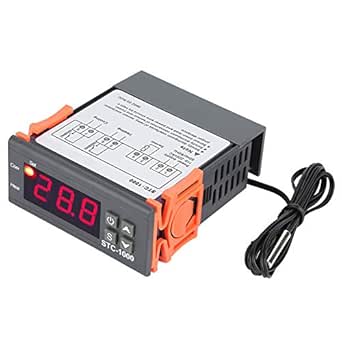
STC-1000 Digital Temperature Controller
- Switch the modes between cool and heat
- Control temperature by setting the temperature set value and the difference value
- It supports temperature calibration function
- Refrigerating control output delay protection
- Alarm when temperature exceeds temperature limit or when sensor error

Key operation instructions
1. View the parameter method:
When the controller is working normally, press and release the “up� key once to display the temperature setting value: press and immediately release the “down� key once, the temperature difference setting value is displayed. After 2 seconds, it will return to the normal temperature display state.
2. Setting parameters method:
When the controller is working normally, press and hold the "S" key for more than 3 seconds to enter the parameter modification mode, the "Set" indicator light is on, and the digital tube displays the code of the first menu item "F1" Press the "up" key or "down" key to increase or decrease the code of the menu item, press the "S" key to display the parameter setting value of the current menu, hold down the "S" key, and then press the "up" key or "down" key to increase or decrease and display the The parameter setting value of the current menu, press and hold the "S" or "up" or "down" key at the same time to quickly increase or decrease and display the parameter setting value of the current menu. After the setting is completed, press and release the power switch key. Then save the parameter modification and return to the normal display state. If there is no key operation within 10 seconds, the parameter modification will not be saved and return to the normal display state.


