Image Unavailable
Colour:
-
-
-
- To view this video, download
-
-
-
-
-
-
VIDEO -
Safety and product resources
Issue loading the information
Documents
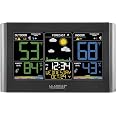
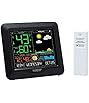
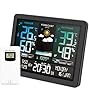
La Crosse Technology C85845-INT Weather Station, Black
Purchase options and add-ons
| Brand | La Crosse Technology |
| Recommended uses for product | Garden, Home |
| Specific uses for product | Dew Point, Heat Index, Humidity, Temperature, Time |
| Power source | Corded Electric |
| Special feature | Adjustable Brightness, Customizable Alert, Large Display, Weather Resistant, Wireless |
About this item
- Dynamic forecast icons with tendency arrows
- Temperature & humidity (Hi/lo) customizable alerts
- Comfort level color bar
- Adjustable backlight
- Self setting accurate Atomic time and date with automatic daylight savings time Reset (on/off optional)
Frequently bought together

Videos for similar products
Product information
Technical Details
| Item Weight | 363 g |
|---|---|
| Specific Instructions for Use | Dew Point, Heat Index, Humidity, Temperature, Time |
| Fabric Type | 0.75 |
| Assembly Required | No |
| Type of Guarantee | 1 year limited parts and labor. |
| Batteries Required | Yes |
| Included components | Weather station^ac adapter^wireless sensor^quick setup guide |
Additional Information
| ASIN | B071VKV4HJ |
|---|---|
| Customer Reviews |
4.2 out of 5 stars |
| 鶹 Rank |
|
| Date First Available | June 23 2017 |
| Manufacturer | La Crosse Technology, Ltd. |
| Place of Business | LA CROSSE, WI, 54601 US |
Feedback
From the manufacturer
USA-Based Family owned Company
Tips!
C85845 Display
*Primary power requires 5.0V power adapter, for adjustable brightness settings. Optional, use of 3 AA alkaline batteries (not included) provides backup for temporary power loss. If using on batteries-only: Backlight settings (HI/LOW/OFF) will not function and temporary illumination activates for several seconds, as this is a power-saving feature.
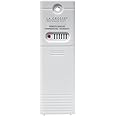
TX141TH-B wireless weather-resistant sensor
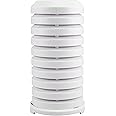
*Recommend mounting sensor vertically, out-of-direct sunlight & well-ventilated sheltered location. Metal siding, stucco, and some types of glass can greatly reduce the signal's range.
Outdoor Temperature (reads dashed lines, or HH.H, or LL.L)
Quick Connect
Explanation: Use the quick connect for a weather station and outdoor sensor that have been working but lost connection due to interference or low batteries. This is not the same as a thorough factory reset.
1. Bring the outdoor sensor and weather station together inside and place the units 5-10 feet apart with nothing between them.
2. Hold TEMP button for 5 seconds. The outdoor temperature area will flash.
3. Remove battery cover from the outdoor sensor and press and release the TX button to send the signal.
4. Wait for 2 minutes for the outdoor temperature to appear on the weather station.
Factory Restart: If the above procedure does not work, please try the factory reset.
1. Remove all power (batteries and AC) from outdoor sensor and weather station.
2. Press one of the buttons on the weather station at least 20 times to clear all memory.
3. Verify that the weather station is blank before proceeding (there may be lines painted on the screen that will show when there is no power).
4. Leave both units without power for 15 minutes (very important).
5. Insert the AC power cord into the wall outlet then into the weather station.
6. Insert fresh batteries into the outdoor sensor.
7. Press the TX button on the outdoor sensor to transmit RF signal.
8. Keep the outdoor sensor 5-10 feet from the weather station.
9. When RF connection is established, the temperature will appear on the station. Allow the outdoor sensor and weather station to sit together for 15 minutes to establish a strong connection.
10. Do not press buttons for 15 minutes.
For optimum 433MHz transmission, place the outdoor sensor no more than 330 feet (100 meters, open air) from the weather station. See owner's instructional manual for distance/resistance/interference details for properly mounting the outdoor sensor.
A minimum voltage of 1.48V for each battery is necessary for proper performance.
Use batteries dated at least six years in advance of the current year. Batteries dated earlier than six years from now may still work, but may be unstable in performance.
Good name brand batteries make less noise, which reduces the chance of RF (radio frequency) interference from the battery compartment.

Product description
Full color display gives you current temperatures & humidity, with a future forecast whether it could be sunny or rainy to snowy. Features accurate, self-set atomic time & date with automatic DST updates. Records min/max values and alerts you of extreme temperatures. Also displays your heat index and dew point. Will indicate of weak or low battery and the signal reception strength.
Safety and product resources
Safety documents
Top Brand: La Crosse Technology
Product summary presents key product information
Keyboard shortcut
Shift
+
Alt
+
opt
+
D
Product Summary: La Crosse Technology C85845-INT Weather Station, Black
From La Crosse Technology
About this Item
- Dynamic forecast icons with tendency arrows
- Temperature & humidity (Hi/lo) customizable alerts
- Comfort level color bar
- Adjustable backlight
- Self setting accurate Atomic time and date with automatic daylight savings time Reset (on/off optional)
Product description
Product Guidance & Documents
Feedback
Did you find this product summary feature useful?
Disclaimer:While we work to ensure that product information is correct, on occasion manufacturers may alter their ingredient lists. Actual product packaging and materials may contain more and/or different information than that shown on our Web site. We recommend that you do not solely rely on the information presented and that you always read and follow labels, warnings, and directions before using or consuming a product. This product may not be right for you. For additional information about a product, please contact the manufacturer. Content on this site is for reference purposes and is not intended to substitute for advice given by a physician, pharmacist, or other licensed health-care professional. You should not use this information as self-diagnosis or for treating a health problem or disease. Contact your health-care provider immediately if you suspect that you have a medical problem. 鶹.ca assumes no liability for inaccuracies or misstatements about products.