| Maximum Media Size | 2 In |
|---|---|
| Included components | Labels |
| Print media | Labels |
| Scanner type | Portable, Photo |
| Max input sheet capacity | 50 |
| Max copy speed (black and white) | 15 ppm |
| Compatible devices | Smartphones, Tablets |
| Sheet size | 2 In Inches |
| Maximum black and white print resolution | Very High |
| Colour depth | 3 |
| Dual-sided printing | No |
| Maximum copies per run | [EO] 5 to 10 copies per run (estimated) |
| Model | S1 |
| Part Number | S1 |
| Number of Processors | 1 |
| Hardware interface | Bluetooth |
| Ink Color | Black |
| Scanner Resolution | 300 x 300 |
| Special features | Portable |
| Display type | LCD |
| Batteries included | Yes |
| Batteries Required | Yes |
| Battery Cell Composition | Lithium Ion |
| Form Factor | Printer |
| Item model number | S1 |
| Product Dimensions | 3.81 x 7.62 x 7.62 cm; 308 g |
| ASIN | B0D3LMFSHJ |
Buy new:
To see product details, add this item to your cart.
Ships from: 鶹 Sold by: Fire Glamour
Save with Used - Like New
To see product details, add this item to your cart.
Ships from: 鶹 Sold by: Warehouse Deals
Sorry, there was a problem.
There was an error retrieving your wish lists. Please try again.Sorry, there was a problem.
List unavailable.Sticker Printer - Printpods Mini Printer with Stickers, Print Pod, Bluetooth Inkless Printer, Sticker Maker, Portable Thermal Printer for iphone, Impresora Portátil for Notes, Journal, DIY, Kids Gift
Purchase options and add-ons
| Brand | Anycash |
| Connectivity technology | Bluetooth |
| Printing technology | Thermal |
| Special feature | Portable |
| Colour | Light Blue |
| Model name | S1 |
| Printer output | Monochrome |
| Max print speed monochrome | 15 ppm |
| Product Dimensions | 3.8D x 7.6W x 7.6H Centimetres |
| Controller type | iOS |
About this item
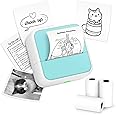
- 𝑷𝒐𝒓𝒕𝒂𝒃𝒍𝒆 𝑻𝒉𝒆𝒓𝒎𝒂𝒍 𝑷𝒓𝒊𝒏𝒕𝒆𝒓: Delightfully compact and lightweight, this Mini Printer easily fits into your pocket, making on-the-go printing tasks hassle-free. Perfect for printing tickets, labels, and other thermal printing tasks anytime, anywhere.
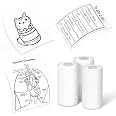
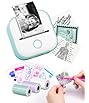
- 𝑴𝒊𝒏𝒊 𝑷𝒓𝒊𝒏𝒕𝒆𝒓 𝒘𝒊𝒕𝒉 3 𝑹𝒐𝒍𝒍𝒔 𝒐𝒇 𝑺𝒕𝒊𝒄𝒌𝒆𝒓𝒔: Incorporates unique sticker printing capabilities, allowing you to create a variety of stickers with ease. Personalize your belongings and print your memories as stickers within seconds.
- 𝑰𝒏𝒌𝒍𝒆𝒔𝒔 𝑺𝒕𝒊𝒄𝒌𝒆𝒓 𝑴𝒂𝒌𝒆𝒓: Enjoy stickers printing with Luck Jingle App at your fingertips. Perfect for printing out your favourite moments and turning them into lasting memories. You can now printout your ideas wherever you go!
- 𝑪𝒖𝒕𝒆 𝑫𝒆𝒔𝒊𝒈𝒏: Its adorable appearance design makes it a fun and engaging printing gadget for people alike. It is an enjoyable tool to foster creativity and make printing a fun experience.
- 𝑷𝒆𝒓𝒇𝒆𝒄𝒕 𝑮𝒊𝒇𝒕 𝑪𝒉𝒐𝒊𝒄𝒆: Whether for Christmas or a birthday celebration, this Sticker Printer serves as an excellent gift choice. Ideal for individuals who love taking notes or cherish documenting memories.
- 𝑯𝒐𝒘 𝒕𝒐 𝑷𝒓𝒊𝒏𝒕 𝑸𝑹 𝑪𝒐𝒅𝒆: Open Luck Jungle App - Select Label Print - Confirm Setting Szie - Select QR code - Input your content - Print
- 𝑯𝒐𝒘 𝒕𝒐 𝑷𝒓𝒊𝒏𝒕: 1. Long press the power button to turn on 2. Connect the printer in the Lucky Jungle App 3. Select the corresponding printer model 4. Input your content - Print
Frequently bought together

Videos for similar products
Product details
- Batteries : 1 C batteries required. (included)
- Product Dimensions : 3.81 x 7.62 x 7.62 cm; 308 g
- ASIN : B0D3LMFSHJ
- Item model number : S1
- Customer Reviews:
Product information
Technical Details
Additional Information
| Batteries | 1 C batteries required. (included) |
|---|---|
| Date First Available | Nov. 28 2024 |
| Customer Reviews |
4.2 out of 5 stars |
| 鶹 Rank |
|
Feedback
Product description
Anycash MINI STICKER PRINTER A versatile, portable thermal printer designed to be a fun and easy to use device that fits right in your pocket. Use it as a sticker printer to design and print unique stickers to personalise your belongings. Or capture and print your favorite moments on the go with the mini photo printer feature. Its toy-like, appealing design adds a touch of fun and creativity to your printing tasks, making it an appealing device for children and adults. The portability and ease of use make it perfect for instant printing of tickets, labels and other thermal printing tasks. For those who love to make every day unforgettable, and those who have a sense of creativity, this mini printer is an ideal gift. Be it Christmas or a birthday, it adds a touch of personalisation and joy to the celebration. Make printing fun and accessible no matter where you are. Experience our mini printer today and let every print tell a story!
Brands in this category on 鶹
Product summary presents key product information
Keyboard shortcut
Shift
+
Alt
+
opt
+
D
Product Summary: Sticker Printer - Printpods Mini Printer with Stickers, Print Pod, Bluetooth Inkless Printer, Sticker Maker, Portable Thermal Printer for iphone, Impresora Portátil for Notes, Journal, DIY, Kids Gift
From Anycash
About this Item
- 𝑷𝒐𝒓𝒕𝒂𝒃𝒍𝒆 𝑻𝒉𝒆𝒓𝒎𝒂𝒍 𝑷𝒓𝒊𝒏𝒕𝒆𝒓: Delightfully compact and lightweight, this Mini Printer easily fits into your pocket, making on-the-go printing tasks hassle-free. Perfect for printing tickets, labels, and other thermal printing tasks anytime, anywhere.
- 𝑴𝒊𝒏𝒊 𝑷𝒓𝒊𝒏𝒕𝒆𝒓 𝒘𝒊𝒕𝒉 3 𝑹𝒐𝒍𝒍𝒔 𝒐𝒇 𝑺𝒕𝒊𝒄𝒌𝒆𝒓𝒔: Incorporates unique sticker printing capabilities, allowing you to create a variety of stickers with ease. Personalize your belongings and print your memories as stickers within seconds.
- 𝑰𝒏𝒌𝒍𝒆𝒔𝒔 𝑺𝒕𝒊𝒄𝒌𝒆𝒓 𝑴𝒂𝒌𝒆𝒓: Enjoy stickers printing with Luck Jingle App at your fingertips. Perfect for printing out your favourite moments and turning them into lasting memories. You can now printout your ideas wherever you go!
- 𝑪𝒖𝒕𝒆 𝑫𝒆𝒔𝒊𝒈𝒏: Its adorable appearance design makes it a fun and engaging printing gadget for people alike. It is an enjoyable tool to foster creativity and make printing a fun experience.
- 𝑷𝒆𝒓𝒇𝒆𝒄𝒕 𝑮𝒊𝒇𝒕 𝑪𝒉𝒐𝒊𝒄𝒆: Whether for Christmas or a birthday celebration, this Sticker Printer serves as an excellent gift choice. Ideal for individuals who love taking notes or cherish documenting memories.
- 𝑯𝒐𝒘 𝒕𝒐 𝑷𝒓𝒊𝒏𝒕 𝑸𝑹 𝑪𝒐𝒅𝒆: Open Luck Jungle App - Select Label Print - Confirm Setting Szie - Select QR code - Input your content - Print
- 𝑯𝒐𝒘 𝒕𝒐 𝑷𝒓𝒊𝒏𝒕: 1. Long press the power button to turn on 2. Connect the printer in the Lucky Jungle App 3. Select the corresponding printer model 4. Input your content - Print
Product description
Feedback
Did you find this product summary feature useful?