| Brand | SinLoon |
|---|---|
| Manufacturer | Xin sen long(Shenzhen)Electronics Co., Ltd |
| Model | SL2024502 |
| Part Number | SL2024502 |
| Compatible Devices | PC |
| Special features | Mechanical touch, RGB lighting, hot-swapping, programmable macro keyboard |
| Mounting Hardware | Keyboard, USB cable, instruction manual |
| Number of Items | 1 |
| Power source type | Corded Electric |
| Batteries included | No |
| Batteries Required | No |
| Keyboard Description | Mechanical, Mini, with RGB Lighting |
| Connector Type | USB-C |
| Material Type | Plastic |
| Hand Orientation | Ambidextrous |
| Manufacturer | Xin sen long(Shenzhen)Electronics Co., Ltd |
| Item model number | SL2024502 |
| Parcel Dimensions | 12.8 x 9.1 x 4.7 cm; 150 g |
| ASIN | B0DN9T9J75 |
-
-
-
-
-
-
-
VIDEO -
Image Unavailable
Colour:
-
-
-
- To view this video, download
SinLoon Mini Macro Programmable Keyboard USB Mini 6 Keys 1 Knob OSU Mechanical Gaming Keyboard RGB DIY Multifunction Keyboard Compatible with Mac OS, Windows (Black)
Purchase options and add-ons
| Brand | SinLoon |
| Compatible devices | PC |
| Connectivity technology | USB-C |
| Keyboard description | Mechanical, Mini, with RGB Lighting |
| Recommended uses for product | gaming, office work, music, media, industrial control |
| Special feature | Mechanical touch, RGB lighting, hot-swapping, programmable macro keyboard |
| Colour | Multicoloured |
| Keyboard backlighting colour support | RGB |
| Material | Plastic |
| Included components | Keyboard, USB cable, instruction manual |
About this item
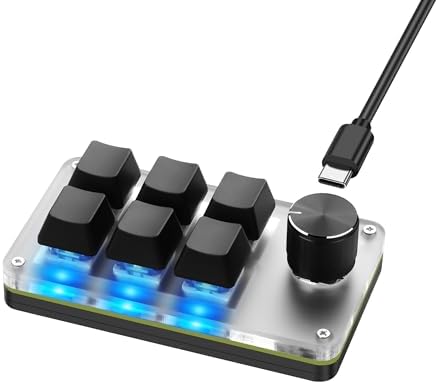
- [Multifunctional Mechanical Keyboard] The programmable macro keyboard has 6 number keys + 1 knob key. You can set all the functions of the standard keyboard keys and perform complex shortcut key combinations via the keys. You can also replace the keycaps and keys as needed. Key shaft. Choose from 7 colors and 2 modes (gradient or light at the touch of a button) for your RGB lighting (mode 0 - off): instantly create your perfect gaming setup
- [Software Programming] Note: Before you first run the downloaded compressed file, you need to set up the antivirus software to add this file to the exceptions/approval list, in order to open it!! !,Sign in (https://sikaicase.com/blogs/news/before-software-setting) to run software programming for Windows system settings. Applications and programming pages have easy to understand English translations. Connect the USB C cable to download the software installation package and open the application to modify the keyboard. Compatible with Windows 7 and above, iOS and Android, Linux
- [Knob Settings] A single knob can get 3 functions. The knob can be pressed left, right and center to set volume up/decrease/mute, previous/next song/pause/play and other functions.
- [Note for Mac users] The default Windows system is, if you need to set it to MAC, customize the settings in Windows before you can use it on Mac. After configuring the software, you don't need to open the background, just close it (to work you need a USB-C cable). The gaming keyboard has a storage function. After configuring Windows, it can be used on systems that support USB protocol, such as Linux, OS
- [Wide Application] The mini mechanical keyboard uses a Type-C to USB interface, no driver required, plug and play, portable, lightweight, convenient and practical, supports Windows, Vista, Linux, operating systems, and is very suitable for office, games , music, media and industrial control, laboratory, production line testing and other fields.
Product information
Technical Details
Additional Information
| Date First Available | Dec 8 2024 |
|---|---|
| Customer Reviews |
3.6 out of 5 stars |
| 鶹 Rank |
|
Feedback
Videos for similar products
Product description
SinLoon Mini Mechanical Gaming Keyboard 6 Keys & 1 Knob Specifications: 6 Keys Keyboard + 1 Controller. 1. Color: Black 2. Supports hot swap and custom change
3.Type-C interface and cool RGB backlight
4. Small size, light weight, easy to carry
5. Mechanical touch: linear touch, soft touch, click touch Features: 1. PC type connection, plug and play without driver, 2. Key customization, you can configure all the functions of the standard keyboard keys and perform complex combinations of hotkeys through the keys. 3. At the same time, this button can also be used to implement complex operations and is a good helper for office, games, music, media and industrial control. 4. Mechanical key shaft, durable. 5. Support ergonomic design, 6. Windows/vista/linux/mac operating system can be used. The gaming keyboard has a storage function and can be used on other systems after setting it up on Windows system (note: it must be wired before you can set it up and use) 7. Configuration method: 1. When unpacking, first confirm that there is no obvious damage during the logistics process, and then click each button normally to confirm that it feels normal (if some axes are loose, just press them normally). 8. Note: If a connection error is reported, reinstall or replace other USB port connections. After the connection is normal, the LED light will flash. Packing list:
1 x Keyboard
1 x USB Cable
1 x User Manual
Product summary presents key product information
Keyboard shortcut
Shift
+
Alt
+
opt
+
D
Product Summary: SinLoon Mini Macro Programmable Keyboard USB Mini 6 Keys 1 Knob OSU Mechanical Gaming Keyboard RGB DIY Multifunction Keyboard Compatible with Mac OS, Windows (Black)
From SinLoon
3.6 out of 5 stars, 68 ratings
Customer reviewsAbout this Item
- [Multifunctional Mechanical Keyboard] The programmable macro keyboard has 6 number keys + 1 knob key. You can set all the functions of the standard keyboard keys and perform complex shortcut key combinations via the keys. You can also replace the keycaps and keys as needed. Key shaft. Choose from 7 colors and 2 modes (gradient or light at the touch of a button) for your RGB lighting (mode 0 - off): instantly create your perfect gaming setup
- [Software Programming] Note: Before you first run the downloaded compressed file, you need to set up the antivirus software to add this file to the exceptions/approval list, in order to open it!! !,Sign in (https://sikaicase.com/blogs/news/before-software-setting) to run software programming for Windows system settings. Applications and programming pages have easy to understand English translations. Connect the USB C cable to download the software installation package and open the application to modify the keyboard. Compatible with Windows 7 and above, iOS and Android, Linux
- [Knob Settings] A single knob can get 3 functions. The knob can be pressed left, right and center to set volume up/decrease/mute, previous/next song/pause/play and other functions.
- [Note for Mac users] The default Windows system is, if you need to set it to MAC, customize the settings in Windows before you can use it on Mac. After configuring the software, you don't need to open the background, just close it (to work you need a USB-C cable). The gaming keyboard has a storage function. After configuring Windows, it can be used on systems that support USB protocol, such as Linux, OS
- [Wide Application] The mini mechanical keyboard uses a Type-C to USB interface, no driver required, plug and play, portable, lightweight, convenient and practical, supports Windows, Vista, Linux, operating systems, and is very suitable for office, games , music, media and industrial control, laboratory, production line testing and other fields.
Product description
Feedback
Did you find this product summary feature useful?