| Brand | Doombusy |
|---|---|
| Manufacturer | Doombusy |
| Place of Business | 10 |
| Model | L5B83G |
| Model Name | L5B83G |
| Compatible Devices | Television |
| Special features | Digital Display, Ergonomic, Voice Search |
| Battery Description | AA |
| Batteries included | No |
| Batteries Required | No |
| Connector Type | Bluetooth |
| Manufacturer | Doombusy |
| Item model number | L5B83G |
| Parcel Dimensions | 15.5 x 4.4 x 2.1 cm; 80 g |
| ASIN | B0CSJ3Y9TZ |

Image Unavailable
Colour:
-
-
-
- To view this video, download
Voice Remote Replacement fit for Fire-Smart TV Lite,TVs Stick/Cube,and Universal TV Remote fit for Insignia/Toshiba/Pioneer/Hisense/TCL Smart TVs,Not for Samsung/Roku TV
Purchase options and add-ons
| Brand | Doombusy |
| Special feature | Digital Display, Ergonomic, Voice Search |
| Max number of supported devices | 5 |
| Compatible devices | Television |
| Connectivity technology | Bluetooth |
About this item
- COMPATIBLE WITH TV MODELS: for Insignia smart TVs: F20/ F30 / F50 / DF710 / DF711 / DF310 / DF311 /DF510 / DF620 series, for Toshiba smart TVs: C350 / M550 / LF711 / LF221U /LF621U / LF421U / LF711 / A810U / A710U / V35 series, for Pioneer TVs PN851 / PN951 / PN450 / PN651 series, for Omni / Omni QLED Series, 2-Series / 4-Series smart TVs
- COMPATIBLE REMOTE MODELS: This 3rd Gen Pro Plus Voice Remote fit for Insignia/Toshiba TV Remote Control(CT-RC1US-21,NS-RCFNA-21,CT-95018,NS-RCFNA-19,CT-RC1US-19) etc,Not for Samsung/Roku TV
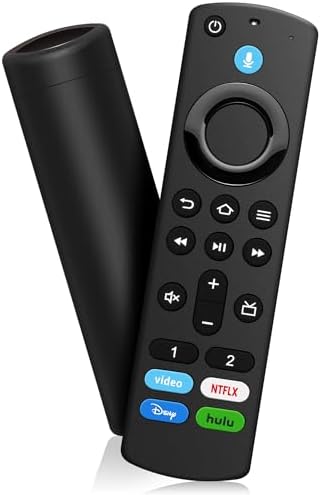
- SHORTCUT KEYS: The remote control offers 4 shortcut keys for popular streaming channels, allowing you to quickly access any content you like
- VOICE FUNCTION: Use the voice function to play music, watch movies, and even control more smart home functions. Simple voice commands find what you need quickly and efficiently, increasing ease of use
- HOW TO PAIR: Press the Home button for about 10-15 seconds, the indicator light will blink slowly for 10-30 seconds, when the remote control is in pairing mode, the indicator light will blink faster, when pairing is completed, the indicator light will turn off. If you have any questions, please contact us
Frequently bought together

Product information
Technical Details
Additional Information
| Date First Available | Feb. 15 2024 |
|---|---|
| Customer Reviews |
4.2 out of 5 stars |
| 鶹 Rank |
|
Feedback
Videos for similar products
Product Description
Brands in this category on 鶹
Brand in this category on 鶹
Product summary presents key product information
Keyboard shortcut
Shift
+
Alt
+
opt
+
D
Product Summary: Voice Remote Replacement fit for Fire-Smart TV Lite,TVs Stick/Cube,and Universal TV Remote fit for Insignia/Toshiba/Pioneer/Hisense/TCL Smart TVs,Not for Samsung/Roku TV
From Doombusy
About this Item
- COMPATIBLE WITH TV MODELS: for Insignia smart TVs: F20/ F30 / F50 / DF710 / DF711 / DF310 / DF311 /DF510 / DF620 series, for Toshiba smart TVs: C350 / M550 / LF711 / LF221U /LF621U / LF421U / LF711 / A810U / A710U / V35 series, for Pioneer TVs PN851 / PN951 / PN450 / PN651 series, for Omni / Omni QLED Series, 2-Series / 4-Series smart TVs
- COMPATIBLE REMOTE MODELS: This 3rd Gen Pro Plus Voice Remote fit for Insignia/Toshiba TV Remote Control(CT-RC1US-21,NS-RCFNA-21,CT-95018,NS-RCFNA-19,CT-RC1US-19) etc,Not for Samsung/Roku TV
- SHORTCUT KEYS: The remote control offers 4 shortcut keys for popular streaming channels, allowing you to quickly access any content you like
- VOICE FUNCTION: Use the voice function to play music, watch movies, and even control more smart home functions. Simple voice commands find what you need quickly and efficiently, increasing ease of use
- HOW TO PAIR: Press the Home button for about 10-15 seconds, the indicator light will blink slowly for 10-30 seconds, when the remote control is in pairing mode, the indicator light will blink faster, when pairing is completed, the indicator light will turn off. If you have any questions, please contact us
Product description
Replacement Voice Remote
How to pair your TV stick?
If this is a replacement remote and you don't have the original remote that came with your TV device:
1. Restart the TV equipment. When the main screen of TV appears, the remote control can be used. If not, please move to step 2.
2. Press and hold the Home button on the new remote control for at least 10 seconds, until the LED starts to flash quickly,
and then send the loosening.
At this time, enter the pairing mode, indicating that your remote control has been successfully paired.
If you do have the remote that came with your TV device, you'll need both remotes for setup:
1. On your new remote, press and hold the Home button for 10 seconds. The indicator LED will slowly fash amber for 10 seconds,
then flash faster when your remote is ready to connect.
Compatible with TV Models :
for Smart TV Stick 4K
for Smart TV Stick Lite
for Smart TV Stick 4K Max
for Smart TV Stick (2nd Gen)
for Smart TV Stick (3rd Gen)
for Smart TV Cube (1st Gen)
for Smart TV Cube (2nd Gen)
for Smart TV (3rd Gen, Pendant Design)
for Smart TV Stick 4K Bundle
Compatible with Remote Models :
for Smart TV Stick Lite
for Smart TV (2nd Gen)
for Smart TV (1st Gen)
for TV Edition smart TVs
Feedback
Did you find this product summary feature useful?