| Brand | ProtoArc |
|---|---|
| Manufacturer | ProtoArc |
| Place of Business | / |
| Model | K110-A |
| Compatible Devices | Mac |
| Special features | Backlit, Full-Size, Low-Profile Key, Rechargeable |
| Number of Items | 1 |
| Power source type | Battery Powered |
| Batteries included | No |
| Batteries Required | No |
| Keyboard Description | Backlit |
| Connector Type | Bluetooth |
| Material Type | Aluminum |
| Hand Orientation | Ambidextrous |
| Manufacturer | ProtoArc |
| Item model number | K110-A |
| Product Dimensions | 1.02 x 1.02 x 1.02 cm; 816 g |
| ASIN | B0FVF8T812 |

Prime Member Price
Ships from: 鶹 Sold by: ProtoArc
Non-Deal Price
To see product details, add this item to your cart.
Ships from: 鶹 Sold by: ProtoArc
Sorry, there was a problem.
There was an error retrieving your wish lists. Please try again.Sorry, there was a problem.
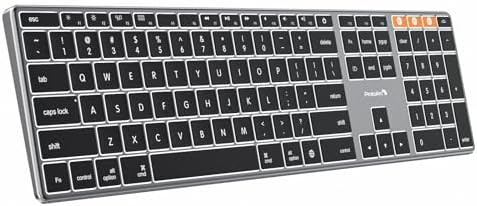
List unavailable.ProtoArc Backlit Wireless Keyboard for Mac, K110-A Aluminum Full Size Bluetooth Keyboard, Multi-Device, Low Profile, Fluid Quiet Typing, Rechargeable, for MacBook Pro/Air, Mac mini, iPad - Space Gray
| Brand | ProtoArc |
| Compatible devices | Mac |
| Connectivity technology | Bluetooth |
| Keyboard description | Backlit |
| Recommended uses for product | Everyday Use |
| Special feature | Backlit, Full-Size, Low-Profile Key, Rechargeable |
| Keyboard backlighting colour support | Single Color |
| Material | Aluminum |
| Power source | Battery Powered |
| Switch type | Mechanic |
About this item
- Enhanced Mac Compatibility: Bluetooth keyboard for Mac mirrors the sleek aluminum construction of the magic keyboard and is compatible with Mac OS 10.12 or later. Ideal for MacBook, MacBook Pro, MacBook Air, Mac Mini, Mac Pro, iMac, iMac Pro, iPad, or iPhone, supporting Bluetooth 5.1 or above. Note: K110-A Keyboard is designed primarily for macOS and may not be compatible with Windows. The media keys and function keys don't work on Windows. Devices manufactured before 2013 are not compatible.
- Customizable Backlighting: ProtoArc backlit wireless keyboard for Mac offer 3 adjustable brightness levels (low-mid-high) with soft white LED lighting. Perfect for dimly lit environments, the gentle illumination reduces eye strain and can be tailored to your preferences.
- Sleek Design, Responsive Typing: Featuring a sleek aluminum design that seamlessly complements your mac setup, wireless keyboard delivers a remarkable typing experience. The low-profile scissor mechanism keys provide responsive tactile feedback for effortless, fast, and accurate typing.
- Multi-Device Connectivity: Seamlessly connect up to 3 devices with our wireless bluetooth keyboard using the 3 Bluetooth channels. Easily switch between devices by pressing the mode switch button. Note: Connection is established via Bluetooth; USB dongle not included.
- Rechargeable and Efficient: Rechargeable keyboard features built-in 1800mAh rechargeable batteries. It enters sleep mode after 60 minutes of inactivity and awakens instantly with any key press. Backlighting requires manual reactivation.
- Work Efficiently with a Full-Size Keyboard: Elevate your work efficiency with a full-size keyboard designed for Mac. Note that full-size keyboards may necessitate more desk space compared to compact alternatives.
Videos for similar products
Product Description
If you’re a mac users and looking for a aluminum keyboard that combines backlight, durability, aesthetics and performance, ProtoArc K110-A backlit bluetooth keyboard for Mac is a fantastic choice
Easily connect to multiple devices
No cable or dongle needed: Unlike other wireless keyboards, ProtoArc Bluetooth models connect directly to a device that supports bluetooth connection, freeing up a USB port
Don't work on Windows: K110-A keyboard is designed primarily for macOS. The media keys and function keys don't work on Windows
Aluminum keyboard built for Mac Users
If you work from home, or use spreadsheets a lot, then the Full-size is the best option. A familiar, full-size layout improves accuracy during high-speed typing and reduces the likelihood of pressing the wrong key
ProtoArc backlit keyboard makes a world of difference
ProtoArc K110-A keyboard is increasingly becoming an essential tool for mac users looking to improve both their workflow and well-being during those after-dark shifts. Bluetooth Keyboard is perfect for work, general tasks, and everyday use. However, gaming is not recommended
-
The keyboard cannot connect to your device
1.Ensure that the keyboard is fully charged.
2.Confirm that the keyboard is in the correct mode.
3.Delete the keyboard's Bluetooth pairing from your device's Bluetooth listing.
4.Repair the keyboard with your device.
-
Some keyboard keys do not work / Keyboard keys have typing delay / Keyboard keys repeat typing:
1. Ensure that the keyboard is fully charged.
2. Delete the keyboard's Bluetooth connection from your computer's Bluetooth connection history. After deleting the Bluetooth connection, restart your computer.
3. Re-pair the keyboard with your computer
-
Is K110-A Bluetooth Keyboard compatible with Windows?
No. K110-A Keyboard is designed primarily for macOS and may not be compatible with Windows. The media keys and function keys don't work on Windows.
-
Which device operating systems (OS versions), and devices are supported?
Device manufactured before 2013 or running macOS versions below 10.12 are not supported. Not compatible with Linux, Windows, or the Windows installed on Mac hardware.
-
After the device restart that required login, the keyboard wouldn't reconnect?
The reason is FileVault On Mac. To disable FileVault:
1. Go to System Settings/System Preferences 2. Click Privacy & Security 3. Click FileVault 4. Click the lock icon in the bottom left and enter your password. 5. Click Turn Off Encryption
-
How to Use Multimedia or F1-F12 function?
The Bluetooth keyboard comes preconfigured with multimedia functions. The F1-F12 functions need to be activated by pressing Fn + F1-F12 keys. Or you can set the keyboard to the F1-F12 functions by default on your Mac
-
How long does it take for the keyboard backlight to automatically turn off if not in use?
If the keyboard is not in use for 2 minutes, the backlight will automatically turn off and can be awakened by pressing any key.
-
Does the keyboard come with usb dongle or bluetooth adapter?
No. The keyboard doesn't come with usb dongle or bluetoooth adapter. The keyboard can be connected via 3 bluetooth channels when your device supports bluetooth connection.
-
Can I connect and switch between multiple devices with the keyboard?
Yes. The keyboard offers 3 bluetooth channels and supports bluetooth 5.1 version or above. Using our keyboard for multiple devices helps declutter your workspace by eliminating the need for separate peripherals for each device.
-
How to know if the keyboard is at low battery?
When the battery is low, the low battery indicator light will start flashing in red until the keyboard is turned off. Low battery power can cause performance issues such as response delay and keys sticking.
Product details
- Product Dimensions : 1.02 x 1.02 x 1.02 cm; 816 g
- Manufacturer : ProtoArc
- ASIN : B0FVF8T812
- Item model number : K110-A
- Country/Region of origin : China
- Customer Reviews:
Product information
Technical Details
Additional Information
| Date First Available | Nov. 16 2025 |
|---|---|
| Customer Reviews |
4.7 out of 5 stars |
| 鶹 Rank |
|