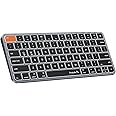
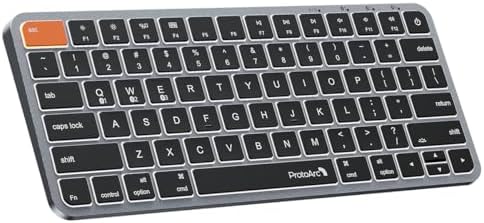
ProtoArc Backlit Compact Wireless Keyboard for Mac, K90-A Bluetooth Keyboard, Multi-Device, Low Profile, Fluid Quiet Typing, Compatible with MacBook Pro/Air, iPad - Space Gray
Sustainability features
Purchase options and add-ons
| Brand | ProtoArc |
| Compatible devices | MacBook Pro, MacBook Air, iPad, iPhone |
| Connectivity technology | Bluetooth |
| Keyboard description | Multimedia |
| Recommended uses for product | Business, Personal |
| Special feature | Backlit, Portable, Rechargeable |
| Colour | Grey |
| Keyboard backlighting colour support | Single Color |
| Included components | 1 x Bluetooth Keyboard, 1 x Type C Charging Cable, User Manual, User manual (English language not guaranteed) See more |
| Model name | K90-A |
About this item
- Efficiently Compact: Our keyboard features a compact layout designed for precise functionality without compromising on portability. Compatible with MacBook Pro, MacBook Air, iPad, or iPhone. Note: Device manufactured before 2013 or running macOS versions below 10.12 are not supported. Not compatible with Linux, Windows, or the Windows installed on Mac hardware
- Customizable Backlighting: Customize your typing experience with our ProtoArc backlit wireless keyboard for Mac, offering three soft white LED brightness levels for reduced eye strain in any environment
- Seamless Multi-Device Connectivity: Connect up to 3 devices effortlessly with our wireless bluetooth keyboard's 3 bluetooth channels. Conveniently switch between devices using the mode switch button, with connection established via Bluetooth (no USB dongle required)
- Sleek Design, Responsive Typing: Featuring a sleek design that seamlessly complements your mac setup, wireless keyboard provides a remarkable typing experience, thanks to its low-profile scissor mechanism keys offering tactile feedback for fast and accurate input
- Rechargeable and Eco-Friendly: Features a built-in 1200mAh rechargeable battery, entering sleep mode after 60 minutes of inactivity to conserve energy. Easily awaken the keyboard with any key press, with manual reactivation needed for backlighting
- Flat Design: The intentionally flat ProtoArc keyboard promotes a neutral wrist position, reducing discomfort and the risk of conditions like carpal tunnel syndrome, ensuring optimal typing comfort with level wrists and fingers
- Maximize Efficiency with Compact Design: Experience enhanced productivity with our compact keyboard tailored for Mac devices. Compact keyboard offers a space-saving solution without compromising on performance, ideal for those seeking efficiency in a smaller form factor
Frequently bought together

Videos for similar products
Sustainability features
This product has features recognized as more sustainable by certifying organizations.
Carbon emissions from the lifecycle of this product were measured, reduced and offset.
Product Description
If you've ever had trouble typing in low light or want to add a stylish touch to your desk, the ProtoArc K90-A backlit keyboard is the perfect solution
By eliminating the numpad, this space-saving design lets you position your mouse closer to your body, improving ergonomics and making your workspace more efficient
A compact Bluetooth keyboard helps reduce desk clutter, allowing you to type faster and more comfortably. Note: ProtoArc K90-A Keyboard is designed primarily for macOS and may not be fully compatible with Windows. The media keys and function keys don't work on Windows
ProtoArc K90-A Keyboard is perfect for work, general tasks, and everyday use. However, gaming is not recommended
-
The keyboard cannot connect to your device
1.Ensure that the keyboard is fully charged.
2.Confirm that the keyboard is in the correct mode.
3.Delete the keyboard's Bluetooth pairing from your device's Bluetooth listing.
4.Repair the keyboard with your device.
-
Some keyboard keys do not work / Keyboard keys have typing delay / Keyboard keys repeat typing:
1. Ensure that the keyboard is fully charged.
2. Delete the keyboard's Bluetooth connection from your computer's Bluetooth connection history. After deleting the Bluetooth connection, restart your computer.
3. Re-pair the keyboard with your computer
-
Is K90-A Bluetooth Keyboard compatible with Windows?
No. K90-A Keyboard is designed primarily for macOS and may not be fully compatible with Windows. The media keys and function keys don't work on Windows.
-
Which device operating systems (OS versions), and devices are supported?
Device manufactured before 2013 or running macOS versions below 10.12 are not supported. Not compatible with Linux, Windows, or the Windows installed on Mac hardware.
-
How to Use Multimedia or F1-F12 function?
The Bluetooth keyboard comes preconfigured with multimedia functions. The F1-F12 functions need to be activated by pressing Fn + F1-F12 keys. Or you can set the keyboard to the F1-F12 functions by default on your Mac
-
How long does it take for the keyboard backlight to automatically turn off if not in use?
If the keyboard is not in use for 2 minutes, the backlight will automatically turn off and can be awakened by pressing any key.
-
Do the keyboard come with usb dongle or bluetooth adapter?
No. The keyboard don't come with usb dongle or bluetoooth adapter. The keyboard can be connected via 3 bluetooth channels when your device supports bluetooth connection.
-
Can i connect and switch between multiple devices with the keyboard?
Yes. The keyboard offers 3 bluetooth channels and supports bluetooth 5.1 version or above. Using our keyboard for multiple devices helps declutter your workspace by eliminating the need for separate peripherals for each device.
-
How to know if the keyboard is at low battery?
When the battery is low, the low battery indicator light will start flashing in red until the keyboard is turned off. Low battery power can cause performance issues such as response delay and keys sticking
-
How to charge the keyboard?
The keyboard can be charged using the included USB-C charging cable(in the upper right corner of the compartment inside the box), and the charging indicator will change from red to green when the keyboard is fully charged
From the brand
-
Mission
At ProtoArc, our mission is to deliver innovative workspace solutions that enhance comfort, boost productivity, and foster overall wellness.
Vision
We believe that everyone deserves a workspace that not only meets their functional needs but also empowers them to thrive. Our vision is a world where work environments promote health, happiness, and high performance.
-
-
-
-
-
Product details
- Parcel Dimensions : 30.1 x 16.3 x 3.2 cm; 680 g
- Manufacturer : ProtoArc
- ASIN : B0FH6W6V4P
- Item model number : K90-A
- Country/Region of origin : China
- Customer Reviews:
Product information
Technical Details
| Brand | ProtoArc |
|---|---|
| Manufacturer | ProtoArc |
| Place of Business | / |
| Model | K90-A |
| Model Name | K90-A |
| Compatible Devices | MacBook Pro, MacBook Air, iPad, iPhone |
| Special features | Backlit, Portable, Rechargeable |
| Mounting Hardware | 1 x Bluetooth Keyboard, 1 x Type C Charging Cable, User Manual, User manual (English language not guaranteed) |
| Number of Items | 1 |
| Batteries included | No |
| Batteries Required | No |
| Keyboard Description | Multimedia |
| Connector Type | Bluetooth |
| Hand Orientation | Ambidextrous |
| Manufacturer | ProtoArc |
| Item model number | K90-A |
| Parcel Dimensions | 30.1 x 16.3 x 3.2 cm; 680 g |
| ASIN | B0FH6W6V4P |
Additional Information
| Date First Available | Aug. 21 2025 |
|---|---|
| Customer Reviews |
4.6 out of 5 stars |
| 鶹 Rank |
|