| Brand | ProtoArc |
|---|---|
| Manufacturer | ProtoArc |
| Place of Business | / |
| OS | Windows |
| Compatible Devices | Laptop, Personal Computer, Tablet |
| Special features | Portable |
| Number of Items | 1 |
| Power source type | Corded Electric |
| Batteries included | No |
| Batteries Required | No |
| Connector Type | USB |
| Movement detection technology | Optical |
| Material Type | Aluminum |
| Manufacturer | ProtoArc |
| Parcel Dimensions | 18 x 12.8 x 4.1 cm; 306.17 g |
| ASIN | B0FDGPJSXR |

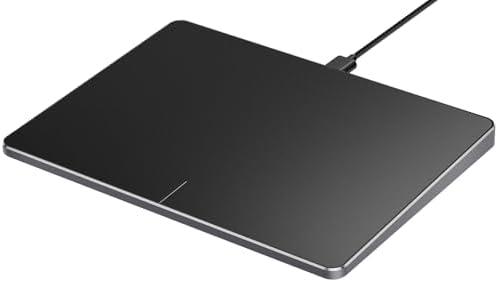
ProtoArc Wired USB Trackpad for Windows 10/11, Large High-Precision Wired Trackpad Mouse with Multi-Gesture, Ultra Slim Portable Aluminum Touchpad Mouse for Computer/Desktop/Laptop, Grey Black
Purchase options and add-ons
| Brand | ProtoArc |
| Colour | Black |
| Connectivity technology | USB |
| Special feature | Portable |
| Movement detection technology | Optical |
About this item
- Windows Only: The Large Wired Trackpad for Windows10/11 is compatible with Windows 11, Windows 10, PC, laptops and desktop computers. Note: Not compatible with Mac/Chrome OS/Linux. Not recommended for use on other systems. Some touchpad gestures or functions may be missing
- Convenient left and right physical clicks: The wired trackpad supports physical clicks of the left and right buttons at the bottom to realize the left and right mouse button functions. It also supports full-area single-click to realize the left mouse button function and two-finger single-tap for right mouse clicks, which is convenient for you to select text/documents and drag large areas easily
- How to drag files and select text: Double-click with one finger + hold/slide to drag files or select text
- Multiple gestures support: The touchpad supports multiple gestures and supports up to four-finger operation, which is smoother than the laptop touchpad operation. Fast and sensitive response, at your fingertips. Multiple functions, including smooth screen clicks, scrolling up and down pages, pinching to enlarge photos, etc.
- How to adjust the touchpad cursor speed: Open "Windows Settings" → "Bluetooth and other devices" → "Touchpad". Adjust the "Cursor Speed" slider to suit your preference (slower ← → faster)
- Extra Large Metal Touchpad: Large 6.4 inch touch screen, size 6.4*4.8*0.4 inches, thickness 0.19in-0.39in, compared with the traditional touch pad is even thinner
- Plug and Play, Stable USB C Connection: Simply plug the USB cable into the USB port of your computer and the touchpad is ready to use, no additional drivers required. The USB C cable's reliable and stable connection allows you to use it easily without any connection issues
Check Compatibility
Frequently bought together

Product information
Technical Details
Additional Information
| Date First Available | July 7 2025 |
|---|---|
| Customer Reviews |
4.5 out of 5 stars |
| 鶹 Rank |
|
Feedback
Product details
- Parcel Dimensions : 18 x 12.8 x 4.1 cm; 306.17 g
- Manufacturer : ProtoArc
- ASIN : B0FDGPJSXR
- Country/Region of origin : China
- Customer Reviews:
Product Description
ProtoArc Wired Trackpad for Windows 10/11
Compatibility Warning for Wired Trackpad for Windows 10/11
Windows Only: T1 Wired Trackpad is compatible with Windows 10/11 only
Wired Only: Connects only via wired, provides you with a stable connection via a USB-C cable.
It is not compatible with Mac/Chrome/Linux operating system devices
Note: It is not recommended to use on other systems. Some touchpad gestures or functions may be missing.
Why can't I find the DPI adjustment feature on the T1 wired touchpad?
The T1 wired touchpad does not include a DPI adjustment feature. However, you can customize cursor speed via:
Open Windows Settings → Navigate to Bluetooth & other devices → Select Touchpad.
Adjust the Cursor speed slider to match your preference (slower ← → faster)
Tip: Test small incremental changes to find your ideal speed for productivity.
About Convenient left and right physical clicks
- The wired trackpad supports physical clicks of the left and right buttons at the bottom to realize the left and right mouse button functions. It also supports full-area single-click to realize the left mouse button function and two-finger single-tap for right mouse clicks
- How to drag files and select text: Double-click with one finger + hold/slide to drag files or select text
Multi Gesture Operations
ProtoArc Wired Trackpad is a great alternative to computer mice when desk space is limited. In addition to being a space saver, trackpad can be easier to use than other input devices like mice