
| Brand | ProtoArc |
|---|---|
| Manufacturer | ProtoArc |
| Place of Business | Shenzhen Huangshi Electronic Technology Co., LTD Floor 1, Building A1, Zone G, Democratic West Industrial Zone, Democratic Community, Shajing Street, Bao 'an District, Shenzhen |
| Model | KM100-A |
| Part Number | Protoarc B0D4V2C5C3 |
| OS | Mac OS |
| Compatible Devices | MacBook Air, MacBook Pro, iPad, Mac |
| Special features | Backlit, Full Size, Hotkeys and Media Keys, Numeric Keypad, Rechargeable |
| Number of Items | 1 |
| Power source type | Battery Powered |
| Batteries included | Yes |
| Batteries Required | No |
| Keyboard Description | Designed for Mac, Backlit, Full Size |
| Connector Type | Bluetooth |
| Movement detection technology | Optical |
| Manufacturer | ProtoArc |
| Item model number | KM100-A |
| Product Dimensions | 14 x 42 x 2 cm; 500 g |
| ASIN | B0D4V2C5C3 |

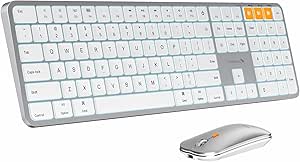
ProtoArc Backlit Bluetooth Keyboard and Mouse for Mac, KM100-A Multi-Device Wireless Keyboard Mouse for Mac, Full Size Rechargeable for MacBook Pro/Air, iPhone, iPad, White Silver
Purchase options and add-ons
| Brand | ProtoArc |
| Colour | White Silver |
| Connectivity technology | Bluetooth |
| Special feature | Backlit, Full Size, Hotkeys and Media Keys, Numeric Keypad, Rechargeable |
| Compatible devices | MacBook Air, MacBook Pro, iPad, Mac |
| Keyboard description | Designed for Mac, Backlit, Full Size |
| Movement detection technology | Optical |
| Keyboard backlighting colour support | Single Color |
| Item weight | 500 Grams |
| Batteries required? | No |
About this item
- Bluetooth Keyboard for Mac: Bluetooth keyboard and mouse for Apple resembles magic keyboard in full size layout with numeric keypad. Compatible with Mac OS 10.12 or later, for MacBook, MacBook Pro, MacBook Air, Mac Pro/Mini, iPad, or iPhone, supports Bluetooth 5.1 version or above. Note: KM100-A Keyboard is designed primarily for macOS and may not be fully compatible with Windows. The media keys and function keys don't work on Windows. Devices manufactured before 2013 and devices with Mac OS versions lower than 10.12 are not compatible
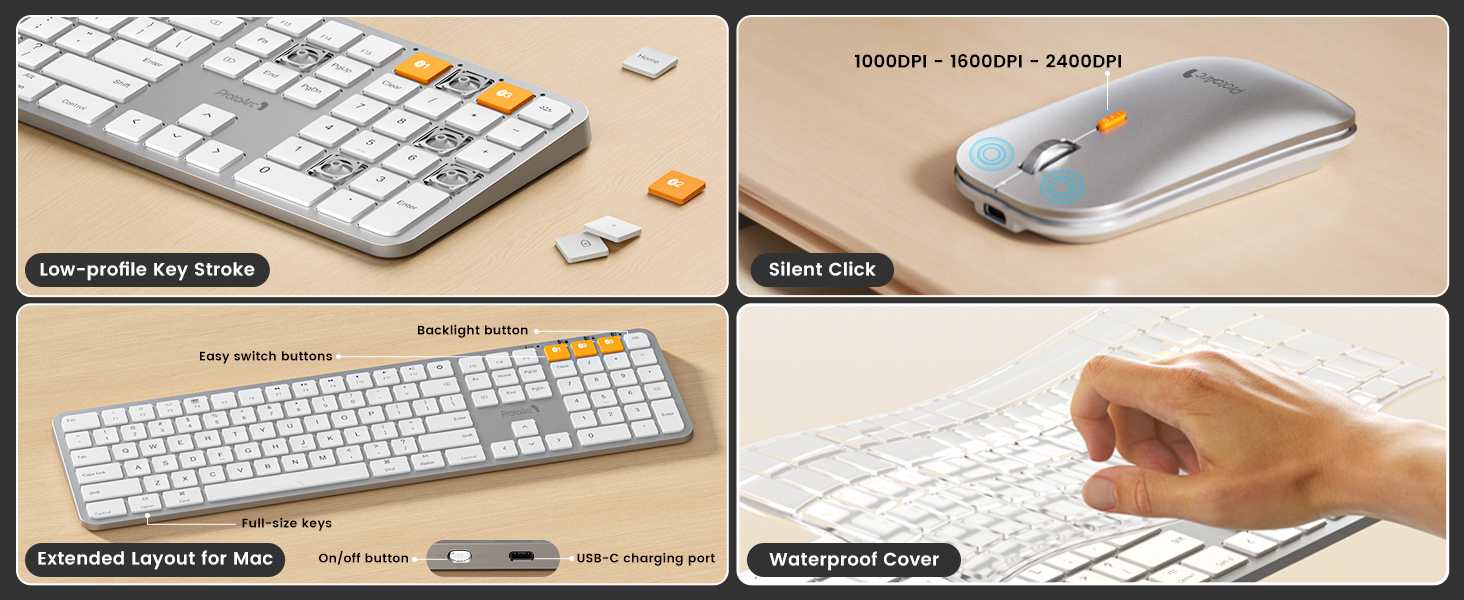
- Backlit illuminated Keys: This backlit wireless keyboard for Apple comes equipped with soft white LED backlighting and boasts three adjustable brightness levels (low-mid-high) to suit your individual needs. Perfect for use in dimly lit environments, the gentle illumination won't strain your eyes, and the brightness can be easily customized to your liking
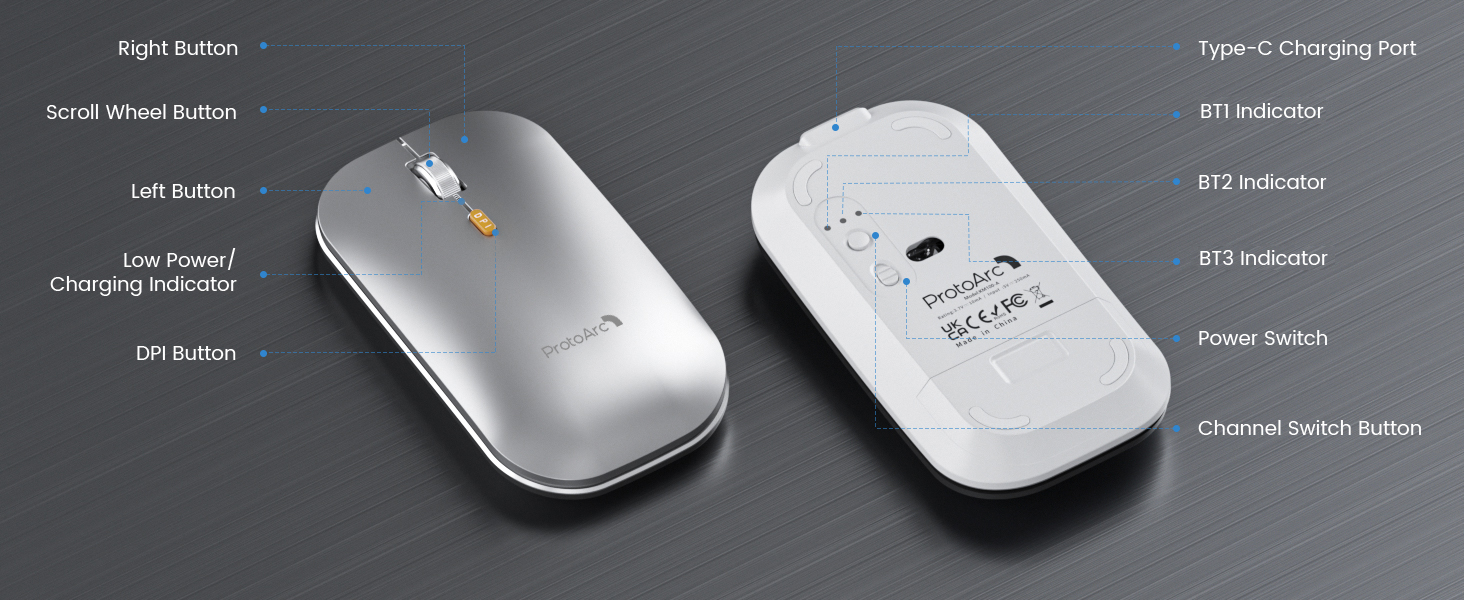
- Switch Up To 3 Devices: Bluetooth keyboard mouse for Mac can connect to three different devices simultaneously through its triple Bluetooth channels. You can easily switch between the devices by clicking on the mode switch button. Note: Connection is established solely through Bluetooth. USB dongle is not included
- Responsive Keys and Quiet Typing: This keyboard boasts a responsive scissor switch, allowing for efficient and hushed typing. The low-profile design and soft-touch keys elevate the typing experience to a new level of fingertip comfort and The mouse features three adjustable DPI levels of 1000/1600/2400, providing you with customizable sensitivity options
- Rechargeable and Power Saving: The keyboard and mouse for Mac feature built-in rechargeable batteries, 1200mAh for keyboard, 300mAh for mouse. Additionally, if the keyboard is not used for 60min, it will enter sleep mode and can be awakened by pressing any key. Backlighting needs to be turned on again
- Flat Keyboard: ProtoArc keyboard for Mac is intentionally designed to be flat for neutral wrist position, allowing you to hold your wrists level with your fingers while typing. This design minimizes the risk of discomfort and potential issues such as carpal tunnel syndrome
- Notice: Utilize a full-size keyboard and mouse to enhance your work efficiency for Mac. However, please be aware that they may require more desk space compared to compact options
Frequently bought together

Videos for similar products
Product Description
Bluetooth Wireless Keyboard and Mouse for Mac Professionals
Note: KM100-A Keyboard is designed primarily for macOS and may not be fully compatible with Windows. The media keys and function keys don't work on Windows
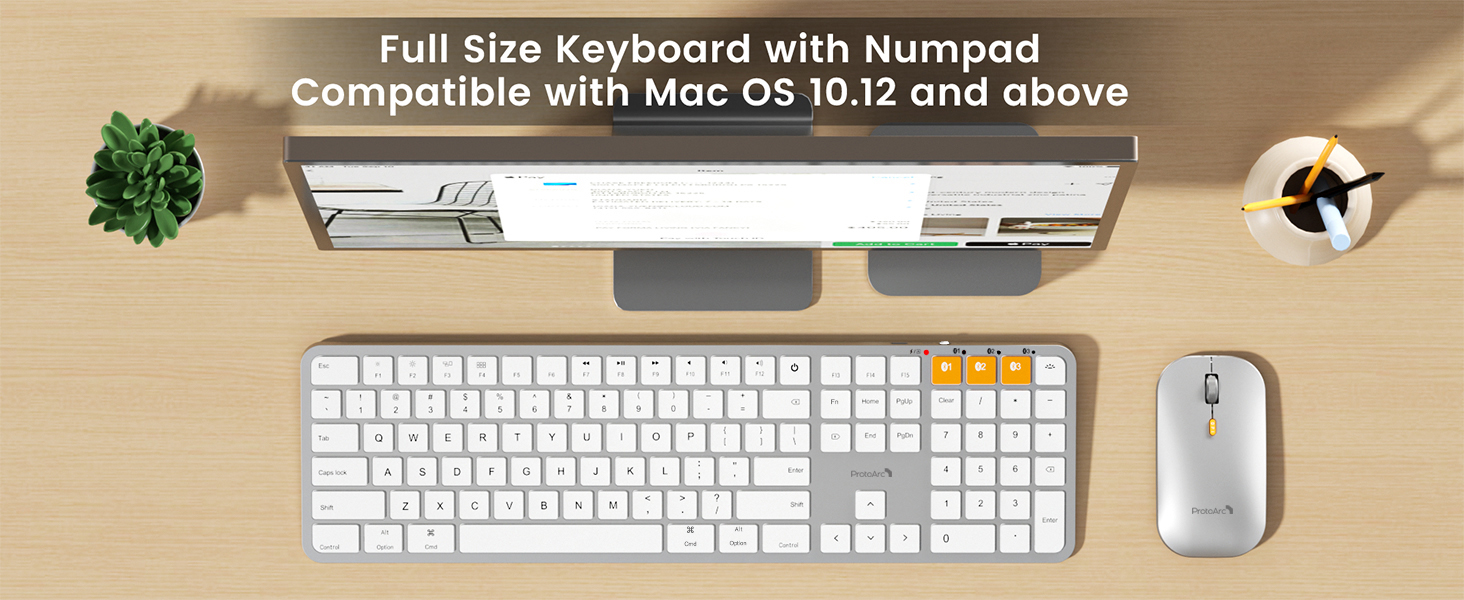
Discover the ProtoArc Full Size Keyboard with Numeric Keypad
Enhance your work efficiency with the full-size keyboard and mouse for Mac, but note that they may occupy more workspace than compact options. Before placing your order, we recommend measuring your desk dimensions to ensure a perfect fit for a seamless and comfortable setup
Seamlessly Switch Between Devices For Ultimate Productivity
Flat keyboard design, similar to the magic keyboard, for neutral wrist position, allowing you to hold your wrists level with your fingers while typing. This design minimizes the risk of discomfort and potential issues such as carpal tunnel syndrome that can arise from elevated or tilted keyboards
-
The keyboard/mouse cannot connect to your device
1.Ensure that the keyboard/mouse is fully charged.
2.Confirm that the keyboard/mouse is in the correct mode.
3.Delete the keyboard/mouse's Bluetooth pairing from your device's Bluetooth listing.
4.Repair the keyboard/mouse with your device.
-
Some keyboard keys do not work / Keyboard keys have typing delay / Keyboard keys repeat typing:
1. Ensure that the keyboard is fully charged.
2. Delete the keyboard's Bluetooth connection from your computer's Bluetooth connection history. After deleting the Bluetooth connection, restart your computer.
3. Re-pair the keyboard with your computer
-
Is KM100-A Bluetooth Keyboard compatible with Windows PCs?
No. This KM100-A keyboard and mouse set is designed exclusively for macOS 10.12 and above, iPadOS, and iOS. Device manufactured before 2013 or running macOS versions below 10.12 are not supported. It does not support Windows, Android, or Linux
-
Does this keyboard help with wrist pain or carpal tunnel?
Yes. Its flat, low-profile design (1.4cm height) promotes a neutral wrist position, reducing strain during long typing sessions. Many users with carpal tunnel syndrome feel less discomfort compared to traditional angled keyboards
-
After the device restart that required login, the keyboard and mouse wouldn't reconnect?
The reason is FileVault On Mac. To disable FileVault:
1. Go to System Settings/System Preferences 2. Click Privacy & Security 3. Click FileVault 4. Click the lock icon in the bottom left and enter your password. 5. Click Turn Off Encryption
-
How to Use Multimedia or F1-F12 function?
The Bluetooth keyboard comes preconfigured with multimedia functions. The F1-F12 functions need to be activated by pressing Fn + F1-F12 keys. Or you can set the keyboard to the F1-F12 functions by default on your Mac
-
How long does it take for the keyboard backlight to automatically turn off if not in use?
If the keyboard don't use for 2 minutes, the backlight will automatically turn off and can be awakened by pressing any key.
-
Does it come with a USB receiver or bluetooth adapter?
No. This set connects only via Bluetooth — no dongle, no port clogging. lt's designed for the clean wireless experience mac users expect
-
Can i connect and switch between multiple devices with the keyboard and mouse combo?
Yes. Our combo offers 3 bluetooth channels and supports bluetooth 5.1 version or above. Using our keyboard and mouse for multiple devices helps declutter your workspace by eliminating the need for separate peripherals for each device
-
How to know if the keyboard/mouse is at low battery?
When the battery is low, the low battery indicator light will start flashing in red until the keyboard/mouse is turned off. Low battery power can cause performance issues such as response delay, keys sticking and cursor drifting.
From the brand
-
Mission
At ProtoArc, our mission is to deliver innovative workspace solutions that enhance comfort, boost productivity, and foster overall wellness.
Vision
We believe that everyone deserves a workspace that not only meets their functional needs but also empowers them to thrive. Our vision is a world where work environments promote health, happiness, and high performance.
-
-
-
-
Product details
- Batteries : 1 Lithium Ion batteries required. (included)
- Product Dimensions : 14 x 42 x 2 cm; 500 g
- Manufacturer : ProtoArc
- ASIN : B0D4V2C5C3
- Item model number : KM100-A
- Country/Region of origin : China
- Customer Reviews:
Product information
Technical Details
Additional Information
| Batteries | 1 Lithium Ion batteries required. (included) |
|---|---|
| Date First Available | March 23 2025 |
| Customer Reviews |
4.0 out of 5 stars |
| 鶹 Rank |
Feedback
Product summary presents key product information
Keyboard shortcut
Shift
+
Alt
+
opt
+
D
Product Summary: ProtoArc Backlit Bluetooth Keyboard and Mouse for Mac, KM100-A Multi-Device Wireless Keyboard Mouse for Mac, Full Size Rechargeable for MacBook Pro/Air, iPhone, iPad, White Silver
From ProtoArc
About this Item
- Bluetooth Keyboard for Mac: Bluetooth keyboard and mouse for Apple resembles magic keyboard in full size layout with numeric keypad. Compatible with Mac OS 10.12 or later, for MacBook, MacBook Pro, MacBook Air, Mac Pro/Mini, iPad, or iPhone, supports Bluetooth 5.1 version or above. Note: KM100-A Keyboard is designed primarily for macOS and may not be fully compatible with Windows. The media keys and function keys don't work on Windows. Devices manufactured before 2013 and devices with Mac OS versions lower than 10.12 are not compatible
- Backlit illuminated Keys: This backlit wireless keyboard for Apple comes equipped with soft white LED backlighting and boasts three adjustable brightness levels (low-mid-high) to suit your individual needs. Perfect for use in dimly lit environments, the gentle illumination won't strain your eyes, and the brightness can be easily customized to your liking
- Switch Up To 3 Devices: Bluetooth keyboard mouse for Mac can connect to three different devices simultaneously through its triple Bluetooth channels. You can easily switch between the devices by clicking on the mode switch button. Note: Connection is established solely through Bluetooth. USB dongle is not included
- Responsive Keys and Quiet Typing: This keyboard boasts a responsive scissor switch, allowing for efficient and hushed typing. The low-profile design and soft-touch keys elevate the typing experience to a new level of fingertip comfort and The mouse features three adjustable DPI levels of 1000/1600/2400, providing you with customizable sensitivity options
- Rechargeable and Power Saving: The keyboard and mouse for Mac feature built-in rechargeable batteries, 1200mAh for keyboard, 300mAh for mouse. Additionally, if the keyboard is not used for 60min, it will enter sleep mode and can be awakened by pressing any key. Backlighting needs to be turned on again
- Flat Keyboard: ProtoArc keyboard for Mac is intentionally designed to be flat for neutral wrist position, allowing you to hold your wrists level with your fingers while typing. This design minimizes the risk of discomfort and potential issues such as carpal tunnel syndrome
- Notice: Utilize a full-size keyboard and mouse to enhance your work efficiency for Mac. However, please be aware that they may require more desk space compared to compact options
Product description
Feedback
Did you find this product summary feature useful?