| Battery description | Lithium |
|---|---|
| Number of batteries | 1 CR2 batteries required. (included) |
| Voltage | 5 Volts (DC) |
| Control method | App |
| Noise level | 85 Decibels |
| Mounting type | Tabletop Mount |
| Sensor technology | Power Sensor |
| UPC | 752574242316 |
| Item weight | 0.13 Kilograms |
| Manufacturer | Risinglink |
| Part Number | pd201w |
| Product Dimensions | 6.1 x 6.1 x 2.03 cm; 132 g |
| Batteries | 1 CR2 batteries required. (included) |
| Item model number | pd201w |
| Item Package Quantity | 1 |
| Included Components | Power Failure Detector, USB charger, USB Cable |
| Batteries Included? | Yes |
| Batteries Required? | Yes |
| Battery Cell Type | Lithium Metal |
| Battery Description | Lithium |
| Item Weight | 132 g |

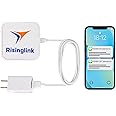
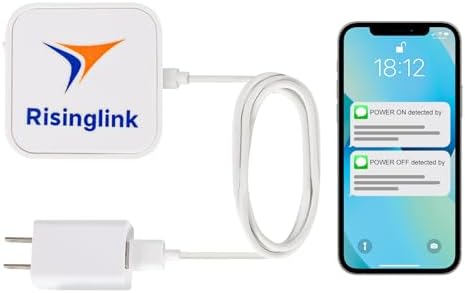
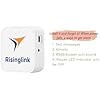
Power Failure Alarm, Power Failure Detector, with Email, Text Message, and Audio Alerts(2nd Generation)
Purchase options and add-ons
| Colour | Green |
| Brand | Risinglink |
| Power source | Corded Electric |
| Compatible devices | Smartphone, Tablet, Computer, WiFi-enabled IoT devices |
| Product Dimensions | 6.1L x 6.1W x 2H Centimetres |
About this item
- Easy Setup: Say goodbye to cumbersome hubs and apps. Simply connect the device to your Wi-Fi and enjoy uninterrupted monitoring without any monthly fees or subscriptions. (Note: Only 2.4GHz WiFi supported. However, most WiFi routers nowadays could support both 2.4 and 5 GHz.)
- Prompt Detection: Our device identifies power outage within 3 seconds and alerts you instantly. Experience faster responsiveness than many competitors that require much longer to recognize a power outage. Be in the know of even short power interruptions, enabling you to act preventively.
- Enhanced Alert Reliability: Risinglink allows you to register 2 phone numbers and 4 email addresses per device. Be cautious of competitors claiming to support multiple phones; they actually restrict you to just a single phone number for the direct text alert and rely on potentially unreliable Email-to-SMS services for the 2nd phone. If you and an additional contact, such as your spouse or coworker, both need to receive timely and reliable text alerts, Risinglink is the right choice for you!
- Optimized Text Alerts: We believe in timely alerts. Unlike competitors who impose intervals or monthly caps on direct text alerts, Risinglink ensures you receive every text alert promptly. If your outlet experiences multiple trips in a short period, other systems might only send the initial text alerts, potentially delaying or missing the most critical last power outage alert. With Risinglink, there are no such hidden limitations, ensuring you stay fully informed.
- Comprehensive Notifications: Not just power outages! Receive alerts for power restoration, low battery, and device offline (Wi-Fi loss). Unlike some brands that only inform about power status, our device ensures you're never in the dark about battery health or device connectivity.
- Audible Security: An 85dB alarm sounds during power failures, independent of Wi-Fi. If you prefer a quieter environment, this feature can be disabled during setup.
- Durable Backup Battery: Our device is built with an internal backup battery designed to last over 5 years, considering average power outages and maintaining a stable wifi connection. When not relying on the backup, the device seamlessly draws power from the A/C outlet it monitors.
- Optimal Performance Note: Our device is engineered to promptly keep you informed. To achieve this, it requires just a few seconds of active Wi-Fi and internet connection after a power loss to dispatch alerts.
Frequently bought together

Videos for similar products
Product Description
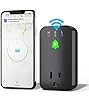
This smart device diligently monitors your GFCI or outlet for power failures around the clock. Powered by a USB charger and equipped with an internal backup battery, it ensures continuous operation and sends out alerts via Wi-Fi the moment a power interruption is detected, keeping you connected and aware, anytime, anywhere.
- When the device is connected to a power source, it operates via the included USB charger, indicated by the illumination of a green LED light.
- In the event of a power outage, the device will automatically switch to its internal battery, which is signified by the green LED turning off. Simultaneously, you will receive an immediate power-off alert.
- Alert/notification via email is unlimited and free permanently. 300 free text messages come with the purchase, which can cover more than 5 years for most users, and can be renewed upon request at no additional cost after the 5-year period. Only US/Canada phones are supported currently.
The alert/notification will be sent to you via Email/Text message timely, when:
- Device startup
- Power failure
- Power back on
- Low internal backup battery
- WiFi connection lost over 24h
- Setting changed(via email only)
Very easy and straight forward to set up the device
Connect the USB charger to the outlet to activate the green LED. Press the white switch to power up the device, and you will notice the red LED begin to flash. Quickly press the black switch within 5 seconds to initiate setup mode.
When the red LED ceases flashing and remains lit, the device is now functioning as a temporary Wi-Fi hotspot for setup purposes. Use your smartphone, tablet, or computer to connect to this Wi-Fi network.
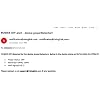
Launch a web browser on your device, enter the provided setup webpage address, and complete the single setup form. Once you click "Save and Restart," a confirmation email will be sent to you. The device will now continuously monitor your power status 24/7.
Some other notes before your purchase:
- Wi-Fi and Internet Service Required: This device is designed to quickly alert you in the event of a power failure, provided that the Wi-Fi connection and internet service continue for a few seconds post-power loss. It will attempt to send power failure alerts at pre-set intervals multiple times. However, to preserve the internal battery, it will not do so indefinitely. In the event of a whole house power outage where Wi-Fi is lost simultaneously, the device may not be able to send an alert. To ensure you still receive these important alerts, we suggest the use of a Uninterruptible Power Supply (UPS) for your Wi-Fi router. A UPS will maintain power to your router and keep your internet connection live for a period, allowing the device to communicate the power failure alert to you.
- Alert via Text Message without Subscription: Users can register two mobile phones to receive instant alerts via text messages. We cover the cost of each text message sent to the cell carriers, ensuring reliable and swift delivery. Included with each device are 300 free text messages, typically enough to last over 5 years for most users. These can be renewed upon request at no additional cost after the 5-year period. And users will get reminder when the text message quota drops down to 20. Currently, we support phone numbers from the US and Canada only.
- 'Device Offline' Alert for Connection Loss: The "device offline" alert notifies you when the device loses its connection with our cloud server. This alert is typically triggered by a loss of WiFi connection or an internet service outage. Please note that the "device offline" alert is not generated in real-time, unlike the "power off" (power failure) alert.
We Hear You - Addressing Your Concerns:
- "Useless - Power went out over night. No audible alarm was made, no txt message, no email": After investigating the issue, we found that the backup battery of the device had been at 0% before the power outage occurred. Our system had sent a 0% battery report to the user, but unfortunately, the battery was not replaced in time. As a result, when the power outage occurred, the device shut down due to the depleted battery. This explains why no audible alarm, text message, or email notification was generated. As designed, when the battery level drops from a higher level to 20%, a "low battery" alert is sent to prompt timely replacement.
- "Not reliable, randomly decide if to report or skip": The customer reported that our device takes more than 10 seconds to detect a power outage and that alerts are not being sent consistently. This is not typical behavior and does not align with the device’s design. Normally, the power outage should be detected within 3 seconds, with alerts sent immediately. Based on the description, it seems likely that a different power adapter is being used instead of the one provided with the device. We've encountered similar situations where users' third-party adapters contain capacitors that retain power for several seconds, causing delayed detection or failure to detect.
- "Never worked at all": Unfortunately, we didn't have the opportunity to assist this user directly and ascertain the precise cause of their issue. However, many users report that setting up the device is straightforward when the user manual is followed closely. From our comprehensive support experience, we’ve identified two common obstacles to Wi-Fi connectivity: inputting incorrect Wi-Fi credentials and trying to connect to a 5GHz network. Our device exclusively supports 2.4GHz networks. Modern routers typically accommodate both 2.4GHz and 5GHz frequencies, so ensuring your router has 2.4GHz enabled can typically resolve connectivity problems.
- "No App!": Considering these sophisticated features, we've determined that a dedicated mobile app is unnecessary. Mobile apps can drain both the battery and the memory resources on your smartphone. Instead, we've established a comprehensive alert system that keeps you promptly and efficiently informed of essential notifications, negating the need for extra software on your phone. This approach keeps our technology simple, direct, and user-friendly. We understand this design choice might not meet every user's expectations, which is why we're here to listen and help.
- "No Power Off alerts for me": After investigating this customer's case, we found that the device had been in use for over two years and had successfully detected and reported multiple power outages. However, around two months ago, the device went offline. No action was taken despite a "device offline" alert being sent. Just like a smartphone cannot make calls during a network outage or with a dead battery, the Risinglink device also requires power and Wi-Fi to send out alerts. In this case, the missed "power off" alerts were due to the device being offline, not a defect.
Product information
Technical Details
Additional Information
| ASIN | B09XJZ77BV |
|---|---|
| Customer Reviews |
4.4 out of 5 stars |
| 鶹 Rank |
|
| Date First Available | April 15 2022 |