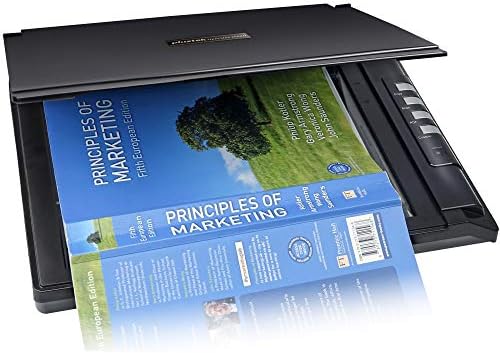
| Brand | Plustek |
|---|---|
| Model | PLUS-OS-2680H |
| Model Name | OpticSlim 2680h |
| Part Number | PLUS-OS-2680H |
| Scanner Resolution | 1200 dpi |
| Light Source Type | LED |
| Color Screen | Yes |
| Horizontal resolution | 1200 Dots Per Inch |
| Voltage | 24 Volts |
| Wattage | 15 watts |
| Batteries included | No |
| Batteries Required | No |
| Connector Type | USB |
| Media Type | USB |
| Item model number | PLUS-OS-2680H |
| Product Dimensions | 41.4 x 3.56 x 26.42 cm; 1.8 kg |
| ASIN | B06XCQVV4S |

- 2 VIDEOS
OS2680H - installation tutorial videoPlustek Estore
Image Unavailable
Image not available for
Colour:
Colour:
-

-
-
- To view this video, download
Frequently bought together
This item: Plustek OpticSilm 2700 - High Speed Flatbed Scanner, 3sec Fast scan Speeds. Compact Design for Home and Home Office. Windows and Mac Support
$149.00
Get it by Wednesday, Feb 11
In Stock
+
$8.79
Get it by Monday, Feb 9
In Stock
Total price:Ìý$00
To see our price, add these items to your cart.
Choose items to buy together.
Videos for similar products
Product Description

-

High Speed Scanning
With 3 seconds high speed scanning, easily digitize documents, receipts, sketchs and phtographs.
-

Compact and Transportable
The OpticSlim 2700 won't take up a lot of your desktop space and weighs less than 2 kgs.
-

Removable Lid for Oversize Scanning
The OpticSlim 2700 removable lid accommodates bulky books or documents.
-

One-Touch Scanning Buttons
Just press a button and your document is scanned and saved to the destination of your choice.
-

Powerful OCR Recognition
OCR technology extracts data from images and converts to Word, Excel and searchable PDF easily.
-

View scanned images
With the preview function, you can make adjustments without rescan the document multiple times.
-

Easy operation
Select a button to set a format & destination. Preconfigure workflows to streamline ​scanning steps.
-

Easy see effects​
Image Express enables to make quick changes and instant adjustments before exporting your images.​
-

Image Processing
With image processing techniques, you can easily adjust images and enhance the quality
-

Upload to Cloud/FTP
Easily upload images to Dropbox or Google drive. Access your files from anywhere at anytime.​
Easy operation to improve work efficiency
Key Feature

1
2
3
4
5
6
Product information
Additional Information
| Date First Available | Oct. 24 2015 |
|---|---|
| Customer Reviews |
4.0 out of 5 stars |
| Â鶹Çø Rank |
|
| Is discontinued by manufacturer | No |