Young Sherlock. Coming soon. Prime.
To see product details, add this item to your cart. You can always remove it later.
Shipper / Seller
luqeeg
Shipper / Seller
Returns
Eligible for Return or Refund within 30 days of receipt
This item can be returned in its original condition for a full refund within 30 days of receipt. You may receive a partial or no refund on used, damaged or materially different returns.
Payment
Secure transaction
Your transaction is secure
We work hard to protect your security and privacy. Our payment security system encrypts your information during transmission. We don’t share your credit card details with third-party sellers, and we don’t sell your information to others. Learn more
Added to

Sorry, there was a problem.

There was an error retrieving your wish lists. Please try again.

Sorry, there was a problem.

List unavailable.
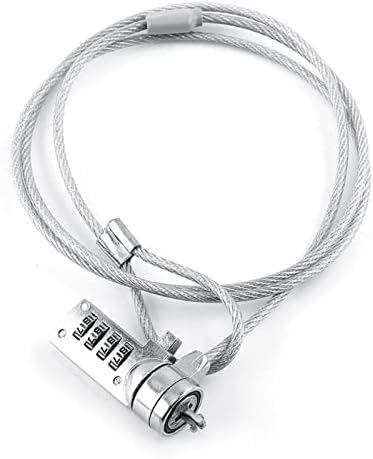
  • Laptop Locking Cable, Digit Password Lock, 110cm 4 Digit Password Combination Security Lock Cable Laptop Theft Deterrent Security Locks Computer Lock for Notebook PC

Laptop Locking Cable, Digit Password Lock, 110cm 4 Digit Password Combination Security Lock Cable Laptop Theft Deterrent Security Locks Computer Lock for Notebook PC

4.6 out of 5 stars (2)

To see product details, add this item to your cart. You can always remove it later.
if you qualify qualifying items | Terms

Purchase options and add-ons

  • KEYLESS LOCK - This cable lock features a 4-digit resettable function, allowing for up to 10,000 unique combinations. You can set your own code, providing maximum security without the need for keys. It's easy to remember and eliminates the risk of losing keys!
  • STRONG STEEL WIRE ROPE - The plated steel cable, combined with the alloy steel lock body, provides outstanding fortitude and stability. This lock acts as an ideal theft deterrent, offering superior strength to resist tampering and ensure the safety of your valuables.
  • WIDE COMPATIBILITY - Compatible with all notebooks, desktops, and docking stations with built-in standard security locking slot holes, this lock offers wide compatibility. Its push-to-lock function allows for easy one-handed use, making it highly convenient for everyday use.
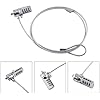
  • PASSWORD RESET INSTRUCTIONS - The original password of this lock is 0000. To unlock, enter the password and hold the square button. In the unlocked state, use a small tool (such as a small screwdriver or key) to press the round button at the bottom of the lock until it is fully pressed. Then, change the password as desired. Remember not to release the round button until the password change is complete, ensuring a secure and customized code.
  • SATISFACTION GUARANTEED - If there are any product problems , you can us by email or other way. We will do our best to answer your questions. Customer satisfaction is our aim.
Brief content visible, double tap to read full content.
Full content visible, double tap to read brief content.

Videos for similar products


Product Description

1
2
5

How To Set Password

3
4

Product information

Technical Details

Manufacturer ‎Luqeeg
Part Number ‎Luqeegpsr5xk7ozb
Parcel Dimensions ‎20.29 x 14.1 x 2.49 cm; 159 g
Item model number ‎Luqeegpsr5xk7ozb
Power Source ‎Hardwire
Batteries Included? ‎No
Batteries Required? ‎No
Item Weight ‎159 g
Country of origin ‎China

Additional Information

ASIN B0C7R92P6B
Customer Reviews
4.6 out of 5 stars (2)

4.6 out of 5 stars
鶹 Rank
Date First Available June 12 2023

Feedback

Laptop Locking Cable, Digit Password Lock, 110cm 4 Digit Password Combination Security Lock Cable Laptop Theft Deterrent Security Locks Computer Lock for Notebook PC


Found a lower price? Let us know. Although we can't match every price reported, we'll use your feedback to ensure that our prices remain competitive.

Where did you see a lower price?

Price Availability
/
/
/
/
Please sign in to provide feedback.

From the brand

|
Delivery Fri, Feb 27

Product Summary: Laptop Locking Cable, Digit Password Lock, 110cm 4 Digit Password Combination Security Lock Cable Laptop Theft Deterrent Security Locks Computer Lock for Notebook PC

From Luqeeg

4.6 out of 5 stars, 2 ratings

Customer reviews

Price

No featured offers available

Other sellers

Other sellers

About this Item

  • KEYLESS LOCK - This cable lock features a 4-digit resettable function, allowing for up to 10,000 unique combinations. You can set your own code, providing maximum security without the need for keys. It's easy to remember and eliminates the risk of losing keys!
  • STRONG STEEL WIRE ROPE - The plated steel cable, combined with the alloy steel lock body, provides outstanding fortitude and stability. This lock acts as an ideal theft deterrent, offering superior strength to resist tampering and ensure the safety of your valuables.
  • WIDE COMPATIBILITY - Compatible with all notebooks, desktops, and docking stations with built-in standard security locking slot holes, this lock offers wide compatibility. Its push-to-lock function allows for easy one-handed use, making it highly convenient for everyday use.
  • PASSWORD RESET INSTRUCTIONS - The original password of this lock is 0000. To unlock, enter the password and hold the square button. In the unlocked state, use a small tool (such as a small screwdriver or key) to press the round button at the bottom of the lock until it is fully pressed. Then, change the password as desired. Remember not to release the round button until the password change is complete, ensuring a secure and customized code.
  • SATISFACTION GUARANTEED - If there are any product problems , you can us by email or other way. We will do our best to answer your questions. Customer satisfaction is our aim.

Product description

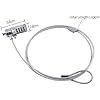
Specification: Material: Plated steel, alloy steel, ABS Color: Silver Length: 110cm / 43.3inch Package Weight: 107g Quantity: 1pc Fitments: Fit almost all laptop (Except some mini laptop with small keyhole) How To Set Password: 1. The original password is 0000, enter the password and hold the square button to unlock. 2. Change the password: In the unlocked state, use a small tool (such as a small screwdriver, key, etc.) to press the round button at the bottom of the lock (need to gently press till the end); Change the password; Do not loosen the round button until the password is totally changed. Package included: 1 x Notebook Security Lock Note: 1. Please allow 1-3cm error due to manual measurement. Thanks for your understanding. 2. Monitors are not calibrated same, item color displayed in photos may be showing slightly different from the real object. Please take the real one as standard.

Feedback

Did you find this product summary feature useful?

Thank you for your feedback
Thank you for your feedback. You selected “Yes, it is useful”
Thank you for your feedback. You selected “No, it is not useful”
Product summary presents key information. Close to see all product details.