-
-
-
-
-
-
-
5 VIDEOS -
Image Unavailable
Colour:
-
-
-
- To view this video, download
PXN CB1 Gaming Button Box ¨C Sim Drive Control with 19 Buttons (9 Types), 30 Programmable Options, RGB Backlight, USB ¨C Compatible with Windows PC ¨C For Racing, Truck, Farming & Flight Simulators
Purchase options and add-ons
About this item
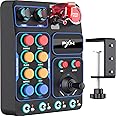
- Wide Compatibility: The PXN CB1 Racing Button Box is compatible with PC and the PXN V9 GEN2 steering wheel, featuring plug-and-play functionality that supports a variety of popular racing simulators. It connects seamlessly with Assetto Corsa, iRacing, Project CARS, Euro Truck Simulator 2, and American Truck Simulator, ensuring you can maximize its features and significantly enhance your gaming experience across different platforms.
- 30 Programmable Multifunction Buttons: The PXN CB1 comes equipped with 30 programmable buttons for personalized control. Whether you need to shift gears, navigate menus, or execute complex commands, you can configure each button to suit your preferences, providing greater flexibility and control during gameplay.
- Multiple Mounting Options: Designed for easy installation, the PXN CB1 features a straightforward setup. The button box mount can be securely attached to your gaming desk or any other surface, accommodating thicknesses of up to 7 cm. It can also be installed on monitor stands or any compatible screw holes, simplifying the installation process and getting you into the action quickly.
- Durable Premium Materials: Constructed from high-quality ABS resin, the PXN CB1 is lightweight, heat-resistant, and durable. This material ensures stability and longevity during extended use, maintaining outstanding performance even during intense gaming sessions.
- Versatile RGB Lighting Control: The knob allows you to manually switch between seven lighting effects. When connected to the racing base, you can customize additional colors from the color palette, creating an immersive racing atmosphere. It also supports adjustments for both lighting color and brightness.
- Linked Toggle Switch: The linked toggle switch features a one-button start/stop function, with metal contacts that provide excellent conductivity and durability. This design simulates a real racing experience by allowing you to control the engine power on and off with ease.
Frequently bought together
Customers who bought this item also bought
Shkalacar USB Gearshift Knob Truck Simulator Shifter, Gearshift Shifter Knob Replacement for Logitech G29 G27 G25 G920,Gearshift Knob for ATS & ETS2 Games AI PCShkalacarWindowsFREE Shipping by Âé¶¹ÇøGet it by Tuesday, Dec 16
Universal PC USB Handbrake Bracket FOR 16bit SIM for Racing Games G25/27/29/920/923 T500 Universal ONLY BRACKET ONLY CLAMPFREE Shipping by Âé¶¹ÇøGet it by Tuesday, Dec 16
SIMPUSH Universal Adjustable Phone Holder Mount Stand Compatible with MOZA R5 R3 R9 R12 Base - Sturdy Clamp, Easy InstallFREE Shipping by Âé¶¹ÇøGet it by Wednesday, Dec 24
Next Level Racing HF8 - Haptic Feedback Gaming Pad (NLR-G001)Next Level RacingWindowsFREE Shipping by Âé¶¹ÇøGet it by Sunday, Dec 21
Brand in this category on Âé¶¹Çø
Product details
- Parcel Dimensions : 24.41 x 23.09 x 12.19 cm; 544.31 g
- Release date : Oct. 23 2024
- Subtitles: : English
- Manufacturer : PXN
- ASIN : B0DKNW88FN
- Âé¶¹Çø Rank: #2,368 in Video Games (See Top 100 in Video Games)
- #9 in PC Flight Controllers
- #15 in PC Steering Wheels & Pedals
- Customer Reviews:
Product Description
Applicable Scenarios and Games
The PXN CB1 is ideal for simulation enthusiasts, supporting a wide range of games:
£¨Note£ºThis product is compatible with PC only.£©
- Racing Simulators:
Game Examples: iRacing, Assetto Corsa, Assetto Corsa Competizione, Project CARS 2, Forza Motorsport 7, Forza Horizon 4/5, F1 2023, Dirt Rally 2.0, rFactor 2, RaceRoom Racing Experience, Automobilista 2, SnowRunner, BeamNG.drive
- Truck Simulators:
Game Examples: Euro Truck Simulator 2, American Truck Simulator, Truck Driver
- Flight Simulators:
Game Examples: Microsoft Flight Simulator, X-Plane 12, Aerofly FS 2023, DCS World
- Farming Simulators:
Game Examples: Farming Simulator 25, Farming Simulator 22, Pure Farming 2018, Cattle and Crops
How to Use PXN CB1 on PC
1.Connect the Device
USB: Simply connect the CB1 to your PC with the provided USB cable.
C2C (Optional): For the V9 GEN2 wheel, use a C2C cable to connect it to the CB1. Ensure the wheel is in D-INPUT mode.
2.Configure in Game
Launch your game (iRacing, Euro Truck Simulator, Microsoft Flight Simulator).
Go to Control Settings and map buttons and switches to functions like headlights, engine start, wipers, or traction control.
Save your changes and test each button to ensure it¡¯s working correctly.
- Tips:
For additional installation and setup assistance, refer to the user manuals or PXN support resources (search for E-PXN via your browser).