



| Brand | Logitech |
|---|---|
| Series | Logitech MX Master 4 |
| Item model number | 910-007574 |
| Hardware Platform | Linux, Mac, PC |
| Operating System | Android, Chrome OS, Linux, Windows, iPadOS, macOS |
| Product Dimensions | 16.51 x 13.97 x 0.25 cm; 281 g |
| Item dimensions L x W x H | 16.5 x 14 x 0.3 Centimetres |
| Colour | White Silver |
| Power Source | Battery Powered |
| Batteries | 1 Nonstandard Battery batteries required. (included) |

Consider these alternative items
- VIDEO
Logitech Mx Master 4 Product VideoLogitech Canada
Image Unavailable
Image not available for
Colour:
Colour:
-

-
-
- To view this video, download
Product information
Additional Information
| ASIN | B0FC5C7VCJ |
|---|---|
| Customer Reviews |
4.3 out of 5 stars |
| Â鶹Çø Rank |
|
| Date First Available | Sept. 30 2025 |
| Manufacturer | Logitech |
Warranty & Support
Feedback

Featured items you may like
Page 1 of 1 Start again
- Logitech MX Master 4 for Mac, Ergonomic Bluetooth Mouse with Advanced Performance Haptic Feedback, Ultra-Fast Scrolling, USB-C Charging, MacOS, iPadOS, Windows - Space BlackFREE Shipping by Â鶹ÇøGet it by Sunday, Dec 28
- Â鶹Çø Basics Full-Size Ergonomic Wireless PC Mouse with Fast Scrolling19% offLimited-time dealGet it Dec 30 - Jan 4
- Logitech MX Master 4, Ergonomic Wireless Mouse with Advanced Performance Haptic Feedback, Ultra-Fast Scrolling, USB-C Charging, Bluetooth, Windows, MacOS - Pale GreyFREE Shipping by Â鶹ÇøGet it by Tuesday, Dec 30

From the manufacturer
-

Designed for Mac
MX Master 4 for Mac optimized for macOS and iPadOS, offers programmable functions for macOS via Logi Options+ (1), and matching finishes for your Apple setup.
(1) Requires Logi Options+ app
-

MX + Creative Cloud
Get a complimentary 1-month Adobe Creative Cloud subscription with your purchase of MX Master 4 for Mac.
-

Immerse yourself with the Haptic Sense Panel
Experience tactile feedback, offering precision and customizable control for an immersive workflow.
-

Personalize haptic feedback
with Logi Options+ (1). Assign haptic feedback to the Actions Ring, Smart Actions and more. Use plugins for 3rd party apps and adjust feedback intensity.
-

Save up to 33% of time with Actions Ring (2)
Your favorite tools, shortcuts, and actions at the tip of your cursor through a dynamic overlay that adapts to the app you’re using.
(2) Logitech Ergo Lab study (2025)
-

Reduce mouse movements by up to 63% (2)
Streamline navigation by cutting time from searching menus for shortcuts, tools, and actions to stay immersed in your workflow.
-

Create shortcuts that work for you
Tailor your Actions Ring with plugins for third-party apps and personalized shortcuts, tools, and actions designed for your workflows (1).
-

Scroll 1,000 lines per second
With the MagSpeed scroll wheel. 87% more precision(3) and 90% more speed(4) with its 2 modes: ratchet & hyper fast scroll.
(3)Compared to Logitech Master 2S mouse
(4)Compared to regular Logitech mouse
-

Track on any surface, even glass (5)
with an 8K DPI sensor with customizable sensitivity (1) for precision on large screens. Logitech’s most accurate sensor is 5x more precise than a basic mouse.
(5) 4 mm minimum glass thickness.
-

Experience 2x times more powerful connectivity (7)
For faster, more reliable performance. Powered by an advanced radio chip, optimized antenna placement, and a new USB-C dongle (not included).
(7) Compared to MX Master 3S
-

Deeper flow with 90% less click noise (8)
Quiet clicks deliver a satisfying feel – but with 90% less click noise (8). You’ll get the same performance and precision you’ve come to expect.
(8) Compared to MX Master 3
-

Customize your workflow with Logi Options+
using shortcuts and app presets for editing, designing, or coding. Automate workflows with Smart Actions and expand functionality through powerful plugins.
-

More comfort deeper focus
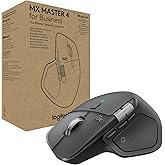
MX Master 4’s tilt angle supports natural arm posture, and intuitive button placement reduces strain — keeping you comfortable and focused for longer.
-

USB-C quick charging, long lasting
Stays powered for up to 70 days on a full charge – and gets 3 hours of use from a 1-minute quick charge (10). Work while you recharge with an USB-C cable (not included).
-

Work seamlessly across Apple devices
Connect with up to 3 devices and switch between them via Actions Ring or Easy-switch buttons. Transfer files across devices seamlessly with Logi Options+.
-

Be more productive with MX Mechanical Mini for Mac
Next-level typing experience with fluid mechanical switches, smart illumination and matching colorways. The keyboard follows the mouse automatically when switching devices.
-

Get MX Brio Ultra HD webcam for sharper calls
Level up calls with 4k video, streaming optimization and adjustable field of view settings. Optimized for streaming with a wide, adjustable field of view.
-

Get MX Creative Console
Access tools, shortcuts, and actions effortlessly with the customizable LCD display keypad and take control with precise tactile analog controls on the wireless dialpad.
-

Get Combo Touch for iPad Pro
The keyboard case that enables new levels of versatility. Type, view, sketch, and read with iPad Pro — all while keeping the front, back, and corners snug and protected.


