To see product details, add this item to your cart. You can always remove it later.
Ships from
Ships from
Sold by
Returns
Eligible for Return, Refund or Replacement within 30 days of receipt
This item can be returned in its original condition for a full refund or replacement within 30 days of receipt.
Payment
Secure transaction
Your transaction is secure
We work hard to protect your security and privacy. Our payment security system encrypts your information during transmission. We don’t share your credit card details with third-party sellers, and we don’t sell your information to others. Learn more
Added to

Sorry, there was a problem.

There was an error retrieving your wish lists. Please try again.

Sorry, there was a problem.

List unavailable.
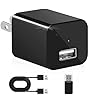
phone charger cameraLIZVIE
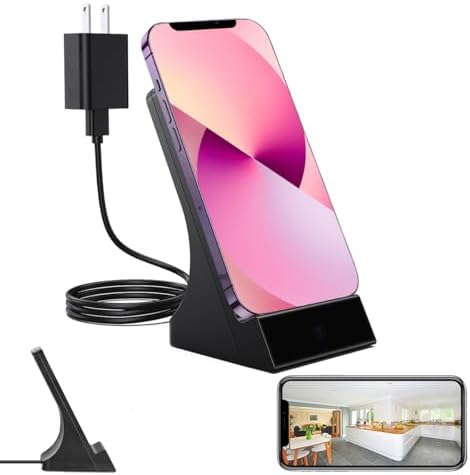
  • LIZVIE Phone Charger, 1080P HD Night Vision/Motion Detection/Remote Control/SD Storage Loop Surveillance, iPhone Android Support.
  • To view this video, download
  • VIDEO

LIZVIE Phone Charger, 1080P HD Night Vision/Motion Detection/Remote Control/SD Storage Loop Surveillance, iPhone Android Support.

1.0 out of 5 stars (1)

To see product details, add this item to your cart. You can always remove it later.

Purchase options and add-ons

About this item

  • Wireless charge & Invisible lens: Three layers of optical lens, Its camouflage makes it hard for the human eye to see that this is a hidden camera. This phone charger spy camera can charge phones that support wireless charging at any time.
  • Day Night & Motion Detect:1080P HD lens, built-in 5 infrared lights. camera can be set to automatically open the night vision mode, with the motion detection function, when the screen appears suspicious, the APP will send an alarm notification.
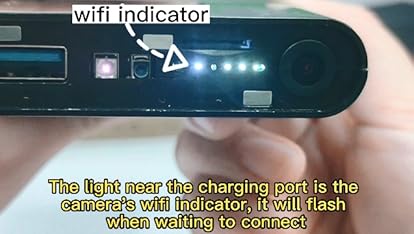
  • Dual-Mode & Loop Storage:Camera phone charger supports Bluetooth and 2.4G WiFi connection. The device paired with the home router can be accessed at any time through the APP. SD card(Not included) storage supports new files overwriting old files.
  • Cross-Device & Multi-User:Share access with family or team. One phone connects multiple cameras, or multiple phones view one hidden camera. See inside your baby home or office with hidden spy camera.
  • Privacy Guard + Tech Support:You can set a unique password for your security camera, and no one can hack your camera. We provide technical support. If you need help, please contact our support team.
Brief content visible, double tap to read full content.
Full content visible, double tap to read brief content.

Videos for similar products

Product information

Technical Details

Included components ‎Case
Wireless communication technology ‎Wi-Fi
Manufacturer ‎Shenzhen Goodflys Technology Co.,Ltd
Parcel Dimensions ‎17 x 9 x 7.1 cm; 290.3 g
Item model number ‎GF-Q200
Special Features ‎HD Resolution
Batteries Required? ‎No
Item Weight ‎290 g

Additional Information

ASIN B0F2SZX2DW
Customer Reviews
1.0 out of 5 stars (1)

1.0 out of 5 stars
鶹 Rank
Date First Available March 28 2025

Feedback

LIZVIE Phone Charger, 1080P HD Night Vision/Motion Detection/Remote Control/SD Storage Loop Surveillance, iPhone Android Support.


Found a lower price? Let us know. Although we can't match every price reported, we'll use your feedback to ensure that our prices remain competitive.

Where did you see a lower price?

Price Availability
/
/
/
/
Please sign in to provide feedback.

Product Description

hideen camera spy camwra
hidden camera
hidden camera

How to Use (Quick Setup Guide)

Step 1: Remove the Protective Film

Before use, gently peel off the protective film covering the lens to ensure a clear image.

Step 2: Power On the Device

Plug the device into a outlet and wait 30–60 seconds for it to boot up. The device will emit a wireless network signal named “BLink-XXXX.”

Step 3: Connect via Phone’s WiFi Settings

On your phone, open WiFi settings, find and connect to “BLink-XXXX”. Default password: 0123456789. “No Internet” message is normal — just ensure the connection is successful.

Step 4: Open the App

Launch the Lizvie Pro app. The device will appear automatically and take you to the viewing screen.

Step 5: Connect to Home WiFi

After about 10 seconds, a prompt will appear. Select your 2.4GHz home WiFi, enter the password, and complete the setup.

Important: Pairing with your home router is required for remote viewing functionality.(If no prompt appears, go to Settings > Network Information in the app.)

Step 6: Ready to Use

You can now access the device remotely, receive motion alerts, and manage settings via your phone.