Beast Games. Strong. Smart. Coming soon. Prime.
To see product details, add this item to your cart. You can always remove it later.
Ships from
Ships from
Sold by
Returns
Returnable until 31 Jan 2026
For the 2025 holiday season, eligible items purchased between 1 November and 31 December 2025 can be returned until 31 January 2026.
Payment
Secure transaction
Your transaction is secure
We work hard to protect your security and privacy. Our payment security system encrypts your information during transmission. We don’t share your credit card details with third-party sellers, and we don’t sell your information to others. Learn more
Support
Product support included
What's product support?
In the event that your product does not work as expected or you need help using it, 鶹 offers free product support. To access this option, go to Your Orders and choose Get product support.
Added to

Sorry, there was a problem.

There was an error retrieving your wish lists. Please try again.

Sorry, there was a problem.

List unavailable.
  • VIDEO
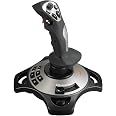
PC Flight Joystick with Vibration Function and Throttle ControlFengying
  • PC Joystick, USB Gaming Flight Simulator Game Controller with Vibration Function and Throttle Control, PXN 2113 Wired Gamepad Flight Sim Stick for Windows PC/Computer
  • To view this video, download

PC Joystick, USB Gaming Flight Simulator Game Controller with Vibration Function and Throttle Control, PXN 2113 Wired Gamepad Flight Sim Stick for Windows PC/Computer

3.8 out of 5 stars (620)

To see product details, add this item to your cart. You can always remove it later.

Purchase options and add-ons

About this item

  • 【With Vibration Function】PXN2113 gaming joystick for pc will never let you down with realistic fly experience. Compatible with many flight joystick pc games: World of Tanks,World of Warplanes,War Thunder,Assault Horizon,Microsoft Flight Simulator,X Plane 10,etc. Vibration Switch is at the bottom,please switch to“ON”.If less than 20%,you will almost not feel the vibration.Please set the vibration strength in the driver to 50% or higher. This flight stick is for PC/Computer and compatible with Windows 7/8/10/11 (Mac/Apple computers/Apple devices/PS3/PS4/PS5/Xbox One/Switch not supported).
  • 【Immersive Fly Experience for Your Flying Dream】You can make the right moves with rapid fire trigger,4 axis controlling,8-Way hat switch and 12 programmable buttons of this computer joystick for gaming pc flight.Advanced software,Support various custom adjustment and keyboard mapping,enjoy exciting joystick flight simulator controls for pc games now! Not only a game, but also a dream of flying!
  • 【Comfortable to Hold, Agile to Operate】This usb joystick for pc is with a solid and smooth feeling,very comfortable.Four power-grip suction cups at the bottom of this pc joystick for flight simulator pc games,they can fix firmly and easily when the table is smooth.Precise throttle control,Ergonomic design,Single hand control full function with this flight joystick for pc games.(Note:Force Feedback/Minecraft/Asphalt 8/Ace Combat 7 not supported).
  • 【Quality Customer Service】This Flight simulation pc controller with Friendly and Easy-to-Reach Customer Service.Please turn on your PC first and then connect with this joystick.If plug in joystick before starting PC,some computers may not identify this joystick pc flight simulator.No need to install the driver and can play pc games directly.If you need English driver of PXN-2113PRO,please find the download link in "Installation" section of the manual or visit official website: Home – Support.The drive has the function of testing and calibrating the pc flight joystick.If any problem,please contact us directly(Contact Seller),Fengying will reply within 12 hours.
  • 【Setup Guide for Microsoft Flight Simulator】For PXN 2113 flight sim joystick pc setup in Microsoft Flight Simulation,please refer to below images and follow below steps: Step 1: Launch the game and click"MENU.FLOWBAR_ OPTIONS",select“MENU.OPTIONS CONTROLS". Step 2: Except the keyboard and mouse mode, also have joystick mode in game.Please click“GENERIC USB JOYSTICK" to map the key. (Note:The joystick should be plugged into PC before this setting). Step 3: For function settings,take “INPUT.KEY_ _SWITCH_ CAMERA"as an example,scroll down to select“Select an input",click No.12 button,finally click“VALIDATE”to save.

Frequently bought together

This item: PC Joystick, USB Gaming Flight Simulator Game Controller with Vibration Function and Throttle Control, PXN 2113 Wired Gamepad Flight Sim Stick for Windows PC/Computer
$75.99
Get it by Sunday, Jan 4
In Stock
Sold by Fengying and ships from 鶹 Fulfillment.
Total price:$00
To see our price, add these items to your cart.
Details
Added to Cart
These items are shipped from and sold by different sellers.
Choose items to buy together.

Product information

Technical Details

Summary
Brand ‎PXN
Series ‎PXN-2113 Pro
Item model number ‎PXN 2113
Hardware Platform ‎Desktop, PC
Operating System ‎Windows 10, Windows 11, Windows 7, Windows 7/8/10/11, Windows 8
Product Dimensions ‎18.5 x 18.5 x 22.5 cm; 500 g
Item dimensions L x W x H ‎18.5 x 18.5 x 22.5 Centimetres
Colour ‎Gray
Power Source ‎USB Wired

Additional Information

ASIN B06XGBL1HL
Customer Reviews
3.8 out of 5 stars (620)

3.8 out of 5 stars
鶹 Rank
Date First Available March 9 2017
Manufacturer PXN
Place of Business Shenzhen, Guangdong 518100, CN

Warranty & Support

鶹.ca Returns Policies:Electronics purchased from 鶹.ca, or a seller but fulfilled by 鶹, can be returned to 鶹.ca within 30 days of delivery of shipment via our online Returns Centre. These items must be in new condition with original packaging and accessories. New, used and refurbished products purchased from Marketplace vendors are subject to the returns policy of the individual vendor.

Feedback

PC Joystick, USB Gaming Flight Simulator Game Controller with Vibration Function and Throttle Control, PXN 2113 Wired Gamepad Flight Sim Stick for Windows PC/Computer


Found a lower price? Let us know. Although we can't match every price reported, we'll use your feedback to ensure that our prices remain competitive.

Where did you see a lower price?

Price Availability
/
/
/
/
Please sign in to provide feedback.
Brief content visible, double tap to read full content.
Full content visible, double tap to read brief content.

Videos for similar products


Product Description

PC Flight Games for PC Joystick

  • Updated PXN 2113 PRO Gaming Joystick with Vibration Function - Professional Flight Stick
  • For PC/Computer
  • Compatible with Windows 7/8/10/11
  • Specifications:
  • 1. Size: 18.5 x18.5 x22.5 CM
  • 2. Unit Weight: 495g
  • 3. Charging Power: DC 5V
  • 4. Interface: Wired USB
  • Note:
  • 1. Please turn on your PC first and then connect with the joystick.If plug in joystick before starting PC, some computers may not identify this joystick.
  • 2. Vibration Switch is at the bottom,please switch to “ON”.Please set the vibration strength in the driver to 50% or higher.
  • 3. The game must have vibration function and signal transmission of vibration.If no vibration signal,please try another game with vibration function or tell us the name of your game,we will check for you soon.
  • 4. Test the joystick’s vibration function:install the driver,and then please see "Vibration function" in the manual and follow the "Vibration test" to check.
  • 5. No need to install the driver and can play games directly. Please find the download link in "Installation" section of the manual, please check the English manual in colour box.

PXN 2113 Microsoft Flight Simulator Setup