| Manufacturer | ZOYI |
|---|---|
| Place of Business | Guizhou Province Jinzhu Subdistrict Office, Mainai Village, Mianhuapo, Former Huaxi Electric Pole Factory Guiyang City 550025 Huaxi District CN+8615519150867 |
| Part number | ZT-703S |
| Item Weight | 820 g |
| Parcel Dimensions | 24.8 x 14.2 x 7.5 cm; 820 g |
| Batteries | 1 Lithium Ion batteries required. (included) |
| Item model number | ZT-703S |
| Item Package Quantity | 1 |
| Measurement Accuracy | 0.01 |
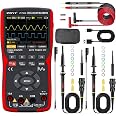
| Included components | oscilloscope,Cloth Bag,Test Leads,One Of Oscilloscope Probe 50M 300V |
| Batteries Included? | Yes |
| Batteries Required? | Yes |
| Battery Cell Type | Lithium Ion |

-
-
-
-
-
-
-
VIDEO -
Image Unavailable
Colour:
-
-
-
- To view this video, download
3 in 1 Handheld Oscilloscope, Automotive Dual Channel 50MHz with Digital Multimeter and Signal Generator
Purchase options and add-ons
- 【High Speed Mode】 The ZT-703S oscilloscope offers two operating modes, which can be switched on the fourth page of the menu. In normal mode, it features a sampling rate of 200MSa/s and a maximum measurement bandwidth of 30MHz, consuming less power and being more energy-efficient. In high-speed mode, it has a sampling rate of 280MSa/s and a maximum bandwidth of 50MHz, with higher power consumption. The storage depth is 128K, catering to different usage needs
- 【Oscilloscope Mode】 This dual-channel oscilloscope can measure pulse waves, circular waves, noise waveforms, and more. When dealing with unknown waveforms, the AUTO automatic recognition function can be used. This powerful auxiliary feature varies in recognition time depending on the size and complexity of the waveform, enhancing measurement efficiency
- 【Multimeter Mode】In multimeter mode, it features 25000 counts and can measure resistance, capacitance, continuity, diodes, and current. Its multifunctional design makes it an ideal tool for electronic measurements, offering high precision and a wide range of applications
- 【Signal Generator Mode】 In the expanded application mode, the oscilloscope can store waveform images and activate the signal generator function. It can output sine waves, square waves, triangle waves, and more, with a synchronous display in the demonstration window for easy observation and comparison, greatly expanding the device's application range
- 【Charging & Data Transfer】 This product uses a Type-C charging port for both charging and data transfer. The Type-C interface supports fast charging and efficient data transfer, making the device more convenient and efficient to use. Due to the multiple functions of this product, please read the user manual before use and refer to the manual for troubleshooting during use
Frequently bought together

Videos for similar products
Product information
Technical Details
Additional Information
| ASIN | B0CZHRNZ4T |
|---|---|
| Customer Reviews |
4.6 out of 5 stars |
| 鶹 Rank |
|
| Date First Available | Oct. 31 2024 |
Feedback
Product details
- Batteries : 1 Lithium Ion batteries required. (included)
- Parcel Dimensions : 24.8 x 14.2 x 7.5 cm; 820 g
- Date First Available : Oct. 31 2024
- Manufacturer : ZOYI
- Place of Business : Guizhou Province Jinzhu Subdistrict Office, Mainai Village, Mianhuapo, Former Huaxi Electric Pole Factory Guiyang City 550025 Huaxi District CN+8615519150867
- ASIN : B0CZHRNZ4T
- Item model number : ZT-703S
- Country of origin : China
- 鶹 Rank: #7,249 in Industrial & Scientific (See Top 100 in Industrial & Scientific)
- #10 in Lab Oscilloscopes
- Customer Reviews:
Product Description
703 function
handheld oscilloscope
The ZOYI ZT-703S features dual-channel input, each with an independent 50MHz bandwidth, ensuring full measurement capabilities for both channels. This allows simultaneous measurement of two different waveforms, making it ideal for professional testing applications.
Compared to single-channel devices, the ZT-703S can directly display two waveforms, facilitating detailed signal analysis. This is crucial for troubleshooting complex circuits and in-depth signal analysis.
The ZT-703S software interface is user-friendly, allowing easy selection between input channels CH1 and CH2, ensuring the displayed waveform matches the selected channel, enhancing measurement accuracy.
Please note that in dual-channel mode, only one channel (CH1 or CH2) can be selected for primary analysis. The unselected channel's waveform will be displayed but with slightly lower accuracy. This ensures optimal processing for the primary channel.
handheld oscilloscope multimeter
The ZT-703S 3-in-1 High Precision Multifunction Oscilloscope Multimeter Signal Generator is a device offering comprehensive waveform measurement capabilities to meet your daily needs. This versatile device can accurately capture and display various waveforms, including sine wave, square wave, sawtooth wave, triangle wave, pulse wave, Lissajous figure (circular wave), noise waveform, and modulated waveform. With its high bandwidth and dual-channel design, the ZT-703S ensures precise and reliable measurements for professional engineers and electronics enthusiasts.
portable oscilloscope
Press the F1 button to enter the extended application mode. The screen will display icons for image browsing and signal output. Select signal output and press the menu button to enter signal generator mode. It can output sine waves, square waves, triangular waves, half-waves, full-waves, and sawtooth waves, with the waveform simultaneously displayed in the demonstration window.
digital oscilloscope
Press and hold the SAVE button for 2 seconds to save the current screen screenshot, allowing you to view the full-screen image and perform secondary analysis on the saved waveform data. You can also connect the device to a computer via a USB data cable to retrieve and store waveform data.
Oscilloscope Mode Main Interface
| Operating Status Display | RUN: Automatic waveform acquisition state WAIT: Normal trigger mode, blinking waiting for trigger signal T.D: Captured triggered waveform data STOP: Lock the current waveform, acquisition stopped |
| Time Base Window | Display current time base position within the storage depth |
| Time Base Scale | Display the current set horizontal time base scale value |
| Trigger | Trigger Channel:1 for CH1, 2 for CH2 |
| Trigger Mode | Display the current trigger mode as rising edge or falling edge |
| Level | Display the current set trigger voltage value |
| Battery Level | Displaying the current battery status and charging status. |
| Horizontal Trigger | Displaying the current horizontal time base position triggered. |
| Vertical Trigger | Displaying the current vertical voltage position triggered. |
| Voltage/ Time Menu (VOL/TIME) | In this menu, you can adjust channel voltage and time base as follows: Press F1 to switch channels; the menu color will indicate the current channel's color setting. Press the up arrow to increase voltage amplitude, and the down arrow to decrease it. Press the left arrow to decrease time scale value, and the right arrow to increase it. |
| Waveform Movement (MOVE) | Press F1 to switch channels; the menu color will indicate the current channel's color setting. Use the arrow keys to adjust the waveform position |
| Trigger Cursor (TRIGGER) | Press the up/down keys to adjust the vertical trigger position and the left/right keys to adjust the horizontal trigger position. |
| Measurement Cursor | Press this key to select the cursor axis that needs adjustment. |
| CH1 Voltage | Displaying the coupling mode and voltage scale of Channel 1. |
| CH2 Voltage | Displaying the coupling mode and voltage scale of Channel 2. |
| Signal Generator Status | Showing the corresponding waveform shape symbol and frequency setting parameters according to the current output status of the signal generator, including square wave, pulse wave, sine wave, and triangle wave. |
Introduction to Multimeter Mode
| HOLD | Pressing the HOLD button on the panel will freeze the current displayed data |
| Battery level | Display the current battery level status and charging indication. |
| Analog pointer | The dial's analog pointer changes position according to the main display measurement data, indicating the corresponding scale position. |
| symbol display | Display the current corresponding measurement type symbol, including AC, DC, resistance, capacitance, diode, and buzzer symbols |
| Negative sign | When a negative value occurs, the screen will display a negative sign prompt |
| Main display | Displays the multimeter measurement value, with a maximum display of 25,000 counts. |
| Unit symbol | Displays the unit symbol of the measured data. |
| Testing mode | Automatic Range (AUTO): The multimeter automatically selects the appropriate testing range. Manual Measurement (MANU): Press the RANGE key to manually select and switch to a specified testing range. |
| Max: | Displays the maximum reading during measurement. |
| ճ: | Displays the average reading during measurement. |
| Min&Hz | In DC voltage, resistance, and capacitance measurements, it displays the minimum value (Min). In AC voltage and current measurements, it displays the frequency (Hz) of the AC signal. |
| Voltage range | Press F1 to select the voltage measurement range and press F1 again to select AC/DC mode switching. |
| Current range | Press F3 to switch to the current measurement range. |
| Millivolt range | In the current measurement interface, the original F4 menu displays the mA range. |
| 10A | Input port for current measurement (≤9.999A) |
| mA | Input port for current measurement (≤250mA) |