

Big Spring Sale
To see product details, add this item to your cart. You can always remove it later.
Ships from
Ships from
Sold by
Returns
Eligible for Return, Refund or Replacement within 30 days of receipt
This item can be returned in its original condition for a full refund or replacement within 30 days of receipt.
Payment
Secure transaction
Your transaction is secure
We work hard to protect your security and privacy. Our payment security system encrypts your information during transmission. We don’t share your credit card details with third-party sellers, and we don’t sell your information to others. Learn more
Support
Product support included
What's product support?
In the event that your product does not work as expected or you need help using it, 鶹 offers free product support. To access this option, go to Your Orders and choose Get product support.
Added to

Sorry, there was a problem.

There was an error retrieving your wish lists. Please try again.

Sorry, there was a problem.

List unavailable.
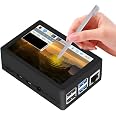
  • GeeekPi TFT 3.5 inch Touch Screen with Case for Raspberry Pi 4, with Fan and Heatsinks, 320x480 Resolution LCD Display for Raspberry Pi 4 Model B (Raspberry Pi Board NOT Included)

GeeekPi TFT 3.5 inch Touch Screen with Case for Raspberry Pi 4, with Fan and Heatsinks, 320x480 Resolution LCD Display for Raspberry Pi 4 Model B (Raspberry Pi Board NOT Included)

3.8 out of 5 stars (299)

To see product details, add this item to your cart. You can always remove it later.

Purchase options and add-ons

About this item

  • This kit contains an ABS case and a 3.5 inch resistive touch screen. It’s fully compatible with Raspberry Pi 4 Model B. NOTE: Raspberry Pi Board NOT Included! The fan and screen can not be installed at the same time.
  • The 3.5 inch resistive touch screen can be directly inserted into any version of the Raspberry Pi boards, but the ABS case is only compatible with Raspberry Pi 4B; The resolution of 3.5 inch touch screen can be adjusted by software; The screen support 125MHz SPI signal input, the refresh rate is about 50fps which is enough to play the videos or games and display stable without flicker; It supports Raspbian, Ubuntu, and Kali system, the drivers and image are provided freely.
  • Package includes: 1x ABS Case for Raspberry Pi 4B, 1x 3.5 inch TFT resistive touch screen, 1x Aluminum heatsinks, 1x Touch Pen, 1x 30x30x7mm cooling fan (NOTE: this fan can not be installed with 3.5 inch screen at the same time)

Frequently bought together

This item: GeeekPi TFT 3.5 inch Touch Screen with Case for Raspberry Pi 4, with Fan and Heatsinks, 320x480 Resolution LCD Display for Raspberry Pi 4 Model B (Raspberry Pi Board NOT Included)
$30.98
Get it by Tuesday, Mar 24
In Stock
Sold by GeeekPi and ships from 鶹 Fulfillment.
+
$156.92
Get it Mar 30 - Apr 1
Usually ships within 2 to 3 days
Ships from and sold by Redruby Trade LLC.
Total price:$00
To see our price, add these items to your cart.
Details
Added to Cart
Some of these items ship sooner than the others.
Choose items to buy together.

From the brand


Product Description

raspberry pi lcd screen
raspberry pi 3.5 inch lcd screen

NOTE: The fan and the screen can not be installed at the same time.

raspberry pi lcd screen with case
raspberry pi 4 case with fan

For Raspberry Pi 4B

If you have difficulty installing the driver, or if you still can't use the display properly after installing the driver, Please Try our Configned images for tested. Just need download and write the image into the TF card.

NOTE: DO NOT need any driver installation steps.

  • Select one of image files and download it from following images:

1. Raspberry Pi OS image file name: "MPI3501-3.5inch-2020-12-02-raspios-buster-armhf.7z"

drive.google.com/file/d/1Jce5SksRIeZu22BElT9x_Ad8rT8oPkZH/view?usp=sharing

Or

2. Ubuntu 18.04 image file name: "MPI2418-MPI2801-MPI3201-Ubuntu-18.04.2.7z"

drive.google.com/file/d/1ydf3tcM9z0Ip2k_sr5Izd8OTsQwjXx36/view?usp=sharing

  • Unzip it and Flash it to TF card with etcher tool.

raspberry pi 4 case with lcd screen

Download LCD Driver Manually: wiki.52pi.com/index.php?title=File:LCD-show.tar.gz

raspberry pi case with fan

FAQ

Q: The screen is whitish and there is no display what should i do?

A: Install driver or just flash TF card with preload driver image.

Q: If I set it according to the operation, what should I do if I start the display character interface?

A: Please re-burn the system and do the same operation.

Q: Why is there no output on my HDMI interface?

A: If you need to switch back to the HDMI display mode, execute:

cd LCD-show/

sudo ./LCD-hdmi

Product details

  • Product Dimensions ‏ : ‎ 17.78 x 2.54 x 8.89 cm; 145 g
  • Manufacturer ‏ : ‎ GeeekPi
  • ASIN ‏ : ‎ B083C12N57
  • Item model number ‏ : ‎ 7e71d25d-aeb0-46a4-ae05-c32f6b53c437
  • Country/Region of origin ‏ : ‎ China
  • Customer Reviews:
    3.8 out of 5 stars (299)

Product information

Feedback

GeeekPi TFT 3.5 inch Touch Screen with Case for Raspberry Pi 4, with Fan and Heatsinks, 320x480 Resolution LCD Display for Raspberry Pi 4 Model B (Raspberry Pi Board NOT Included)


Found a lower price? Let us know. Although we can't match every price reported, we'll use your feedback to ensure that our prices remain competitive.

Where did you see a lower price?

Price Availability
/
/
/
/
Please sign in to provide feedback.

Brands in this category on 鶹

Customer reviews

3.8 out of 5 stars
299 global ratings

Customers say

Customers find this monitor to be really good quality and consider it the best Pi screen. The installation process is easy and the functionality to build is straightforward. However, customers experience issues with HDMI connectivity and dislike the documentation. Opinions vary on functionality, touch responsiveness, image quality, and frame rate, with customers having different experiences in these areas.
AI Generated from the text of customer reviews

Select to learn more

17 customers mention quality, 12 positive, 5 negative
Customers find the monitor to be of great quality with no complaints about performance. They describe it as a really good, perfect little screen that works well as a display for the pi2. Some consider it the best pi screen available.
Great qualityRead more
nice pi accessory...Read more
...This just shows it's a cheap product, and not worth the money. I dropped this to 1 star because it's basically useless. Do not buy.Read more
Bad product...Read more
9 customers mention installation, 7 positive, 2 negative
Customers find the monitor easy to install and connect. The setup process is straightforward and the functionality to build is simple.
It was as advertised and easy to assemble it had came with all the items in the advertisement great itemRead more
...It's not the most responsive;however, it does the job done. Installation was a breeze (the card in the box had clear step by step instructions)....Read more
Easy Install and setup...Read more
...display nor does the display have proper fan pins, you'd need to solder to connect one....Read more
36 customers mention functionality, 14 positive, 22 negative
Customers have mixed experiences with the monitor's functionality. Some report that it works very well and runs nicely, while others find it not very functional at all or hard to get working. The display works for some users, but the screen won't work for others' purposes.
Worked fine initially the second time we tried to use it the screen failed and it is now useless, highly recommend against.Read more
Works well...Read more
...I have not been able to display anything on my Pi 4b screen following the ssh installation of the drivers, supplied ISO or older versions.Read more
Basically doesn't work. It can be used as a console monitor but that's it. Touchscreen can only work with specific OS....Read more
17 customers mention touch responsiveness, 6 positive, 11 negative
Customers have mixed experiences with the monitor's touchscreen functionality. Some report that the touchscreen works and sends video and touch input through GPIO, while others find it non-functional or not responding to clicks. The touch response can feel laggy for some users, and the touchscreen may only work with specific operating systems.
Touch screen not working. Very disappointing! ReturningRead more
...Touchscreen works, well and is easy to read. It's not the most responsive;however, it does the job done....Read more
...It can be used as a console monitor but that's it. Touchscreen can only work with specific OS....Read more
Sends video and touch input through gpio....Read more
12 customers mention image quality, 5 positive, 7 negative
Customers have mixed opinions about the monitor's image quality. Some find the image quality clear with good clarity, while others report that the screen is a complete disappointment and produces a white screen. The display receives mixed feedback, with some finding it okay while others note that the screen image is not really sharp.
...useless outdated OS, because the second you run an update, the image begins to bug, including but not limited to, removing all bluetooth...Read more
Screen image is not really sharp, hopefully I can improve its settingsRead more
...For myself, the screen is a complete disappointment....Read more
8 customers mention frame rate, 3 positive, 5 negative
Customers have mixed experiences with the monitor's frame rate performance. Some report slow frame rate and much slower frame rate, noting that it's not 50 FPS/50HZ and SPI Framerate is super low. However, others find it OK for some slow Apps and mention that executing programs via the icons is fast.
SPI Framerate is super low. Not useable for gaming or video. Unlike stated, it is NOT and HDMI interfaceRead more
...However, although the rPi itself is fast, executing programs via the icons is fast, the mouse cursor is very slow when I use a mouse or touch screen....Read more
...Both work for RPI3B+ and RPI4 but this LCD has much slower frame rate than the non available. May be OK for some slow Apps....Read more
Not 50 FPS/50HZ, not HDMI....Read more
7 customers mention hdmi connectivity, 1 positive, 6 negative
Customers report significant issues with the monitor's HDMI connectivity. They mention the absence of an HDMI interface, wrong fan connector, inability to connect the ice screen, dead links, and removal of Bluetooth functionality.
...Also fan doesn't mount to display nor does the display have proper fan pins, you'd need to solder to connect one....Read more
...the image begins to bug, including but not limited to, removing all bluetooth functionality....Read more
...Not useable for gaming or video. Unlike stated, it is NOT and HDMI interfaceRead more
6 customers mention documentation, 0 positive, 6 negative
The monitor comes with documentation that customers find problematic. Users report outdated instructions, directions that don't work, and a user guide that is laughably sparse. The documentation is not accurate, with instructions that say to clone a bad repo.
The instructions including some lines of code dont work. Garbage.Read more
Good
4 out of 5 stars
Good
Great quality
Thank you for your feedback
Sorry, there was an error
Sorry we couldn't load the review

Top reviews from Canada

  • Reviewed in Canada on January 8, 2026
    Verified Purchase
    Fonctionne très bien

    Report
  • Reviewed in Canada on December 12, 2025
    Verified Purchase
    Great Product for that price!
  • Reviewed in Canada on December 26, 2023
    Verified Purchase
    Technically, the display works. I could see the boot up sequence, and logging into the Raspberry Pi 4 in the console worked just fine.

    However, when I ran the script to install the graphic drivers, I had nothing but problems. I eventually got around the dependency issues, but when I ran 'startx' to start the graphical interface (window manager), I just got a blank screen. This was with the latest Raspian OS. Despite a lot of trial and error, I never did get it working.

    I appreciate the provided OS images in the description as a workaround. I tried them, but they didn't work either. In fact, they wouldn't even boot up.

    Now, I understand this is hardware using an open source solution to install drivers and such. And, I understand that rPi being geared towards developers and tinkerers, that there's a certain amount of work involved. I'm okay with that. However, as a consumer I expect the product to work on the platform that it says it will. And, I expect to get help with that. A FAQ would be very nice. A list of known issues, and their resolutions would be nice.

    I expect to run into problems. That's fine. I do expect that there is a solution, and there is help somewhere to get this working. So far, I'm putting this down as a complete failure of a product, but I'll keep trying to find a solution.

    Edit:
    Finally found an image which worked (MPI3501-3.5inch-2022-04-04-raspios-bullseye-armhf.7z). From the driver's github README, there's a link to a wiki with more images and information. So, the graphical interface is now working, and the touchscreen works.

    However, although the rPi itself is fast, executing programs via the icons is fast, the mouse cursor is very slow when I use a mouse or touch screen. I'm guessing hardware or driver support isn't setup properly. Which other reviews also noted. Also, the viewing angle is terrible. You can only see it from front, and not the sides at all. This just shows it's a cheap product, and not worth the money. I dropped this to 1 star because it's basically useless. Do not buy.
    10 people found this helpful
    Report
  • Reviewed in Canada on July 28, 2022
    Verified Purchase
    While this isn't a top shelf product so to speak, it's very solid. Touchscreen works, well and is easy to read. It's not the most responsive;however, it does the job done. Installation was a breeze (the card in the box had clear step by step instructions). All and all, very satisfied with the purchase.
    One person found this helpful
    Report
  • Reviewed in Canada on January 6, 2025
    Verified Purchase
    My kit came with a plastic case complete with a lid that allows access to the GPIO pins, case fan to mount to the lid or screen, and heatsinks. The included screen will ONLY work with the manufacturer's OS image, though I have had no success with it. If you are a dev or really experienced hardware tinkerer, the screen *might* add some value. For myself, the screen is a complete disappointment. I have not been able to display anything on my Pi 4b screen following the ssh installation of the drivers, supplied ISO or older versions.
  • Reviewed in Canada on July 1, 2025
    Verified Purchase
    can be a bit tricky to get going but works fine once you do.
  • Reviewed in Canada on May 10, 2024
    Verified Purchase
    Not to hard to figure out but I think the screws for the fan may have pushed into the screen to hard causing white spots. I more just wanted the case with the fan. The screens in a drawer now, never really used it
  • Reviewed in Canada on February 2, 2026
    Verified Purchase
    Too small screen and drivers seems to be a problem

Top reviews from other countries

Translate all reviews to English
  • jason sadler
    5.0 out of 5 stars Clear image, easy to connect.
    Reviewed in Australia on February 22, 2025
    Verified Purchase
    Arrived on time and well packaged. Connected to a Raspberry Pi and works without any problems.
    Will be using this as the screen for a Raspberry Pi based weather station.
  • Chase
    5.0 out of 5 stars Good customer service, so-so product....
    Reviewed in the United States on January 28, 2025
    Verified Purchase
    So, first of all, I was referred to this shop due to their stellar customer service on another platform. They were incredibly responsive and helpful, but the shipping policies on the other platform weren't the best and I had problems. The folks at customer service were so helpful in fact that I told them I'd happily order from them again if they had an 鶹 shop. So they sent me the link and I ordered this case/screen. So theres that.

    Second, I could legitimately type you an essay on what I've gone through trying to get this to actually work with Octoprint in the last week. Which, I have no idea why anyone other than Octoprint users would want such a small screen really. Its not very functional at all as far as a normal GUI. There may be other Pi OS's out there that benefit from something like this I suppose, but I'm not immediately aware of them, and I'd assume they'd have the same problems I am... Hah. It seems like everyone else in the reviews basically had the same problems, yet for once, I didnt read them before I purchased this because of how awesome these folks had been with me customer service wise ono a past order that failed to arrive through Walmart. They refunded me and were very responsive, so I told them Id buy the item again on 鶹 if they had an 鶹 store front. This is that item, this is that store front. Hah. So I didnt bother to check the reviews this time, I was already more or less committed in my mind. So that was my first mistake.

    My second mistake was expecting that the drivers work, or that once I finally got the drivers two work after about two days of wasting all my free time on this one thing... Never could get it to work with my original Octopi image that I had been running prior to buying this screen. I wanted a DSI screen and ended up settling for this because it was a good deal and it has 4 stars... But apparently pretty much all these GPIO screens have these problems and as soon as you buy one everyoone tells you that you shouldve gone a different direction. TLDR: THEY'RE RIGHT!!!

    The drivers corrupted my first image. Tried to download their preconfigured image after that only to have the Rpi Imager app tell me it couldnt be authenticated or something like that. Deleted it and tried to redownload it again, same thing. So I went with the basic raspberry pi os 64 bit, still had a little trouble with the drivers this time, but beyond that it went fine. Accept that I forgot to updfate before downloading the drivers, and updating broke the image AGAIN! Came back here and saw someone had recommended a video from Chris' Basement to set up Octodash on this screen. They also mention the drivers that were mentioned in the documents they got were out of date and did not work, and recommended the goodtft drivers instead. That was a couple years ago and now they ship the device with instructions to use the goodtft drivers from the jump. But they;'re out of date too now. They seem to be fine if you're on a Pi 3 or under from what I can make out via my research, but Pi 4 and up you can pretty much throw out the window. Tried the Rpi OS 64 bit again, updated first, installed drivers, configured, and it worked fine. Downloaded Octoprint manually and restored from backup. Tried to get Octodash or something going because as I said, theres no way to use this screen normally. You absolutely need a plugin like Octodash, and your other plug in choices in that regard have been abandoned by their developers at this point it seems like. You may find a decent fork though, cause OCtodash doesnt work either... I've tried it now twice, once on the Rpi Os and another on the Octopi OS, neither would work. All this screen does is basically let you ssh into the Pi next to your printer instead of at your laptop, but the text isnt dummy thicc enough to actually be of any use. You can barely read it at this size, so yeah. Pointless. Finally I kinda gave up and ust started printing again tonight like I used to, from my laptop, excpet now I have a nce new paperweight to go along with my Pi!

    Buuuuut wait! Theres more. Hah. Print stops about 30% because my Pi is running hot and sends a power fluctuation code of some sort which causes the pi to reboot mid print... I'm using the official power supply too. So its not a me problem at all, and it never did this before. Not once... Now all the sudden this screen and fan combo that doesnt actually work is also causing the pi to overheat...

    Just don't buy this. Buy a DSI screen or anything else, stick to HDMI even. Anything but this product. That said, if Geekpi sells a decent DSI screen, they seem like decent business owners. As I said, they were the only support that were good about getting back to me same day basically, even over Christmas. And they tried to rectify the shipping problem and when thaty didnt work, promptly refunded me. So its a decent company to deal with and I've seen youtubers use their stuff in projects before, so they apparently do have some good products out there. I'm just here to warn you, this isnt one of them...

    Hopefully I can tick my Pi Zero on it and give it to my son or something. He's 4, will absolutely love it, and will also destroy it quite promply anyway wanting to take it apart cause he wants to be a, and I quote, "cell phone repair man" when he grows up. Lol. To him, the fact that its crap is just more oppurtunity to take it apart and fix it... I'm done with it at this point. Im here reviewing and then one click buying a 5 inch DSI screen. Lol. Sadly I couldnt find one from Geekpi or i would patronize the establishment again because I do not exactly blame them for this. I shouldve read the reviews... But when it happens to you, don't say we didnt tell yah so. Hah. This screen isnt worth the hassle at all when a bigger DSI or nice HDMI is 10 bucks more. Especially considering the fan that supposed to cool this thing apparently doesnt do so... That could be a misconfiguration thing too I suppose, cause this is the first night its happened and I've had it running much longer than this before tonight. But if you have to misconfigure and break every build you try for weeks before you get back to even your original functionality, this is a waste of money entirely. End of story.

    Edit: After much experimentation, I have been able to get the goodtft drivers provided with the screen to work on both 32 and 64 bit Rpi OS. I’m now leaning more towards the fault being in octodash or something of that sort. Because even after replacing the screen with a DSI screen, (I haven’t gotten as far as reinstalling Octodasg yet honestly), I’m still getting the same error message from one of the dependencies left over from the prior Octodash install. The screen works fine with the basic desktop install of Raspberry Pi OS, 32 or 64 bit. And the screen works fine with the 64 bit Octopi image as well. But you can’t download the desktop package on the Octopi image without it causing blanking on the screen. And you can’t use it via a regular install of Raspberry Pi OS with Octoprint on top really, because it’s no where near big enough to make use of the normal Octoprint browser dashboard. So yeah, sadly this screen won’t work for my purposes no matter what I try, whether it’s a fresh install with no plugins, etc, I can not get this thing to function as an external monitor for my printer using Octoprint as I intended. That said, I will be keeping the screen for my sons Zero 2 W and I’ll make a little gameboy for him or something. Hopefully it’ll work better with a retropie image. If you don’t hear back from me, assume it does. lol.
  • Shibily UAE
    5.0 out of 5 stars Good display for pi2 also. touch little bit lag.
    Reviewed in the United Arab Emirates on September 9, 2025
    Verified Purchase
    It working with Raspberry pi 2 model B also. Good clarity
  • Chrystelle
    4.0 out of 5 stars Buen producto, para otras aplicaciones que no sean las anunciadas
    Reviewed in Mexico on February 13, 2025
    Verified Purchase
    Llegaron bien y las partes están funcionales, pero la pantalla es complicada de hacer funcionar, serviría para retropi y juegos, no para cómputo móvil que es lo que anuncian.
    Report
  • Harry
    5.0 out of 5 stars Tricky to Set Up, but Worth It Once Running
    Reviewed in Australia on October 18, 2025
    Verified Purchase
    This little screen took a bit of tinkering to get working — the setup isn’t exactly plug-and-play, and the touch response can feel a little laggy at first. But once it’s up and running, it’s fantastic. The image quality is clear, the case fits perfectly, and it’s a great compact display option for Raspberry Pi projects.

    If you don’t mind getting your hands a bit dirty during setup, the payoff is absolutely worth it. Great value and solid build for the price.

Product Summary: GeeekPi TFT 3.5 inch Touch Screen with Case for Raspberry Pi 4, with Fan and Heatsinks, 320x480 Resolution LCD Display for Raspberry Pi 4 Model B (Raspberry Pi Board NOT Included)

From GeeekPi

3.8 out of 5 stars, 299 ratings

Customer reviews

Price

No featured offers available

Other sellers

Other sellers

About this Item

  • This kit contains an ABS case and a 3.5 inch resistive touch screen. It’s fully compatible with Raspberry Pi 4 Model B. NOTE: Raspberry Pi Board NOT Included! The fan and screen can not be installed at the same time.
  • The 3.5 inch resistive touch screen can be directly inserted into any version of the Raspberry Pi boards, but the ABS case is only compatible with Raspberry Pi 4B; The resolution of 3.5 inch touch screen can be adjusted by software; The screen support 125MHz SPI signal input, the refresh rate is about 50fps which is enough to play the videos or games and display stable without flicker; It supports Raspbian, Ubuntu, and Kali system, the drivers and image are provided freely.
  • Package includes: 1x ABS Case for Raspberry Pi 4B, 1x 3.5 inch TFT resistive touch screen, 1x Aluminum heatsinks, 1x Touch Pen, 1x 30x30x7mm cooling fan (NOTE: this fan can not be installed with 3.5 inch screen at the same time)

Product description

Description: This is a kit for Raspberry Pi 4B. It contains an ABS case and a 3.5 inch Resistive touch screen. This TFT display is 3.5" diagonal adn bright (6 white-LED backlight) and colorful. It has 480x320 pixels with individual RGB pixel control and a resistive touchscreen attached to it already, so you can detect finger presses anywhere on the screen. It is good for DIY projects such as mini gamepad, Desktop clock, appointment reminder, access control viewer and so on. The Raspberry Pi 3.5 inch Touch Screen can adjust the resolution by the software which also available for connecting Raspberry Pi 3 B+ directly, without additional power.(The RPI screen original resolution is 320×480). The screen support 125MHz SPI signal input, the refresh rate is about 50fps which is enough to play the videos or games and display stable without flicker. It supports Raspbian, Ubuntu, and Kali system, the drivers and image are provides freely. The case can be used as raspberry pi case with mini cooling fan and 3.5 inch screen case. The 3.5 inch resistive Touch Screen can be directly inserted into any version of the Raspberry Pi (Raspberry Pi zero, zero w, a, A+, b, B+, 2B, 3B, 3B+) (The Case only suit for Pi 4). Note: If Raspberry Pi is equipped with GPIO display drivers,the HDMI port will have no signal output Features: 3.5" diagonal LCD TFT display Resistive touch screen ABS material case Supported OS: Raspbian buster for RPi 4B; Ubuntu mate, kali-linux, Raspbian stretch for RPi 3B/3B+ Specifications: Power Input: 5V/0.13A Resolution: 320x480 Refresh rate:5fps Colors: 65535 Backlight: LED Aspect Ratio: 8:5 Dimention: 91mm x 62mm x 34mm Package Includes 1 x ABS Case with Fan for RPi 4B 1 x 3.5 Inch Resistance Touch Screen 1 x Resistance Pen 1 x Aluminum Heat Sinks pack(4PCS)

Important Information

Visible screen diagonal

4" / 9 cm

Feedback

Did you find this product summary feature useful?

Thank you for your feedback
Thank you for your feedback. You selected “Yes, it is useful”
Thank you for your feedback. You selected “No, it is not useful”
Product summary presents key information. Close to see all product details.