| Brand | WAVLINK |
|---|---|
| Manufacturer | WAVLINK |
| Place of Business | 1-5F, No.5, Taisong Industrial Zone, Dalang Community, Dalang Street, Longhua District, Shenzhen, China, 518109 |
| Model | UMD29PRO |
| Hardware interface | DisplayPort, Ethernet, HDMI, 3.5mm Audio, USB 3.0, USB 3.2 Gen 2 |
| Compatible Devices | Lenovo, Dell, HP, Chrome OS, Windows |
| Number of Items | 1 |
| Wattage | 140 |
| Batteries included | No |
| Batteries Required | No |
| Number of Ports | 9 |
| Total USB Ports | 3 |
| Manufacturer | WAVLINK |
| Item model number | UMD29PRO |
| Product Dimensions | 12.7 x 11.68 x 3.81 cm; 1.36 kg |
| ASIN | B0F4D2CLKP |

-
-
-
-
-
-
-
VIDEO -
Image Unavailable
Colour:
-
-
-
- To view this video, download
USB C Docking Station, PD3.1 Docking Station 3 Monitors with 2* DP + HDMI, 8K@30Hz/4K@144Hz, 140W Charger, USB-C 10Gbps, 2* USB-A 5Gbps, Gigabit Ethernet, Audio/Mic, for Windows,Dell,HP,Lenovo
Purchase options and add-ons
| Brand | WAVLINK |
| Colour | Silver |
| Hardware interface | DisplayPort, Ethernet, HDMI, 3.5mm Audio, USB 3.0, USB 3.2 Gen 2 |
| Compatible devices | Lenovo, Dell, HP, Chrome OS, Windows |
| Total USB ports | 3 |
| Product Dimensions | 12.7L x 11.7W x 3.8H Centimetres |
| Number of ports | 9 |
| Total HDMI ports | 1 |
| Wattage | 140 |
| Manufacturer | WAVLINK |
About this item
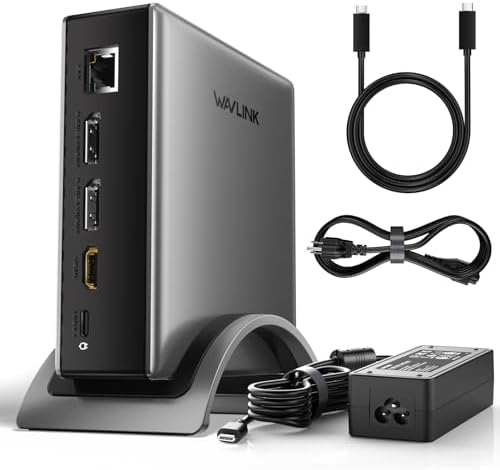
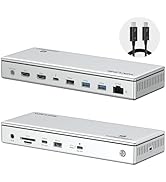
- USB C Docking Station: This WAVLINK usb c docking station has single 8K@30Hz/4K@144Hz dual DisplayPort + HDMI video outputs, wired Gigabit Ethernet port, 1* USB-C 3.2 and 2* USB-A 3.0, 3.5mm combination audio jack. Includes both a PD3.1-140W charger adapter and USB-C cable. Allow your PC to connect a variety of devices with just one cable to the docking station
- Laptop docking station 3 monitors: Equipped with dual DisplayPort and one HDMI port, Single can up to 8K@30Hz/4K@144Hz under DP1.4 source. Resolution will be 4K@60Hz if two monitors play simultaneously.Connect up to three monitors simultaneously.it perfect for expanding multiple displays for meetings, presentations, stock chart analysis, programming, and more.(Pls Note: Please make sure that the USB-C port on the laptop host supports video transmission)
- PD3.1 Docking Station with 125W Charging:With the included PD3.1-140W power adapter , the PD charging port supports 125W to fast charge laptops.This dock keeps your laptop powered while connecting multiple monitors and peripherals.(Pls Note: Please make sure that the USB-C port on the host laptop supports charging) Hot Swap & Extensive Compatibility: Plug and play without any driver, easy to use and save your precious time. Widely compatible with Windows 11/10/8.1/8/7, Mac OS, Chrome OS, Linux, iPad OS, Harmony OS, and Android with OTG function
- Hot Swap & Extensive Compatibility: Plug and play without any driver, easy to use and save your precious time. Widely compatible with Windows 11/10/8.1/8/7, Chrome OS, Linux, Harmony OS, and Android with OTG function
- 【Pls Note】Not compatible with any MAC OS computer. Some Windows laptops only support 3 monitors(including the host screen) due to their graphic card limitations. please be aware of the maximum number of monitors your computer can support. Please make sure that the type-C port of your host supports charging and video output. Please make sure that your laptop supports DP1.4+DSC1.2, if not, the resolution will not be as high as mentioned above.
- 【Products & Services】You can get WAVLINK 12-month warranty and fast response customer service
Frequently bought together

Product information
Technical Details
Additional Information
| Date First Available | April 14 2025 |
|---|---|
| Customer Reviews |
4.6 out of 5 stars |
| 鶹 Rank |
Feedback
Videos for similar products
Brand in this category on 鶹
From the brand
Product Description
-
Why buy this docking station ?
Docking station for Professional Creative Work - lf you are a designer,editor, or photographer who frequently uses professional software such as PS、 PR、 AE, do what u need.lt single 4K@144Hz/8K@30Hz display, Supports up to three extended 4K displays.
-
How to use this product ?
1. Connect: Plug the docking station into your computer, then connect the monitor to the docking station.
2. Power: Plug in the docking station's power cable.
3. Settings: On Windows, right-click the desktop → select [Extend/Mirror these displays].
-
Does Mac OS support extending to different screens ?
No! Due to limitations of the Mac OS chip, all extended displays will be identical.
-
Why isn't my monitor responding ?
Please ensure the USB-C port on your host laptop supports video output and charging functionality.
If you're unsure, you can check the product detail page images or provide us with your laptop model.
| Model: | UMD29 Pro |
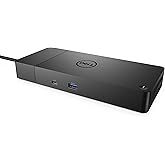
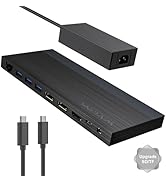
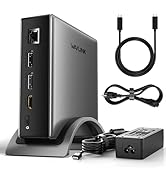
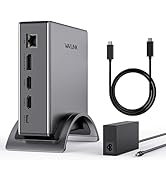
| Ports: | 1* DC IN(20V/7A, 140W); 1* USB-C(Host, 125w); 2* Displayport; 1* HDMI; 1* USB-C 3.2; 2* USB-A 3.0; 1* Gigabit RJ45; 1* Audio/Mic Port; |
| Unit Size: | 12.7x11.7x3.8cm/5x4.6x1.5in |
| Cable Length: | 100cm/39in |
| Housing Material: | ABS Plastic |
| Shell Color: | Silver |
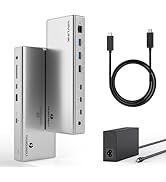
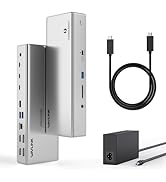
| Package List: | 1* PD3.1 Triple Display Docking; 1* PD3.1-140W GaN Power Adapter;1* AC Power Cable; 1* PD3.1 USB-C to USB-C Cable with Mark (1m); 1* Quick start guide; |