










| Brand | Dell |
|---|---|
| Manufacturer | Dell |
| Place of Business | Dell |
| Model | WD25 |
| Part Number | PTC1N |
| Hardware interface | DisplayPort, Ethernet, HDMI, USB |
| Compatible Devices | Windows 10, Windows 11, Ubuntu, Red Hat Enterprise Linux, ChromeOS, macOS |
| Number of Items | 1 |
| Image stabilization technology | Digital |
| Voltage | 240 Volts (AC) |
| Wattage | 130 |
| Batteries included | No |
| Batteries Required | No |
| Data transfer rate | 1000 Megabits Per Second |
| Wireless Standard | 802.11n |
| Number of Ports | 10 |
| Total USB Ports | 6 |
| Connector Type | DisplayPort, Ethernet, HDMI, USB |
| Includes rechargable battery | No |
| Manufacturer | Dell |
| Language | Italian |
| Item model number | WD25 |
| Product Dimensions | 20.5 x 8.99 x 3.53 cm; 548.85 g |
| ASIN | B0FCSHJGGK |

-
-
-
Image Unavailable
Image not available for
Colour:

Customers usually keep this item
This product has fewer returns than average compared to similar products.
Frequently bought together
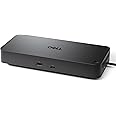
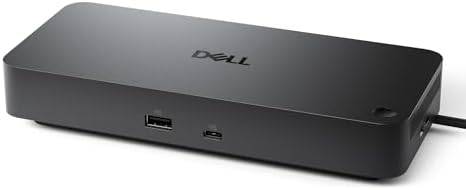
This item: Dell Pro Dock WD25 - USB Type-C with DP Alt Mode Connector, DisplayPort/HDMI/USB 3.2 Gen2 Connectivity, Up to 100-Watt Power delivery - Black
$268.99
Get it by Tuesday, Feb 24
In Stock
+
$39.99
Get it by Tuesday, Feb 24
In Stock
+
$39.00
Get it by Tuesday, Feb 24
In Stock
Total price:Ìý$00
To see our price, add these items to your cart.
Choose items to buy together.
Videos for similar products
From the brand

Dell Peripherals
Browse accessories from Dell
-

Complete your setup.
-
Complete your setup.
-
Complete your setup.
-
-
Featured Dell PCs
-
Featured Dell PCs
-
Featured Dell PCs
-
Featured Dell PCs
From the manufacturer


Fuel your productivity
Gain the versatility to create your ideal workspace with a dock featuring 6 USB ports, support for 4 displays and driving 100W of power delivery to the latest Dell AI PCs for optimal productivity.

More manageable
Keep your dock up to date and work without interruption.
Improved manageability: Manage your dock from the Dell Device Management Console by utilizing Dell Display and Peripheral Manager installed on your PC.
Simplify firmware updates: Reduce IT complexity by deploying a single firmware file across workspaces. Minimize end-user disruption with silent firmware updates that are performed upon dock disconnection.
Work with confidence: Enhance your docking experience with universally compatible features including MAC Address Pass-Through and Power Button Sync, for a better docking experience across brands.
Power Button Sync will work with non-Dell notebooks if they support PD3.1 spec.


Ports and slots
Front side
1. USB-A 3.2 Gen 2 with PowerShare | 2. USB-C 3.2 Gen 2
Rear side
3. HDMI 2.1 | 4. DisplayPort 1.4 | 5. DisplayPort 1.4 | 6. USB-C 3.2 Gen 2 Multifunction DisplayPort 1.4 | 7. USB-A 3.2 Gen 2 with PowerShare | 8. USB-A 3.2 Gen 2 with PowerShare | 9. USB-A 3.2 Gen 2 with PowerShare | 10. 2.5 Gigabit Ethernet (RJ45) | 11. Power In
Product information
Additional Information
| Batteries | 1 AAAA batteries required. |
|---|---|
| Date First Available | June 20 2025 |
| Customer Reviews |
4.7 out of 5 stars |
| Â鶹Çø Rank |