



| Brand | MUSRUN |
|---|---|
| Manufacturer | MUSRUN |
| Model | k188 |
| Model Name | k188 |
| Part Number | k188 |
| Memory storage capacity | 64 GB |
| Digital Storage Capacity | 64 GB |
| Compatible Devices | Headphone, Speaker |
| Special features | Built-In Speaker, Equalizer, FM Radio, Voice Recorder |
| Mounting Hardware | AUX cable, USB cable, User manual, Wired earphones |
| Display Technology | LCD |
| Standing screen display size | 1.8 Inches |
| Display type | LCD |
| Battery Average Life | 80 Hours |
| Batteries included | Yes |
| Batteries Required | Yes |
| Battery Cell Composition | Lithium Polymer |
| Wireless Standard | Bluetooth, Radio Frequency |
| Connector Type | Bluetooth |
| Compatible media type | MP3 |
| Human Interface Input | Keypad |
| Media Type | Micro SD |
| Includes rechargable battery | Yes |
| Manufacturer | MUSRUN |
| Item model number | k188 |
| ASIN | B08FSXQ49S |

- 2 VIDEOS
MP3 Player with Bluetooth Sport Armband 64GB metal shellVXGold
Image Unavailable
Image not available for
Colour:
Colour:
-

-
-
- To view this video, download
Additional details

Verified by Transparency
The brand applies a unique Transparency code to each item. We verify this code before shipping. You can verify this code using the Â鶹Çø Shopping app to confirm that it comes from the brand and view additional product details.
Verified by Transparency
Each item has a unique code that we verify before shipping.
Frequently bought together
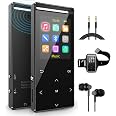
This item: MP3 Player with Bluetooth 64GB,Sport Armband,Line-in rip Music,FM Record,HiFi,Shuffle Play,Time-Sleeper,Metal Shell, Matt,Gift Packing
$49.99
Get it by Sunday, Dec 28
In Stock
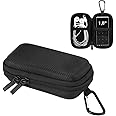
+
$11.99
Get it by Sunday, Dec 28
In Stock
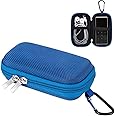
+
$11.99
Get it by Tuesday, Dec 30
In Stock
Total price:Ìý$00
To see our price, add these items to your cart.
Choose items to buy together.
Product information
Additional Information
| Batteries | 1 Lithium Polymer batteries required. (included) |
|---|---|
| Date First Available | Nov. 20 2021 |
| Customer Reviews |
4.1 out of 5 stars |
| Â鶹Çø Rank |
|
| Is discontinued by manufacturer | No |
Feedback

Videos for similar products


Product Description


Packing list
- mp3 player
- Quality cable earhpones
- 3.5mm AUX cable
- Micro USB cable
- User manual
MP3 Player with Bluetooth

It support bluetooth 5.0
Please notice that the bluetooth of mp3 player can only connect with bluetooth earphones and bluetooth speaker, cannot connect to phone, computer.
How to pair bluetooth: please press bluetooth device into pair mode, open the bluetooth of the mp3 player, choose the option of search device, find the bluetooth device, and pair it.
Please notice the pair mode and search time no more than 90 seconds

How to dowload music
Transfer music to mp3 player via the USB cable included
Please download songs to computer first, then copy and paste onto mp3 player.
it works like a USB disk whilst downloading from PC, you just need connect with a data cable(in package), then create folders and drag the songs you like over.
When you transfered your mp3 on to SD card put sd card back in mp3 go on to music icon , go to bottom of music menu , press refresh and your songs will come up.If you do not press refresh the song will not be visible.

One Key to Record Portable Voice Recorder
Hold button to power off, hold button 3 seconds to voice record.
click button vol+, click button to vol-

The Function of 3.5mm Audio Cable
Maybe, you don’t know the function of the audio cable. With the audio cable, you can connect the mp3 player to your speaker or car’s stereo.
How to operate? It is very easy, you just insert one port to the mp3 player, and insert the other port to your speaker or your car’s stereo.
With the audio cable, you can enjoy music when you are driving, wild camping, or at parties .

Please notice it's not trouch screen, it's touch buttons
Designed with 7 Touch Buttons, No matter you wear a gloove or not, you can handle it.
Independent Locking and Voice Recording Key. Touch-Screen Designs, has a lock button to stop accidental buttons being knocked, easy Operation. Metal shell makes this mp3 player a unique touching sense and not easy to slide.Enjoy silent touch experience.

Multifunctional Player
This MP3 Player not only has music function, but also features as well as FM radio, FM record, Line Record, Time-sleeper, alarm clock function.

Metal Case Matte
|

Resin Case Matte
|

Resin Case Matte
|

Resin Case Matte
|
|
|---|---|---|---|---|
|
|
||||
| Customer Reviews |
1,354
|
710
|
710
|
710
|
| Weight | 81g | 36g | 36g | 36g |
| Micro sd card | 64GB | 64GB | 64GB | 64GB |
| Wireless | Bluetooth | Bluetooth | Bluetooth | Bluetooth |
| FM Radio | ✓ | ✓ | ✓ | ✓ |
| Line in Record | ✓ | ✓ | ✓ | ✓ |

FAQ
1. How to pair a bluetooth device?
please open the bluetooth speaker keep them waitting to pair, please close your smart phone bluetooth in case they will pair immediately. (press button of the bluetooth speaker let it into pair mode, if it necessary). open the bluetooth of the mp3 player, go into search mode, find the bluetooth speaker and pair it.
If still failed, please unpair/delet all of bluetooth records list of mp3 player, and try again.
please use a needle to press the reset button in the mic hole at the buttom of the mp3 player, it can resolve most of program problem.
2. How do I charge the MP3 player?
Please use USB cable to connect the computer / laptop to charge it. Or use standard 5V 1A, 5V 2A electrical appliances to charge (charger sold separately).
3. There are no songs in the MP3 player, how can I download music?
Basically, it is a traditional MP3 player, it works as like as a USB stick, connected it with computer via a USB cable, drag and drop some songs from the computer to the MP3 player.
When you connect the MP3 player to the computer with a USB cable, two options appear on the MP3 player screen: Charge and Transfer, Charge and Play. Select options: charge and Transfer
Copy some music files from the computer to the MP3 player (ex. File format: MP3, WMA, APE, FLAC, WAV)
4. Did the MP3 player remember the song I last played?
Press the music icon, you will see that the second function is the playback breakpoint, it will stay where you left last time.
5. There is no internal hard drive, I thought it's should built in.
New version use micro sd card, song files can be quickly switched from one device to another.


