| Brand | CHUYI |
|---|---|
| Manufacturer | CHUYI |
| Model Name | WS0266-B |
| Part Number | CWS266-B |
| OS | Android, Linux, Windows 10, Windows 8 |
| Hardware Platform | Laptop, PC, Tablet |
| Compatible Devices | Laptop, Projector, Smart TV, Smartphone, Tablet |
| Special features | Backlit, Portable, Rechargeable, Trackpad, Wireless |
| Mounting Hardware | 1 x USB Charging Cable, 1 x USB Receiver, 1 x Wireless Touchpad & Keyboard, User Manual |
| Number of Items | 1 |
| Power source type | Battery Powered |
| Batteries included | Yes |
| Batteries Required | Yes |
| Battery Cell Composition | Lithium Ion |
| Keyboard Description | Flexible |
| Connector Type | USB-A |
| Movement detection technology | Optical |
| Material Type | Plastic |
| Hand Orientation | Ambidextrous |
| Does it contain liquid? | No |
| Has an attached light | Yes |
| Manufacturer | CHUYI |
| Manufacturer reference | CWS266-B |
| Product Dimensions | 14.2 x 9 x 1.9 cm; 120 g |
| ASIN | B0BMDYCQ4B |
Image Unavailable
Colour:
-
-
-
- To view this video, download
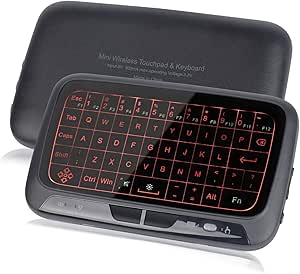
CHUYI Mini Wireless Keyboard and Touchpad Mouse Combo, 3 Level Backlit Adjustable Full Panel Touchpad Rechargeable Handheld Remote Control for Android TV Box, Windows, PC, Mac, HTPC, IPTV, PC, Linux
Purchase options and add-ons
| Brand | CHUYI |
| Compatible devices | Laptop, Projector, Smart TV, Smartphone, Tablet |
| Connectivity technology | USB-A |
| Keyboard description | Flexible |
| Recommended uses for product | Business, Education, Everyday Use, Gaming, Home, Library, Multimedia, Personal, School, Student, Travel See more |
| Special feature | Backlit, Portable, Rechargeable, Trackpad, Wireless |
| Colour | Black |
| Keyboard backlighting colour support | Single Color |
| Style | Contemporary |
| Product Dimensions | 14.2L x 9W x 1.9H Centimetres |
About this item
- 【Two Modes】The full panel touchpad, it has two operating modes, keyboard mode and touch mode. You only need to press the mode switch button to switch at will
- 【Keyboard Mode】You can enter letters and symbols, and it uses vibration as feedback (you can turn off the vibration by pressing the mouse right button + mode switch button)
- 【Touch Mode】You can use this high -sensitive touchpad to achieve the mouse function, including left and right -click, mouse drag, enlarged or shrink, task switching and display desktop
- 【3 Adjustment Backlight】Press Fn and keep the activity key, double -click the Fn button to switch between Fn and the digital key
- 【Plug and Play】Connect through the USB receiver, enjoy a long -range wireless control of up to 10 meters
- 【Sleep Mode】When there is no operation within 3 minutes, the touchpad will enter the sleep mode. Press any button to wake it up
- 【Rechargeable Design】Built -in 300mAh lithium battery, about 2 hours full charging, can be used continuously for 7 days
- 【Wide Compatibility】Suitable for Windows XP / Vista / 7 /8 /10, Linux, Android (with standard USB interfaces), for PC, HTPC, smart TV, Android TV box, laptop computer, etc.
Product information
Technical Details
Additional Information
| Batteries | 1 Lithium Ion batteries required. (included) |
|---|---|
| Date First Available | Nov. 15 2022 |
| Customer Reviews |
3.8 out of 5 stars |
| 鶹 Rank |
|
| Is discontinued by manufacturer | No |
Feedback
Videos for similar products
From the brand
-
About Seller
CHUYI has been engaged in electronic products with excellent quality for many years. We are committed to making life easier, simpler, more convenient and more enjoyable! We want our customers to be 100% satisfied with our products and services.
Product Description
Two Working Modes, "Touch Mode" and "Keyboard Mode"
Thank you for buying this mini keyboard. You can use it for email, chat, remote control, message input and game, and it has 2 modes, touch mode and keyboard mode.
Touch Mode: Mouse function, including mouse movement, left/right button and roller wheel
Keyboard Mode: Virtual keyboard function
How to connect?
- 1. Press the "left button of the mouse" and "Vol +" at the same time, and then turn on the touchpad. If the two LED lights on the left side of the keyboard always flashes, it means that it has been in a pairing state
- Take out the USB receiver and insert the USB port of the main device, and place the touchpad near the receiver
- If the blue LED light is went off, it means that the pairing is successful. If it fails, please repeat the above 2 steps (please keep the touchpad full power before pairing)
Function of the "Fn" key
- Double -click the "Fn" key with your fingers, you can switch the number key and function keys
Please Note:
- When you receive it, it is recommended to fully charge it before using it
- USB cables are only used for charging, and cannot be used for data transmission
This touchpad can support the above ordinary touch gestures
Note: The gesture enlarged or reduced, and the display desktop can only be available on Windows 7 and above systems
Q1. Is the battery removable?
A1. Built in lithium battery, used for repeated cycles, can be used for two years.
Q2. The keyboard and touchpad are not responding, and the indicator is not on
A2. Check the switch position and make sure the equipment is electric
Q3. The touchpad can work normally, but there is no vibration
A3. Please make sure that the device is in the keyboard mode. If there is no vibration, press the right mouse button and mode switch button to open or turn off the vibration function
Rechargeable Design
- Built -in 300 mAh charging lithium ion battery, about 2 hours full charging
- You can use it for about a week after full charging (When you receive it, it is recommended to fully charge it before using it)
- Please use the attached USB cable to charge (USB cables are only used for charging, and cannot be used for data transmission)
- You can use it while charging, but the charging time will be extended
2 Modes Can be Switched Freely
- Touch mode (default), the function of mouse clicks and movement can be achieved, and some normal gestures
- The keyboard mode can enter the letters and symbols at will, and have vibration as a feedback. You can also press the right mouse button and switch button to close the vibration
Convenient Connection
- You can use it to view the email, surf the Internet, shopping, browse web, chat, remote control or message input
Package Included:
- 1 x Wireless Mini keyboard
- 1 x Wireless Receiver
- 1 x Charging Cable
- 1 x User Manual
Backlight Adjustment
- QWERTY mini wireless keyboard with 3 backlight adjustments, you can easily enjoy in the night.
Auto Sleep and Wake up Mode
- When there is no operation within 3 minutes, the device automatically enters the sleep mode and press any button to wake up
- In order to save power, the power can be turned off, and the USB receiver does not need to take it out. It can be connected automatically next time
Applicable Various Devices
- It is compatible with PC, laptops, Mac OS, Linux, HTPC, IPTV, Google Android smart TV box, XBMC, Windows 2000 XP/Vista/7/8/10
- Use Android box or smart TV on the sofa, or browse the Internet in the most comfortable way
Specifications
| Transmission Mode | 2.4GHz wireless |
| Connection Port | With USB2.0 or above |
| Remote Control Distance | Up to 10 meters |
| Power Supply | Rechargeable polymer Lithium-ion battery |
| Battery Capacity | 300mAH |
| Charging Voltage | 4.4V-5.25V |
| Touch Mode | Multi touch |
| Product Size | 14.2 x 8.6 x 16 cm / 5.59" x 3.39" x 0.63" |
| Net Weight | 118g / 4.16oz |
| Photoelectric Resolution | 1600 DPI |
| Transmission Frequency | 2400-2483MHZ (16 channels) |
| Operating Current | <15mA (touchpad mode), <60mA (keyboard mode) |
| Compatible System | Windows XP / Vista / 7 / 8 / 10, Linux, Android etc. (Devices with standard USB ports) |