| Brand | KETAKY |
|---|---|
| Manufacturer | KETAKY |
| OS | Linux, Windows Vista, Windows XP |
| Compatible Devices | Laptop, PC |
| Special features | Multi-functional keys with calculator shortcut |
| Power source type | Battery Powered |
| Batteries Required | No |
| Keyboard Description | Ergonomic |
| Connector Type | Bluetooth |
| Material Type | Plastic |
| Hand Orientation | Ambidextrous |
| Manufacturer | KETAKY |
| Parcel Dimensions | 15.8 x 10.2 x 2.4 cm; 120 g |
| ASIN | B086D92LKN |
Image Unavailable
Colour:
-
-
-
- To view this video, download
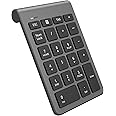
Bluetooth Numeric Keypad for Laptops, KETAKY Portable Wireless Bluetooth 22-Key External Number pad with Multiple Shortcuts for Laptop, PC, Desktop, Surface pro, Notebook, etc (Cool Gray)
Purchase options and add-ons
| Brand | KETAKY |
| Compatible devices | Laptop, PC |
| Connectivity technology | Bluetooth |
| Keyboard description | Ergonomic |
| Special feature | Multi-functional keys with calculator shortcut |
| Colour | Grey |
| Style | Modern |
| Material | Plastic |
| Theme | Number |
| Number of batteries | 1 |
About this item
- ✔【Multi-function 22-KEYS Number pad】Extends your existing keyboard and adds a full 22-key numeric keypad, it supports NumLock, ESC, Tab, Delete etc. With shortcut key which can open the computer calculator directly, perfect for data entry and Excel spreadsheets. The Muli-Function 22 Keys Bluetooth Wireless external number keypad for laptop is more unique than most keyboards.
- ✔【Bluetooth 3.0 connection】Bluetooth 3.0 technology provides a cable-free & clutter-free connection, operating distance 10m, very stable and reliable, no device drivers needed, no delays and dropouts, fast data transmission. [NOTE: No USB reciver. For Desktop PC Laptop without bluetooth function, you need to use third-party bluetooth adapter (not included) before use]
- ✔【Low power consumption design】Power Supply by 1* AAA Battery (not include). The number keypad wireless will automatically go into sleep mode after several minutes of inactivity. Press any key and wait a couple seconds to wake the number pad for laptop.(Note: a few seconds lag when waking up)
- ✔【Easy to use】Comfortable typing precise control, good resilience fast response and reduce the press sound, Give Quiet Office Operation & Long-Life. Ergonomic tilt and anti-slip pads on back provides optimum comfort, helps reduce the strain on the wrist.
- ✔【Wide compatibility】KETAKY bluetooth wireless number pad works with PC, laptop and desktop computers that have Windows 2000 / XP / Vista / 7 / 8 / 10 , Mac OS X 10.6 & higher, Linux 2.4 or above operating systems. 【The bluetooth Numeric keypad is not fully compatible with Mac OS. Because Apple company products don't support external function keys / buttons 】
Frequently bought together

Product information
Technical Details
Additional Information
| Date First Available | April 6 2020 |
|---|---|
| Customer Reviews |
4.1 out of 5 stars |
| 鶹 Rank |
|
Feedback
Videos for similar products
Product description
Powerful Functional Keys:
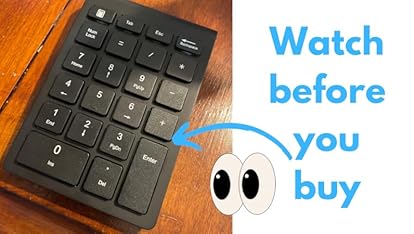
This bluetooth number keypad has 22-keys with multiple useful shortcuts including NUMLOCK, ESC, Del, End, Tab, Home, Page up/down, calculator export button, etc. The Muli-Function 22 Keys Wireless external number keypad for laptop is more unique than most keyboards. Meet all you need of a number keyboard.
LED light display status:
-Bluetooth Connection: Turn on the power at the bottom of the keyboard, red lights up 3s, press the TBA Bluetooth connection button 3s, green light will winkle and into the match mode quickly.
- Low voltage status: when the working voltage below 0.9V, the red indicator light blinks.
-Numlock: green
For prolong the life span of the battery, when you do not use the keyboard for a long time, please switch off the power.
How To Connect?
1) Insert one AAA batteries and switch ON/OFF button to power the keypad.
2) Press the “Bluetooth” key for 3 second until the LED light twinkles.
3) Run the Bluetooth Setup Assistant on your computer or phone and select “Bluetooth Keypad” from the list.
4) When Bluetooth Setup Assistant page shows the “Bluetooth keypad” being connected successfully, you can type numbers into Excel Sheet by this keypad to see whether it is really successful.
Please Note:
- "↑ ← ↓ →" , Home, End, Ins, Del, PgUp and PgDn buttons work with Windows XP/Vista/7/8/10, however NOT with Mac O.S.
-The "Num Lock" button works with Windows XP/Vista/7/8/10, however NOT with Mac O.S.
-A few seconds lag when waking from sleep mode.
System Requirements
- Mac OS X 10.6 & higher(but not fully compatible)
- Windows 98SE /ME /2000 /XP /Vista /7/8 /10
- Linux 2.4 or above
Tips
-This bluetooth keypad just bluetooth connection, no USB adapter needed.