Shop gift cards for every stocking
To see product details, add this item to your cart. You can always remove it later.
Ships from
Ships from
Returns
Returnable until 31 Jan 2026
For the 2025 holiday season, eligible items purchased between 1 November and 31 December 2025 can be returned until 31 January 2026.
Payment
Secure transaction
Your transaction is secure
We work hard to protect your security and privacy. Our payment security system encrypts your information during transmission. We don’t share your credit card details with third-party sellers, and we don’t sell your information to others. Learn more
Added to

Sorry, there was a problem.

There was an error retrieving your wish lists. Please try again.

Sorry, there was a problem.

List unavailable.
  • VIDEO
PCIe to USB 3.2 Card, with 3 USB A Ports and 2 USB C Ports, Limouyin-US
  • PCIe to USB 3.2 Card, with 3 USB A Ports and 2 USB C Ports, 5 Gbps Bandwidth Internal PCI E Express Expansion Card for Desktop PC for Linux
  • To view this video, download

PCIe to USB 3.2 Card, with 3 USB A Ports and 2 USB C Ports, 5 Gbps Bandwidth Internal PCI E Express Expansion Card for Desktop PC for Linux

5.0 out of 5 stars (3)

To see product details, add this item to your cart. You can always remove it later.

Purchase options and add-ons

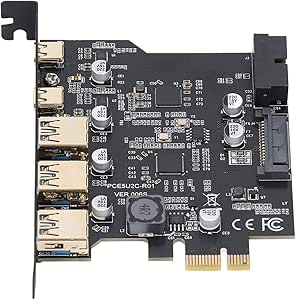
  • High Speed Transfer : This adapter card belongs to USB 3.2 GEN1 5Gbps standard, the 2 USB Type C ports and 2 USB Type A ports on the card are 5Gbps bandwidth, and using them at the same time will reduce the speed
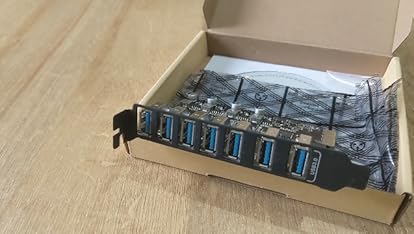
  • Multiple Ports: The PCIe expansion card provides 5 external USB 3.2 Gen 2 ports (3 USB Type A and 2 USB Type C ports) for your computer. You can connect a keyboard, mouse, external hard disk drive, CD, DVD drive, webcam, USB printer, scanner, game controller, USB VR, digital camera and more.
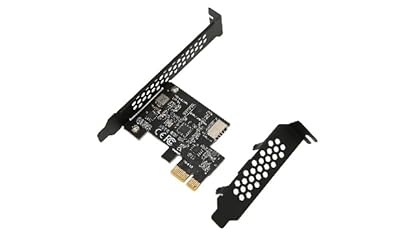
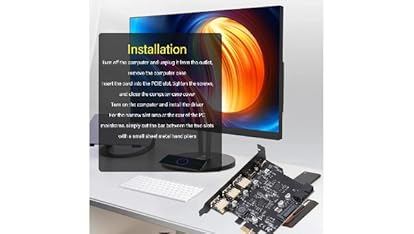
  • Installation: Turn off the PC and unplug it from the outlet, remove the PC case, insert the card into the PCIE slot, tighten the screws, close the PC case cover, turn on the PC and install the driver. For cases where the slot area at the rear of the PC mainframe is narrow, simply cut the crossbar between the two slots with small sheet metal hand pliers.
  • Stable And Easy To Use: The motherboard provides an internal USB card through a PCI Express slot to ensure a stable connection and increase data transfer speeds. There is no problem of losing connection like external USB Hub. Quick and easy to install, it is a simple solution for connecting and using USB 3.2 devices on a standard desktop.
  • Wide Compatibility: The PCIe to USB 3.2 card is compatible with for 7 8 10 11 (32, 64 bit). Ideal for for 11 desktops, for 8950, etc. Drivers are required for XP 7, for Server, not required for 10 11 and for OS X and for Linux.

Product information

Technical Details

Brand ‎GOWENIC
Manufacturer ‎GOWENIC
Model ‎GOWENICpguz9vqge4
Model Name ‎GOWENICpguz9vqge4
Part Number ‎GOWENICpguz9vqge4
Batteries Required ‎No
Manufacturer ‎GOWENIC
Item model number ‎GOWENICpguz9vqge4
Parcel Dimensions ‎13 x 10 x 2 cm; 90 g
ASIN ‎B0D9DQXM7N

Additional Information

Date First Available July 13 2024
Customer Reviews
5.0 out of 5 stars (3)

5.0 out of 5 stars
鶹 Rank

Feedback

PCIe to USB 3.2 Card, with 3 USB A Ports and 2 USB C Ports, 5 Gbps Bandwidth Internal PCI E Express Expansion Card for Desktop PC for Linux


Found a lower price? Let us know. Although we can't match every price reported, we'll use your feedback to ensure that our prices remain competitive.

Where did you see a lower price?

Price Availability
/
/
/
/
Please sign in to provide feedback.
Brief content visible, double tap to read full content.
Full content visible, double tap to read brief content.

Videos for similar products


From the brand


Product Description

2612240119911-1

PCIe to USB 3.2 Card, with 3 USB A Ports and 2 USB C Ports, 5 Gbps Bandwidth Internal PCI E Express Expansion Card for Desktop PC for Windows, Linux, for OS X

YT


Stable And Easy To Use: The motherboard provides an internal USB card through a PCI Express slot to ensure a stable connection and increase data transfer speeds. There is no problem of losing connection like external USB Hub. Quick and easy to install, it is a simple solution for connecting and using USB 3.2 devices on a standard desktop.


Installation: Turn off the PC and unplug it from the outlet, remove the PC case, insert the card into the PCIE slot, tighten the screws, close the PC case cover, turn on the PC and install the driver. For cases where the slot area at the rear of the PC mainframe is narrow, simply cut the crossbar between the two slots with small sheet metal hand pliers.


Multiple Ports: The PCIe expansion card provides 5 external USB 3.2 Gen 2 ports (3 USB Type A and 2 USB Type C ports) for your computer. You can connect a keyboard, mouse, external hard disk drive, CD, DVD drive, webcam, USB printer, scanner, game controller, USB VR, digital camera and more.

1

2612240119911-2

2612240119911-3

1

2612240119911-2

2612240119911-3


Spec:


Item Type: PCIe to USB 3.2 Card


Material: PCB


Color: Black


Bus Type: PCIE


Interface: 2 x USB Type C, 3 x USB Type A, 19pin


System Compatibility: Supports for Windows, for Linux and for OS X


Bandwidth: 5 Gbps


PackageList:


1 x PCIe to USB 3.2 Card


Note:


The USB expansion card only supports data transfer, not PD fast charging and video transfer (DisplayPort, HD Multimedia Interface, VGA display conversion) and USB C for Thunderbolt protocol.