| Brand | v AV Access |
|---|---|
| Manufacturer | v AV Access |
| Model | iDock M10 |
| Part Number | iDock M10 |
| Hardware interface | USB 3.0 |
| Compatible Devices | MacBook Air, Mac mini, MacBook Pro, Mac Studio |
| Wattage | 113 |
| Batteries included | No |
| Batteries Required | No |
| Number of Ports | 16 |
| Total USB Ports | 8 |
| Manufacturer | v AV Access |
| Item model number | iDock M10 |
| Product Dimensions | 22 x 10 x 2.5 cm; 340 g |
| ASIN | B0F6MPW2JX |

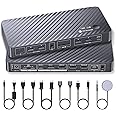
AV Access KVM Switch Docking Station for MacBook, USB-C KVM Switch 2 Monitors 2 Computers, 4K Dual HDMI Displays, 1 Laptop + 1 Desktop Switching, Ethernet, 100W Power Delivery, Edie Emulation
Purchase options and add-ons
| Brand | v AV Access |
| Colour | Black |
| Hardware interface | USB 3.0 |
| Compatible devices | MacBook Air, Mac mini, MacBook Pro, Mac Studio |
| Total USB ports | 8 |
| Number of ports | 16 |
| Item weight | 0.34 Kilograms |
| Total HDMI ports | 2 |
| Wattage | 113 |
| Manufacturer | v AV Access |
About this item
- Important Notes: 1. For MacBooks with M1 or M2 processors, only one external monitor is supported (one of the displays will go black when two monitors are connected). 2. For MacBooks with M3 processors, dual external monitors are supported only when the laptop lid is closed.
- 【Designed for Your MacBook】This dual USB-C KVM switch docking station works seamlessly with a wide range of MacBook Pro and MacBook Air models, as well as Mac mini and Mac Studio. It supports dual extended displays on macOS with M1/M2/M3/M4 Pro, M1/M2/M3/M4 Max, and M3/M4 chips. No additional drivers or software required.
- 【Dual 4K Displays, One Seamless Workflow】Connect 1 laptop (MacBook supported) and 1desktop to two HDMI monitors. Effortlessly switch between systems using the top-mounted button or included wired remote. Ideal for multitasking in office, education, design, and light gaming environments.
- 【10-in-1 KVM Docking Station】Includes 2 x HDMI, 3 x USB 3.0, 2 x USB 2.0, 1 x USB-C (host input), SDXC card reader, 3.5mm audio out, and 1G Ethernet port. Meets the needs of most modern workstations without requiring additional hubs.
- 【Full Speed 100W USB-C Charging】Supports up to 100W power delivery via USB-C, ensuring your MacBook or other laptop stays fully charged during extended work sessions.
- 【Always-On Gigabit Ethernet】Both systems remain online simultaneously. Even while switching control, the inactive computer continues downloading, syncing, or updating through the same 1 Gbps LAN—no network interruptions or dropouts.
- 【EDID Emulation for Constant Connection】With built-in EDID management, monitor resolution and display order remain consistent when switching systems. No screen flicker or re-detection issues.
Check Compatibility
Frequently bought together

Videos for similar products
From the brand

-
-
-
24/7 Expert Assistance
Our technical team will always help you. Reach out to us anytime, anywhere with our toll-free number or chat tool.
-
Renovate Your Hybrid Life
-
No Latency Wireless Extenders
-
Best Selling KVM Switch
-
Dual Monitor KVM Switch
-
KVM HDMI Extenders
-
Product details
- Product Dimensions : 22 x 10 x 2.5 cm; 340 g
- Manufacturer : v AV Access
- ASIN : B0F6MPW2JX
- Item model number : iDock M10
- Customer Reviews:
Product Description
-
How do I know if my MacBook is compatible with this product?
Intel / M1 or M2 (non-Pro/Max): iDock M10 can extend to only one external display.
M3 (non-Pro): up to two extended displays when the lid is closed; lid open supports mirroring only.
M4 or any Pro/Max chip: supports two extended displays.
-
Does this product support DisplayLink? Do I need to install any software or drivers?
No, this product doesn’t use DisplayLink. No software or drivers are needed—just plug and play. It connects to your MacBook using the included dual-head USB-C cable, or you can use two separate USB-C cables of your own.
-
Can I use iDock M10 with a Mac Mini or Mac Studio?
Yes. To connect a MacBook + Mac mini/Mac Studio:
1. Both devices must have a Pro chip or M3 (or newer).
2. The Mac mini/Mac Studio needs enough ports (adapters allowed) to connect to the HDMI, DP, and USB-C ports labeled “② Desktop” on iDock M10.
-
Can I use iDock M10 together with an existing docking station?
If you connect the docking station and iDock to separate USB ports on your laptop, they work normally. But if you plug the iDock into the docking station instead of the laptop, compatibility issues may occur.
-
What are the advantages of iDock M10 over a DisplayLink solution?
1. iDock M10 is fully plug-and-play with no software needed, so it works freely and poses no security risk.
2. iDock M10 sends DP Alt video signals directly over USB-C without compression, ensuring stable and reliable video quality.
Product information
Technical Details
Additional Information
| Date First Available | April 28 2025 |
|---|---|
| Customer Reviews |
4.4 out of 5 stars |
| 鶹 Rank |
|