
| Manufacturer | Autel |
|---|---|
| Place of Business | FARMINGDALE, NY, 11735 US |
| Brand | Autel |
| Model | AL619 |
| Product Dimensions | 19.89 x 10.44 x 3.76 cm; 700 g |
| Item model number | AL619 |
| Batteries | A batteries required. |
| Is discontinued by manufacturer | No |
| Manufacturer part number | AL619 |
| Voltage | 12 Volts |
| Item Weight | 700 g |

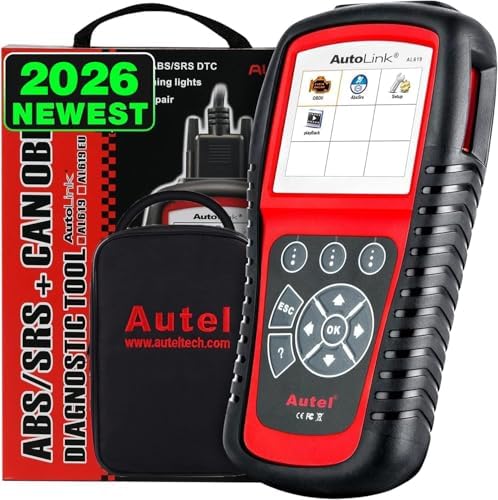
Autel AutoLink AL619 OBD2 Scanner, 2026 Newer ABS SRS Airbag Diagnostic Code Reader with10 OBDII Test Modes, Turn Off Check Engine Light, DTC Lookup, Live Data, Updated of MS319/ AL519/ ML519/ ML619
Purchase options and add-ons
| Brand | Autel |
| Power source | Battery Powered |
| Operating system | Windows XP |
| Screen size | 4 Inches |
| UPC | 711091643693 732130035156 610731241803 714046869230 702245224349 712155466586 750408659576 889327011520 709998237961 785422465667 600682791731 889284765481 712407251786 519968512178 889327002603 709998247694 601116109139 707273311597 721272381269 808890287422 768430781028 746856618173 714046870199 607569883718 758232647264 See more |
| Global Trade Identification Number | 00711091643693, 06937357200699, 69373572006996 |
| Manufacturer | Autel |
About this item
- 【Accurate ABS/SRS Diagnostics Functions】The ABS/SRS diagnostic function is used to retrieve and clear codes from the vehicle’s ABS/SRS systems. It also provides the definition of each code to help diagnose problem areas within the systems that may cause the Malfunction Indicator Light (MIL) to turn on. Diagnoses ABS/ SRS system codes on most 1996 and newer major vehicle models. To get real-time tech-support, please email: ❤AutelUS @ outlook . com❤
- 【All 10 Modes of OBD II Diagnostics Function】The OBD II Diagnostics function is a fast-access option that allows you to carry out a quick test on the engine system of OBD II vehicles. Read Codes, Erase Codes, Live Data, Freeze Frame, Retrieving I/M Readiness Status, O2 Monitor Test, On-Board Monitor Test, Component Test, Viewing Vehicle Information, Modules Present, DTC Lookup.
- 【Easy to Perform AbsSrs】Please follow these steps to finish ABS/SRS system diagnostic testing procedure: 1. Turn the ignition on but do not start the engine. 2. Turn on the scan tool and wait for the Main Screen to appear. 3. Select AbsSrs icon in the Main Screen. 4. Select a specific vehicle manufacture’s regional coverage. From the vehicle make screen, select a specific vehicle manufacture and press OK button.
- 【Wide Vehicle Coverage】AL619 supports more than 80 US, Asian and European vehicles, including Acura, Audi, Bentley, Benz, BMW, Bugatti, Chrysler, Ford, EU Ford, GM, Honda, Hyundai, Infiniti, Isuzu, Jaguar, Kia, Land Rover, Lexus, Maybach, Mazda, Mini, Mitsubishi, Nissan, Opel, Porsche, Saab, Scion, Seat, Skoda, Smart, Sprinter, Suzuki, Toyota, Vauxhall, Volvo.
- 【Free Life-time Updates & Print Data】Get AL619, it will comes with Free lifetime software update online. You can download the newest software anytime. The Print Data function allows printing out diagnostic data recorded by the scan tool or customized test reports by connecting the scan tool to a PC or laptop with the USB cable supplied.
Videos for similar products
From the brand
Autel Smart Your Life!
-
- Autel specializes in the R&D, production, sales & service of automotive intelligent diagnostics as well as TPMS products, and adheres to continuous innovation.
- As one of the global leading providers of automotive intelligent diagnostics and TPMS products, we will strive to create genuine and lasting value for everyone involved by providing customers with superior products and services.
-
Product Description
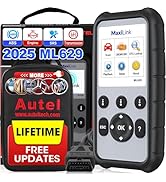
The Autel AutoLink AL619 OBD2 scanner is a versatile diagnostic tool that is built to help you determine why the Malfunction Indicator Light or the ABS / SRS warning light is on but also could perform complete and accurate diagnosis on ABS SRS systems & OBD2/CAN of your cars , light trucks, with functions like reading codes, clearing codes, DTC lookup, viewing live data steam in text and graphing, viewing freeze frame data, retrieving I/M readiness status, performing O2 monitor test, On-Board Monitor Test, Component Test, retrieving vehicle information(VIN, CIN and CVN), module present and turning off Check Engine Light (MIL).
Note: AL619 car diagnostic scanner is specifically designed to perform ABS SRS sytems diagnosis and all 10 modes of tests on OBD2/CAN system.
The OBD II Diagnostics function is a fast-access option that allows you to carry out a quick test on the engine system of OBD II vehicles.
- Read and clear OBD codes on all post 1996 domestic, post 2006 European and post 2009 Asian vehicles.
- Retrieve and clear codes in Anti-Lock Braking System (ABS)
- Retrieve and clear codes in Supplemental Restraint System (SRS)
- Turns off Malfunction Indicator Light (MIL)
- Displays monitor and I/M readiness status (emissions)
- Reads, stores, and playback live PCM data stream
- Views freeze frame data
- Retrieves vehicle information (VIN,CIN and CVN)
- TF memory card for data backup and software update
- Retrieves generic (P0, U0), manufacturer specific (P1, P2, P3, and U1) and pending codes,vehicle information (VIN, CIN, and CVN) and DTC lookup
ABS/SRS diagnostic function
The ABS/SRS diagnostic function is used to retrieve and clear codes from the vehicle’s ABS/SRS systems. It also provides the definition of each code to help diagnose problem areas withinthe systems that may cause the Malfunction Indicator Light (MIL) to turn on.
Turn Off Check Engine Light (MIL)
Turns off Malfunction Indicator Light (MIL) and ABS/SRS warning lights, clears codes and resets monitors
Display DTC Definition on the TFT Color Screen
The DTC Lookup function allows user to search definitions of DTC stored in built-in DTC library. For manufacturer specific codes, you need to select a vehicle make on an additional screen to look for DTC definitions.
EVAP System
The Component Test function allows initiating a leak test for the vehicle's EVAP system. The scan tool itself does not perform the leak test, but commands the vehicle's on-board computer to start the test.
Print and Update
The Print Data function allows printing out diagnostic data recorded by the scan tool or customized test reports by connecting the scan tool to a PC or laptop with the USB cable supplied.
Accessories Included
- User’s Manual
- CD
- OBDII Cable
- USB Cable
- Protective Nylon Case
- TF Card
|
|
|
|
|---|---|---|---|
| Customer Reviews |
— |
— |
— |
| Show OBD2 Live Data | ✓ | ✓ | ✓ |
| Reads and Erases OBD2 DTC'S | ✓ | ✓ | ✓ |
| Displays Freeze Frame Data | ✓ | ✓ | ✓ |
| One Touch I/M Readiness Check | ✓ | ✓ | ✓ |
| Graphs, Records&Plays back OBD2 Live Data | no data | ✓ | ✓ |
| On board Monitor Test | no data | ✓ | ✓ |
| Advanced Mode 6 | no data | ✓ | ✓ |
| ABS/SRS System | no data | no data | ✓ |
| All 10 modes of tests on OBD2/CAN system | no data | no data | ✓ |
Product details
- Batteries : A batteries required.
- Is discontinued by manufacturer : No
- Product Dimensions : 19.89 x 10.44 x 3.76 cm; 700 g
- Manufacturer : Autel
- ASIN : B0091DJWV0
- Item model number : AL619
- Customer Reviews:
Product information
Technical Details
Additional Information
| ASIN | B0091DJWV0 |
|---|---|
| Customer Reviews |
4.4 out of 5 stars |
| 鶹 Rank |
|
| Date First Available | Nov. 8 2012 |
Feedback
Important information
Legal Disclaimer
🍀How To Update AL619 OBD2 Diagnostic Scanner: </b> 1. Register the Tool User would update the scan tool ONLY after you had registered thetool on our website: http://pro.autel.com. </b> 2. Then you could downloadsoftware, update online, retrieve information and get warranty service.(NOTE: Prior to registration, please confirm your network is working properly.) NOTE: Please use the Abut function to find out the Product Serial No. and Register Password. </b> </b> 🍀Update Procedure Autel frequently releases software updates that you can download. The Update feature makes it very easy to determine and get exactly what you need. </b> 1. Install Maxi PC Suite through the included CD, or download the applications in our website: www.autel.com available on both Mac and Windows-based computers. </b> 2. Make sure that your computer is connected to the Internet. 3. Remove the TF card from the scan tool. </b> 4. Connect the TF card to computer with a card reader. </b> 5. Run the Maxi PC Suite. Wait for the Log In window to pop up. </b> 6. Enter your Autel ID and password and wait for the Update window to display. If you forget your password unintentionally, you may always click the [Forget Password?] to link to our website and find your password back. </b> 7. Select the product type and serial number, click OK to continue. 8. In the Update window, select the items you want to install. Usually, you should install all available updates. </b> </b> 🍀If there is any difficulty when updating Please feel free to send email:obdprice@hotmail.com and you can get a quick help!
Product summary presents key product information
Keyboard shortcut
Shift
+
Alt
+
opt
+
D
Product Summary: Autel AutoLink AL619 OBD2 Scanner, 2026 Newer ABS SRS Airbag Diagnostic Code Reader with10 OBDII Test Modes, Turn Off Check Engine Light, DTC Lookup, Live Data, Updated of MS319/ AL519/ ML519/ ML619
From Autel
About this Item
- 【Accurate ABS/SRS Diagnostics Functions】The ABS/SRS diagnostic function is used to retrieve and clear codes from the vehicle’s ABS/SRS systems. It also provides the definition of each code to help diagnose problem areas within the systems that may cause the Malfunction Indicator Light (MIL) to turn on. Diagnoses ABS/ SRS system codes on most 1996 and newer major vehicle models. To get real-time tech-support, please email: ❤AutelUS @ outlook . com❤
- 【All 10 Modes of OBD II Diagnostics Function】The OBD II Diagnostics function is a fast-access option that allows you to carry out a quick test on the engine system of OBD II vehicles. Read Codes, Erase Codes, Live Data, Freeze Frame, Retrieving I/M Readiness Status, O2 Monitor Test, On-Board Monitor Test, Component Test, Viewing Vehicle Information, Modules Present, DTC Lookup.
- 【Easy to Perform AbsSrs】Please follow these steps to finish ABS/SRS system diagnostic testing procedure: 1. Turn the ignition on but do not start the engine. 2. Turn on the scan tool and wait for the Main Screen to appear. 3. Select AbsSrs icon in the Main Screen. 4. Select a specific vehicle manufacture’s regional coverage. From the vehicle make screen, select a specific vehicle manufacture and press OK button.
- 【Wide Vehicle Coverage】AL619 supports more than 80 US, Asian and European vehicles, including Acura, Audi, Bentley, Benz, BMW, Bugatti, Chrysler, Ford, EU Ford, GM, Honda, Hyundai, Infiniti, Isuzu, Jaguar, Kia, Land Rover, Lexus, Maybach, Mazda, Mini, Mitsubishi, Nissan, Opel, Porsche, Saab, Scion, Seat, Skoda, Smart, Sprinter, Suzuki, Toyota, Vauxhall, Volvo.
- 【Free Life-time Updates & Print Data】Get AL619, it will comes with Free lifetime software update online. You can download the newest software anytime. The Print Data function allows printing out diagnostic data recorded by the scan tool or customized test reports by connecting the scan tool to a PC or laptop with the USB cable supplied.
Product description
Feedback
Did you find this product summary feature useful?